Cloud platform for web scraping, browser automation, and AI data extraction with 20,000+ pre-built tools and scalable cloud runs.
4M visits/mo-5%#13 Automation & Agents

Turn public webpages into screenshots, PDFs or structured extracts for ChatGPT workflows
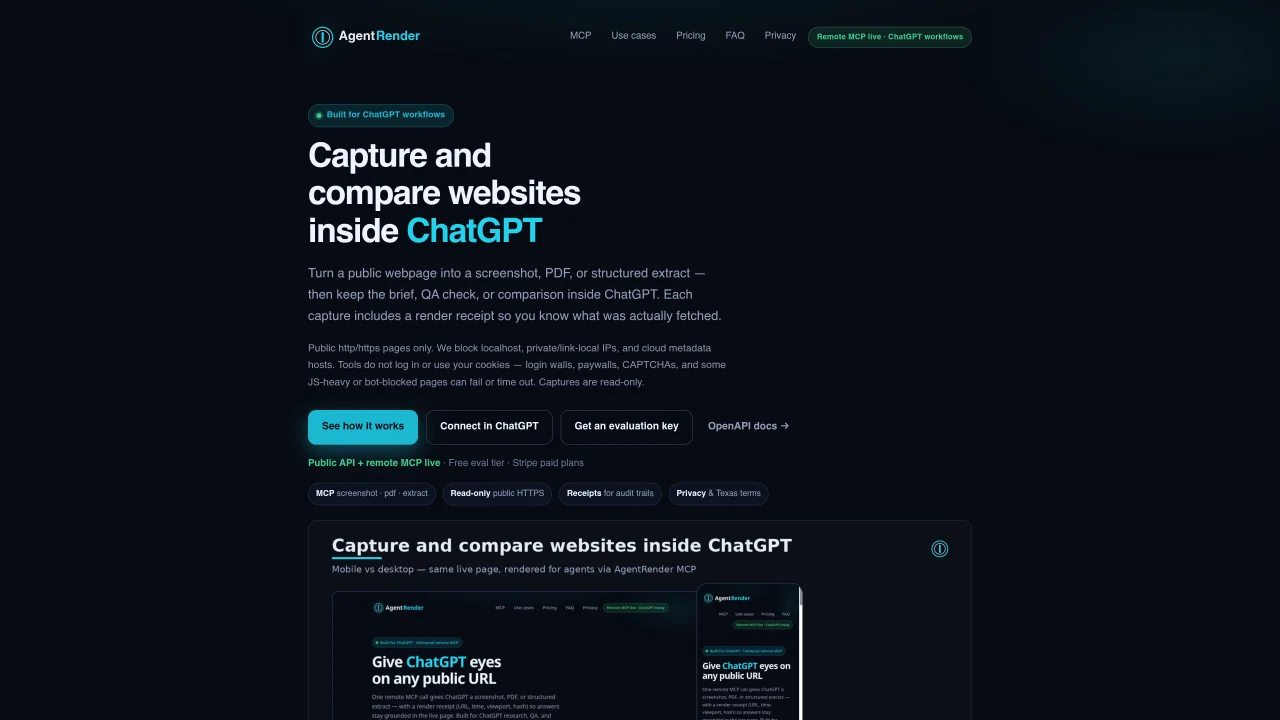
AgentRender provides tools to capture public HTTPS webpages as screenshots, PDFs, or structured JSON extracts, designed to integrate directly with ChatGPT workflows. Each capture includes a render receipt that records the exact URL, timestamp, and viewport used, enabling audit trails and version tracking. The service supports viewport and full-page screenshots in PNG, JPEG, or WebP formats, making it useful for visual quality assurance and competitive layout comparisons. PDF generation produces meeting-ready documents with embedded capture metadata, while structured extraction pulls title, meta tags, main text, and links as clean JSON for briefing documents. Captures are read-only and non-destructive, with no logging of cookies or private data, though paywalls, CAPTCHAs, and JavaScript-heavy pages may fail or time out. Integration is via a universal remote MCP endpoint that requires an API key for authentication, and setup involves pasting the MCP URL and Bearer token into ChatGPT or compatible clients. The service operates under privacy policies aligned with Texas and general data protection terms.
Obtain a free evaluation key or subscribe for a paid plan. In ChatGPT or Codex connector settings, paste the Universal MCP URL (https://api.agentrenderapi.com/mcp) and set the Authorization header to Bearer akr_… with your API key. OAuth sign-in is not yet available, so API key authentication is required.
The tools fetch public HTTPS pages and return a screenshot, PDF, or structured extract along with a render receipt. They do not delete data, revoke keys, send messages, publish content, or mutate third-party accounts. All operations are read-only, non-destructive, and designed for public web content only.
Yes, a free tier is available with 150 renders per month and 10 requests per minute. Request an instant free evaluation key via the form on the website without requiring a credit card.
AgentRender supports viewport or full-page screenshots in PNG, JPEG, or WebP formats, PDF generation for meeting-ready documents, and structured JSON extraction of titles, meta tags, main text, and links from public HTTPS webpages.
The service only works with public HTTPS pages and blocks localhost, private IPs, and cloud metadata hosts. Paywalls, CAPTCHAs, and JavaScript-heavy or bot-blocked pages may fail or time out. Captures are read-only and do not log cookies or private data.
Each capture includes a render receipt that records the exact URL, timestamp, and viewport used, enabling audit trails and version tracking. The receipt is included with every screenshot, PDF, or structured extract for citation and verification purposes.
We use essential cookies to run aitoolnavio™, and optional cookies to analyze traffic and measure our marketing. You choose what we use — optional cookies stay off unless you turn them on. See our Privacy Policy.
One short email a week: fresh tools worth trying, honest takes and the updates that actually matter. No spam, unsubscribe any time.
Cloud platform for web scraping, browser automation, and AI data extraction with 20,000+ pre-built tools and scalable cloud runs.
AI web crawler that extracts clean web data into JSON or markdown for developers and marketers.
Enterprise-grade proxy networks, web scrapers, and ready-to-use datasets for reliable web data collection.
Fast, secure web browser with U3 technology, extensions, and intuitive shortcuts for efficient browsing.
Automate lead generation and data enrichment with AI-powered web scraping and outreach tools.
Web scraping and data extraction API that simplifies gathering data from websites with features like JavaScript rendering and geotargeting.
Create automated web crawlers and automate web scraping tasks without coding.
Automate data entry, extract structured data from websites, and create images using OpenAI's Dall-E.
No-code web scraping tool to extract structured data from websites, automate runs, and export to sheets or databases without coding.
Web scraping API that automates data extraction from websites, including those that block scraping, designed for developers.
REST API that converts any URL into clean, LLM-ready markdown or structured data for AI agents and pipelines.
An AI-powered web scraping toolkit offering APIs, cloud browsers, CAPTCHA solving, and proxy rotation for reliable public data extraction.
Matched on what this tool does — grouped by the job you would be replacing.
matches Screenshot public webpages as PNG, JPEG, or WebP · Generate PDFs with embedded capture time and URL · Viewport or full-page capture options
Website screenshot API that captures pages after removing overlays
Web toolkit for AI agents to screenshot, PDF, read, extract, crawl, monitor and templatize URLs via one API
matches Extract structured JSON including title, meta, main text, and links · Read-only and non-destructive operations · API key authentication via Bearer token
Browser extension that reads pages, extracts data and automates tasks using local or cloud LLMs
Turn any public URL into a real-time JSON API for automations and no-code apps without writing scraping code.
API that turns live web pages and search results into clean, LLM-ready context for AI agents and RAG pipelines.