
LlamaGen.AI turns ideas, scripts, and reference images into polished comics, manga, webtoons, and visual stories.
329K visits/mo-8.2%#142 Image & Design
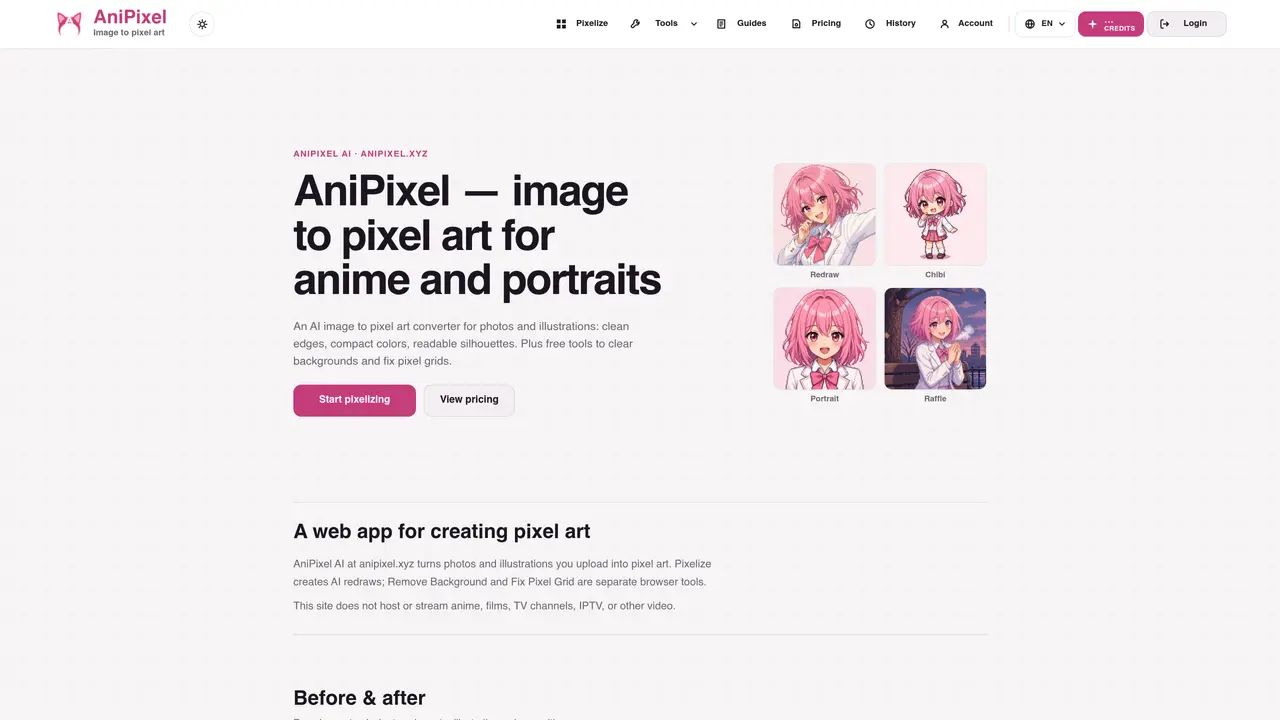
AniPixel is a web-based AI application that transforms uploaded photos or anime illustrations into pixel art. The core feature, Pixelize, uses AI to redraw images with clean edges, compact color blocks, and readable silhouettes suitable for game assets or avatars. Users can select presets like Redraw, Chibi, Portrait, or Icon to steer the output style. The tool preserves the source aspect ratio and maintains character identity while simplifying details into a pixel-art aesthetic. Three free browser utilities—Remove Background, Fix Pixel Grid, and Pixelate Image—are included for image cleanup without credits. Pixelize operates on a credit system, with each generation costing one credit, and new accounts receive five free credits to try the service. Outputs are exported as PNG files with transparency support.
AniPixel is a web-based AI application that converts photos or anime illustrations into pixel art. Users upload an image, select a preset, and generate a PNG with clean pixel edges and compact colors.
Yes. Upload a portrait or anime still, choose a preset like Redraw or Chibi, and generate a PNG. The AI redraws the image with hard edges and compact colors, though details may change and quality varies by source.
Open Pixelize, upload a JPG, PNG, or WEBP file (up to 20MB), pick a preset such as Redraw, generate the result, and download the PNG. Each generation costs 1 credit.
No. The free Pixelate tool makes an image blocky while keeping the original photo. Pixelize uses AI to redraw the image as clean, game-style pixel art with readable silhouettes.
New accounts receive 5 free credits to try Pixelize. After that, each generated image costs 1 credit, and credits are refunded if a generation fails.
Users retain ownership of uploaded files and generated outputs. Pixelize sends uploads to third-party AI providers to produce results, and outputs are exported as PNG files with transparency support.
We use essential cookies to run aitoolnavio™, and optional cookies to analyze traffic and measure our marketing. You choose what we use — optional cookies stay off unless you turn them on. See our Privacy Policy.
One short email a week: fresh tools worth trying, honest takes and the updates that actually matter. No spam, unsubscribe any time.
LlamaGen.AI turns ideas, scripts, and reference images into polished comics, manga, webtoons, and visual stories.
Revolutionize game asset creation with AI, ensuring style consistency and boosting productivity.
Create anime-style scenes, generate stunning images, and produce professional-grade artwork effortlessly.
AI-powered tool for game developers, sketch-to-realistic visuals, and engaging cartoons with professional models.
Create custom avatars, design logos, and generate business team avatars with just a few clicks.
Creates consistent cartoon characters across scenes for children’s book authors, educators, and visual storytellers.
Transform photos into cartoon-style art, customize with effects and styles, and easily share with friends and family.
Design comics effortlessly, create artwork based on preferences, and refine creations using AI-powered tools.
An AI pixel art generator for game developers and artists that creates style-consistent, grid-aligned sprites, tiles, and assets with web and API access.
An AI manga generator that converts scripts or files into manga-style stories with character design and downloadable output.
Create anime portraits, identify user preferences, generate unique character illustrations effortlessly.
Turns prompts into full manga chapters.
Matched on what this tool does — grouped by the job you would be replacing.
matches AI-powered pixel art redraw with hard edges · Preset options for Redraw, Chibi, Portrait, and Icon styles · Background removal tool for transparent exports
AI-powered pixel art generator that creates 8-bit and 16-bit sprites, avatars, and game assets from scratch or via photo conversion.
Create stunning pixel art in minutes with advanced algorithms and an easy interface.
AI-powered image upscaler and enhancer for photos, anime and old images
Generates Minecraft-style thumbnails for YouTube videos using AI
matches AI style transfer for cinematic, artistic, or painted looks · Anime and cartoon conversion with style customization · Pixel art generation with scalable resolution options
matches Background removal tool for transparent exports · PNG export with transparency support
Converts photos to line drawings, sketches, or anime styles online
AI-powered tool to transform existing images via text prompts without creating from scratch
Online AI-powered background remover for JPG, PNG and WebP images
Free AI tool for background removal, watermark removal, and 4K image enhancement
Browser-based tool for cutting objects from photos with transparent backgrounds