Unleash creativity: edit photos, videos, and designs with AI-enhanced tools.
16M visits/mo-11.4%#6 Image & Design

AI-powered design canvas that accelerates UI workflows, visual iteration, and production-ready handoff with real CSS-based layouts.
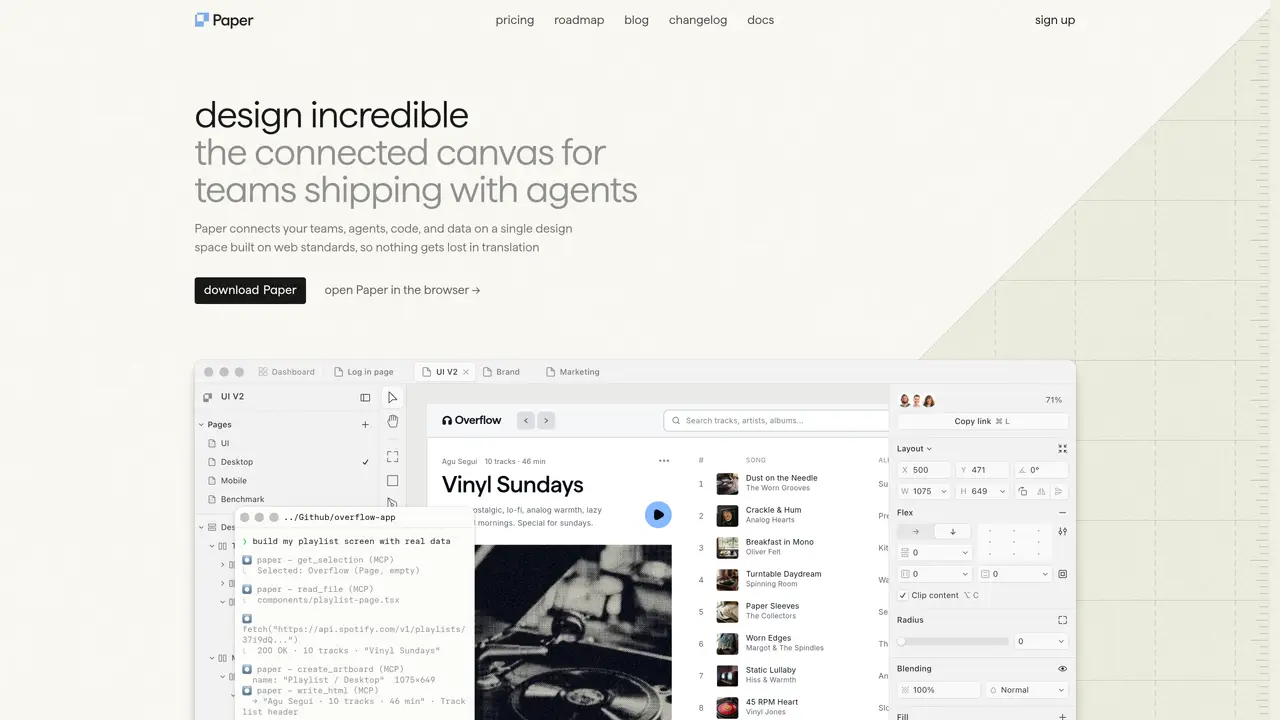
Paper is a connected design platform that unifies teams, agents, code, and data on a single web-standard canvas, enabling faster iteration from exploration to shipping. It bridges the gap between visual design and real-world implementation by using HTML/CSS layouts, allowing designers to work closer to actual product development while maintaining creative freedom. The tool integrates image generation and editing directly into the workflow, letting teams experiment with AI-generated assets and reusable patterns without disrupting the design process. By syncing design tokens, styles, and components between the canvas and codebase, Paper ensures a continuous loop where changes in design or code are immediately reflected in both environments. It is particularly suited for product designers, UI teams, and startups aiming to reduce friction between creative exploration, iteration, and polished interface delivery, all while working with real content and data from connected apps or databases. Paper’s desktop application expands this workflow by connecting visual work with external tools, agents, and repositories via MCP, creating a seamless loop from design to code and back. This approach eliminates the need for static mockups, replacing them with dynamic, production-aware designs that align with actual implementation. Teams can collaborate in a shared space where nothing gets lost in translation, whether they are refining UI components, prototyping layouts, or preparing assets for deployment.
Paper is a design tool that combines a visual canvas with AI-assisted creation and production-aware workflows, enabling teams to design, iterate, and ship interfaces using real code (HTML/CSS) and synchronized design systems.
It is designed for product designers, UI teams, and startups seeking a faster, more connected design process that aligns with real-world implementation rather than static mockups.
Paper syncs design tokens, styles, and components between the canvas and codebase, and allows any agent or IDE to connect to the shared layer, enabling bidirectional updates between design and code.
Yes, Paper connects to real content, databases, and apps from your computer or cloud, allowing designers to work with actual data instead of placeholder content.
Yes, it includes image generation and editing capabilities directly within the design workflow, enabling teams to experiment with AI-generated assets without breaking the creative flow.
Visit the Paper website to sign up or open the browser-based version, then download the desktop app to connect your design canvas with your codebase, agents, and external tools.
paper.design · third-party estimates from Similarweb
Last 4 months · grows by one month every month
Share of visits by channel
No measurable traffic from Paid Referrals.
Share of visits · estimated visits
Other countries: 45.4%
How people reach this site from other AI tools
1.1K a month · 0.2% of all visits
Image & Design · Sep 2026
Traffic figures are third-party estimates, good for scale and trends; they can differ from a company's own numbers. Updated monthly.
We use essential cookies to run aitoolnavio™, and optional cookies to analyze traffic and measure our marketing. You choose what we use — optional cookies stay off unless you turn them on. See our Privacy Policy.
One short email a week: fresh tools worth trying, honest takes and the updates that actually matter. No spam, unsubscribe any time.
Unleash creativity: edit photos, videos, and designs with AI-enhanced tools.
A drag-and-drop design platform for presentations and social graphics with AI photo tools and a large template library.
Create captivating, customizable presentations and easily share them across devices with a cloud-based platform.
Generate custom visuals for blogs, create unique social media images, and design eye-catching visuals for marketing campaigns.
Create stunning designs, edit photos, remove objects, make collages, and transform images with powerful AI tools and effects.
Create auto-resized campaign images and videos with DaVinci AI's generative media suite.
Create precise 3D models, collaborate on designs, and analyze simulations in real-time.
Cloudinary provides APIs and tools to integrate, manage, and optimize images and videos for AI-driven visual experiences.
Generate custom color palettes instantly with AI or from images for design projects.
Turn simple prompts into flyers, social posts, emails, event pages, and tickets using AI-powered design and marketing tools.
Generate high-quality images with flawless embedded text from text prompts, plus batch output and style control in a creative canvas.
Edit, transform, and enhance photos with text prompts using our free AI photo editor online.
Matched on what this tool does — grouped by the job you would be replacing.
matches AI-assisted design canvas for faster interface creation · Production-aware layouts built around real CSS concepts · Image generation and editing directly in the design workflow
Open-source design and prototyping platform that unifies designers and developers using web standards for real-time collaboration.
AI design tool that lets you create pixel-perfect UI screens and flows directly inside your IDE.
Subframe is an AI-powered design tool for building software in the AI era.
An AI-powered visual design canvas for editing production UI directly in real React codebases, used by designers and engineers.
matches AI-assisted design canvas for faster interface creation · Production-aware layouts built around real CSS concepts · Support for modern product design and visual experimentation
matches AI-assisted design canvas for faster interface creation · Support for modern product design and visual experimentation · Component-oriented workflows for reusable patterns
Generate and export production-ready landing page code from simple prompts using AI.
Turns text prompts into ready-to-use React UI code with Shadcn UI and Tailwind CSS components.
AI tool that rapidly converts ideas into online courses or UIs with layouts, code generation, and content personalization.
Build production-ready frontend code, reuse components, and securely feed real data into products for faster time-to-market.
Turns text prompts, screenshots, sketches or URLs into Figma wireframes, mockups and exportable HTML/React code.
Turn app ideas into polished mobile UI concepts instantly using AI-generated designs, screenshots, or templates with real-time refinement.
AI-powered platform that turns plain-language descriptions or screenshots into interactive app and website prototypes with multi-page workflows and UI components.
Design interfaces and creative concepts by conversing with AI to generate, iterate, and refine layouts collaboratively.