Remove image backgrounds instantly, save time with advanced AI, and create stunning images effortlessly.
54M visits/mo-8.6%#2 Image & Design

Indexes photos and videos on-device to make every memory searchable by text, speech, faces and objects
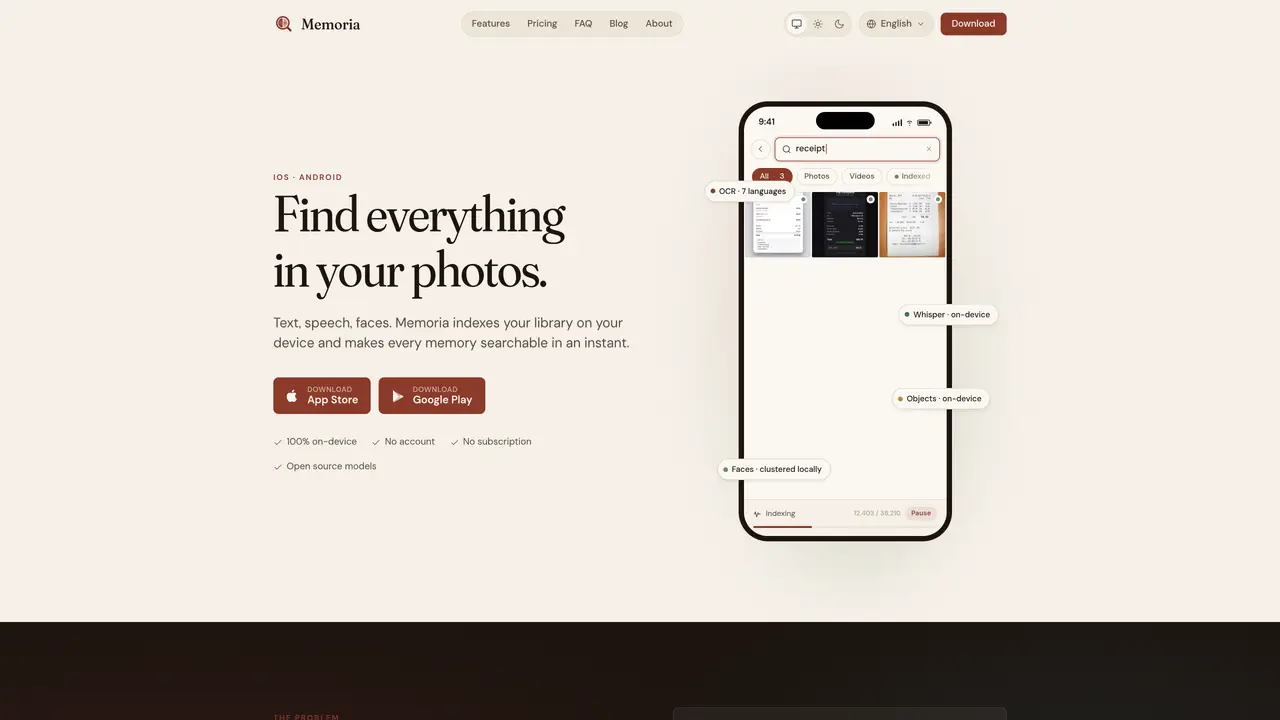
Memoria indexes a user’s photo and video library directly on the device, enabling full-text search across text in images, spoken words in videos, recognized objects, and grouped faces. It supports three search modes: optical character recognition for documents, whiteboards, screenshots and memes; speech transcription for lectures, meetings and voice notes; and face detection that clusters photos by person. All processing occurs locally without cloud uploads, accounts or subscriptions. The app builds a unified index that remains private and accessible offline, with instant search results. Indexing runs in the background and continues even when the app is closed. Supported features include seven OCR languages, on-device Whisper for audio transcription in 99+ languages, and local face clustering and object recognition.
Memoria is an app that indexes a user’s photo and video library directly on their device, enabling full-text search across text in images, spoken words in videos, recognized objects, and grouped faces. It supports three search modes: optical character recognition, speech transcription, and face detection.
Memoria is designed for anyone who needs to quickly find specific content within their personal photo and video collections, such as documents, lectures, meetings, or photos of people. It is particularly useful for users who prioritize privacy and offline access.
No, Memoria does not require an account or subscription. All processing occurs locally on the device, and users can try the app for free with limited indexing before making a one-time purchase to unlock full functionality.
Memoria processes all data locally on the device, with no cloud uploads or tracking. Photos and videos remain in the user’s library, and only anonymous usage data is collected, which can be opted out of in settings.
OCR supports 7 languages: English, French, German, Spanish, Italian, Portuguese, and Japanese. Audio transcription supports 99+ languages through the on-device Whisper model.
Users can download Memoria from the App Store or Google Play, try it for free with limited indexing, and then make a one-time purchase to unlock full library indexing and additional features.
We use essential cookies to run aitoolnavio™, and optional cookies to analyze traffic and measure our marketing. You choose what we use — optional cookies stay off unless you turn them on. See our Privacy Policy.
One short email a week: fresh tools worth trying, honest takes and the updates that actually matter. No spam, unsubscribe any time.
Remove image backgrounds instantly, save time with advanced AI, and create stunning images effortlessly.
AI platform for upscaling images, enhancing photos, and generating high-quality creative assets with contextual detail.
Remove backgrounds, adjust colors, add text, filters, and shapes with ease.
Unleash creativity: edit photos, videos, and designs with AI-enhanced tools.
Transform photos effortlessly with AI: edit, enhance, and remove backgrounds.
Web and mobile AI platform for generating, editing, and training custom visuals from prompts with community models and face-swap tools.
Convert raster images into scalable vector graphics within seconds.
Create stunning designs, edit photos, remove objects, make collages, and transform images with powerful AI tools and effects.
Create stunning visuals, access image recognition and processing, and express creatively with natural language processing.
Cloudinary provides APIs and tools to integrate, manage, and optimize images and videos for AI-driven visual experiences.
All-in-one AI suite for creators to automate workflows, edit media, and generate content across video, design, and productivity tools.
Identify stolen identities, uncover copyright infringements, and find unauthorized use of images with precision.
Matched on what this tool does — grouped by the job you would be replacing.
matches On-device optical character recognition · On-device speech transcription via Whisper · Local face detection and clustering
AI-powered local file search for macOS that indexes documents, media, and other files offline for instant, private retrieval.
AI-powered semantic search for local files without cloud dependency
Local memory layer that indexes everything on a Mac for instant search and agent context
matches On-device speech transcription via Whisper
matches Local face detection and clustering
Privacy-first desktop app that converts voice to text offline using on-device AI for secure, instant transcription in 99 languages.
Offline voice assistant and dictation tool for desktop
On-device subtitle and caption generator for videos with animated styles
Converts spoken words into structured markdown locally on macOS and iOS
Automatically detect objects, people, faces, and text, track video performance, and analyze data effortlessly.
Easily build custom image classifiers, analyze sentiments, detect objects, and run ML tasks in the cloud.
Label, identify, and transcribe videos with accuracy.
Identify objects in photos and videos with accuracy, using an intuitive interface and cutting-edge technology for all users.