Summarizes, extracts, and rewrites content from files.
89M visits/mo+8.7%#2 Productivity & Office

Browser-based PDF editor that edits, signs, converts, merges, compresses, and shares files, with AI for form filling, document chat, and PDF creation.
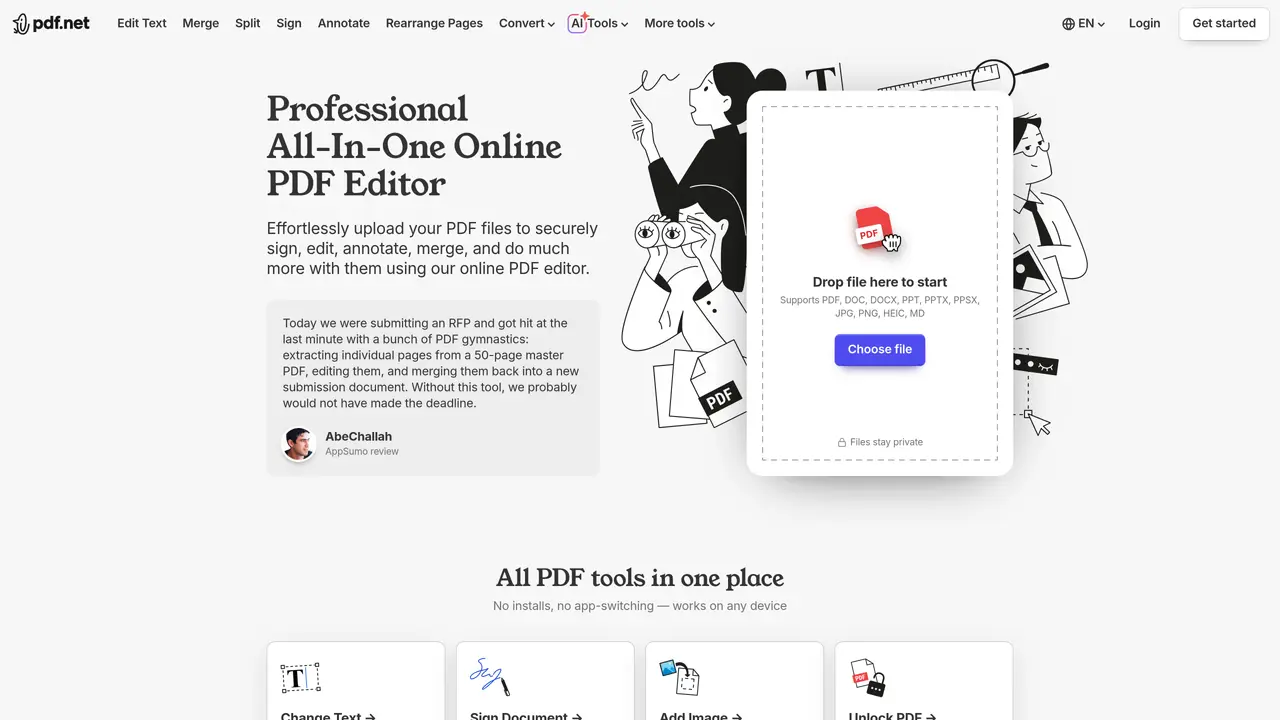
pdf.net is a browser-based PDF editor that lets users edit, sign, annotate, organize, convert, protect, and share documents without installing any software. It supports a wide range of file types including PDF, DOC, DOCX, PPT, PPTX, JPG, PNG, HEIC, and Markdown, and emphasizes privacy by keeping files secure. Users can directly edit PDF text, add images, annotate with drawings or highlights, and sign documents by typing, drawing, or uploading a signature. The platform also provides page management features like merging, splitting, extracting, rotating, compressing, protecting, unlocking, and rearranging pages. Conversion tools handle transformations between PDF and common formats such as Word, Excel, PowerPoint, images, Markdown, and HEIC, including specialized options like converting bank statements to editable Excel or CSV files. AI capabilities allow users to chat with PDFs, summarize documents, generate formatted PDFs from descriptions, and fill out forms automatically using data from source documents. Integration with ChatGPT or Claude enables users to create, edit, and manage PDFs directly within the chat interface.
pdf.net supports PDF, DOC, DOCX, PPT, PPTX, JPG, PNG, HEIC, and Markdown files for editing, conversion, and other operations.
Yes, pdf.net uses secure HTTPS encryption and advanced safety protocols to keep files private and protected during processing.
Yes, pdf.net is fully adapted for mobile devices and can be accessed via any web browser on smartphones or tablets.
Yes, pdf.net includes AI tools such as chatting with PDFs, summarizing documents, generating formatted PDFs from descriptions, and automating form filling.
Simply upload your file, use the available tools to edit, convert, sign, or annotate, and then download the updated file when finished.
Yes, pdf.net allows secure sharing via links or email and supports password protection to control access to documents.
pdf.net · third-party estimates from Similarweb
Last 4 months · grows by one month every month
Share of visits by channel
Share of visits · estimated visits
Other countries: 9.1%
How people reach this site from other AI tools
16K a month · 1% of all visits
Productivity & Office · Sep 2026
Traffic figures are third-party estimates, good for scale and trends; they can differ from a company's own numbers. Updated monthly.
We use essential cookies to run aitoolnavio™, and optional cookies to analyze traffic and measure our marketing. You choose what we use — optional cookies stay off unless you turn them on. See our Privacy Policy.
One short email a week: fresh tools worth trying, honest takes and the updates that actually matter. No spam, unsubscribe any time.
Summarizes, extracts, and rewrites content from files.
Automate citation and reference management, aid research with text and data mining, and securely store and share documents.
Capture, organize, and share ideas, notes, and documents effortlessly.
Headless CMS that lets developers manage structured content and deliver it anywhere via flexible APIs and real-time collaboration tools.
Efficiently create and manage cases, streamline workflows, securely store and share documents, and collaborate with colleagues.
Access files, collaborate, and secure your data with unbeatable customizable system.
An AI-powered PDF editor and converter for editing, OCR, signing, annotating, merging, and chatting with documents across devices.
Securely store, access, and search documents from any device with ease.
Create and customize legal documents, consult lawyers, and access legal guides all in one platform.
Centralize brand assets, automate approvals, and collaborate with external partners in a single digital asset management platform.
AI diagramming and documentation tool for engineering teams to create and update cloud architecture, ERDs, and flowcharts from prompts, code, and CI/CD workflows.
All-in-one legal case management platform for law firms, combining intake, e-signatures, payments, analytics, and reporting in one secure system.
Matched on what this tool does — grouped by the job you would be replacing.
matches Direct PDF text editing with font, size, and color controls · Annotation tools including drawing, highlighting, erasing, and adjustable line widths
AI-powered PDF editor with built-in agents for summarization, translation, and document analysis.
Web-based PDF editor with AI features for editing, summarizing and transforming documents
AI-powered PDF editor that lets users edit text in original fonts and convert scans to editable files
Free browser-based PDF editor with AI text editing and manual annotation tools
matches Conversion between PDF and Word, Excel, PowerPoint, images, Markdown, HEIC, and CSV · Bank statement conversion to editable Excel or CSV files · Compression with three adjustable levels
Compare: pdf.net vs LightPDF
DocuGenie packs 10 AI document tools into one app, including handwriting & image OCR, invoice/receipt/bank-statement to Excel, and more.
AI-powered extraction of bank statements, invoices and receipts into structured data
Browser-based PDF tools for merging, compressing, converting and editing files