

Generate content, correct spelling, suggest synonyms to enhance writing.
173M visits/mo+0.1%#1 Productivity & Office
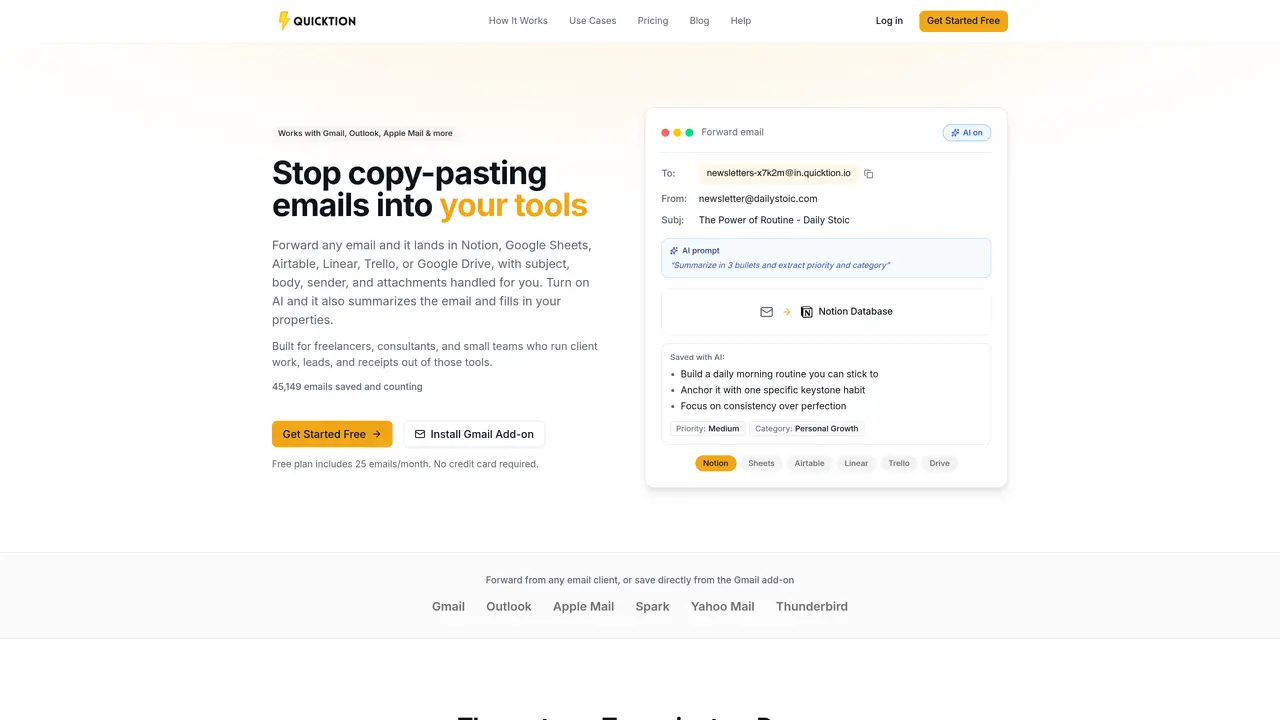
Quicktion forwards emails from any client into connected tools such as Notion, Google Sheets, Airtable, Linear, Trello, or Google Drive. It captures the subject, body, sender, and attachments automatically, storing them as records or pages in the chosen destination. Users can set up unique forwarding addresses per use case and configure auto-forwarding rules or use a Gmail add-on for manual saves. AI features summarize email bodies, extract structured data into fields, and remove signatures or quoted threads before saving. The tool is designed for freelancers, consultants, and small teams who manage client work, leads, or receipts within these platforms. It supports bulk forwarding and individual email saving with minimal setup required.
Quicktion forwards emails from any email client into connected tools such as Notion, Google Sheets, Airtable, Linear, Trello, or Google Drive. It automatically captures the subject, body, sender, and attachments, storing them as records or pages in the chosen destination.
The tool is designed for freelancers, consultants, small teams, sales teams, accountants, and anyone who manages client work, leads, receipts, or knowledge within these platforms.
Sign in and connect your Notion, Google Sheets, Airtable, Linear, Trello, or Google Drive account with one click. Then create a destination by selecting a database, spreadsheet, board, or Drive folder to receive emails.
Yes, Quicktion includes AI Email Intelligence that summarizes email bodies, extracts structured data into fields, and removes signatures or quoted threads before saving them to your destination.
Yes, Quicktion works with Gmail, Outlook, Apple Mail, Spark, Yahoo Mail, Thunderbird, and other email clients. Gmail users also get a dedicated add-on for manual saves.
Quicktion supports integrations with Notion, Google Sheets, Airtable, Linear, Trello, and Google Drive. Each integration maps email data to the appropriate fields automatically.
quicktion.io · third-party estimates from Similarweb
Last 4 months · grows by one month every month
Share of visits · estimated visits
Productivity & Office · Sep 2026
Traffic figures are third-party estimates, good for scale and trends; they can differ from a company's own numbers. Updated monthly.
We use essential cookies to run aitoolnavio™, and optional cookies to analyze traffic and measure our marketing. You choose what we use — optional cookies stay off unless you turn them on. See our Privacy Policy.
One short email a week: fresh tools worth trying, honest takes and the updates that actually matter. No spam, unsubscribe any time.
Generate content, correct spelling, suggest synonyms to enhance writing.
Markdown-based note-taking and personal knowledge management app that turns notes into a connected system of ideas.
Capture, organize, and share ideas, notes, and documents effortlessly.
Easily create and track training courses, design learning environments, and access from any device with an intuitive interface.
An AI-powered note-taking app for students and professionals to write, sketch, annotate PDFs, record audio, and generate summaries, quizzes, and flashcards.
Handwritten note-taking app with searchable ink, PDF annotation, synced audio, and AI-powered study tools.
AI-powered process documentation tool that captures workflows into visual step-by-step guides with screenshots, editing, and exports.
AI web app that transcribes audio, video, and YouTube links into text in 98 languages with summaries, mind maps, and export formats for students and teams.
A note-taking and spaced-repetition flashcard app for students and learners, with PDF annotation plus AI tools for generating cards, quizzes, and study summaries.
AI-powered research assistant for organizing, analyzing, and synthesizing information from notes and documents.
Capture thoughts, create documents, and access on any device for convenient organization and productivity.
AI-powered PDF editor with built-in agents for summarization, translation, and document analysis.
Matched on what this tool does — grouped by the job you would be replacing.
matches Auto-forwarding from any email client · Gmail add-on for one-click saves · AI summarization and structured data extraction
AI invoice automation that scans inboxes and portals, extracts fields, applies rules, and syncs to QuickBooks, Xero, and Drive for accounting teams.
An LLM-powered document parser that extracts structured data from emails, PDFs, images, and HTML for business workflows.
AI-powered email invoice archiving to cloud storage
matches AI-Powered Summarization · Quick Reply Generation · Task Management Integration
Manage emails and daily tasks with AI.
AI-powered email assistant that organizes inboxes, drafts replies, and surfaces priorities across multiple email providers.
AI-powered email assistant integrating with Thunderbird and iOS
Quickly generate answers, summarize emails, and translate into 13 languages.