AI-powered video messaging tool that records, shares, and manages video messages with AI-generated titles, summaries, and tasks.
16M visits/mo-3.4%#5 Chatbots & Assistants

Transform raw footage into polished videos with Levio's AI-powered video editing agent.
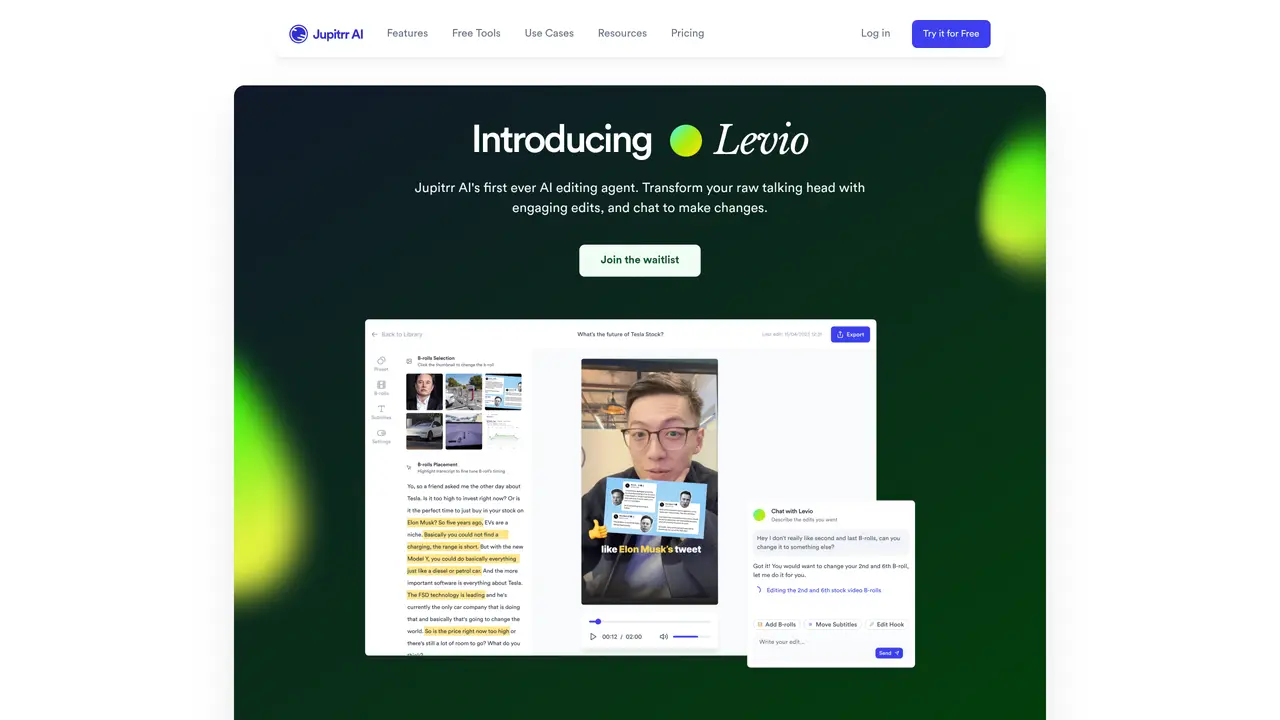
Levio is an AI video editing agent by Jupitrr AI designed to transform raw talking head footage into engaging, polished videos in seconds. It offers a suite of features aimed at content creators, small business owners, and anyone looking to produce professional-quality videos without extensive editing skills. The tool simplifies the video editing process, making it accessible for users who want to enhance their video content effortlessly. Levio’s AI-driven chat interface allows users to make quick edits and refinements with minimal effort. This feature, combined with its comprehensive suite of automated editing tools, makes it a standout choice for those looking to produce high-quality video content without the usual hassle. The tool includes features such as AI-crafted hooks, animated subtitles, B-rolls and GIFs, instant changes, AI background music and color grading, emojis and transitions. Levio is perfect for YouTubers and social media influencers looking to enhance their video content quickly, small business owners creating training or promotional videos, consultants and coaches producing polished video content, and marketers crafting captivating video ads and social media posts efficiently. The tool has been employed by educational institutions for teaching video editing basics and adopted by podcast hosts for creating visual content. Levio offers a range of pricing plans, including Starter, Growth, Pro, and Business, with features such as 10-50 videos/month, up to 5-minute videos, 100-200MB uploads, premium iStock assets, web B-roll, studio quality export, subtitle downloads, brand logo support, and custom presets. The tool is available on the official Levio website.
Levio is an AI video editing agent by Jupitrr AI that transforms raw talking head footage into polished videos through automated edits. Users upload their recording, and Levio applies AI-crafted hooks, subtitles, B-rolls, transitions, and other enhancements in seconds.
Levio is designed for content creators, small business owners, coaches, consultants, marketers, and anyone looking to produce professional-quality videos without extensive editing skills. It is particularly useful for those who want to enhance video content quickly and efficiently.
Yes, Levio includes an AI-driven chat interface where users can type requests for changes, and the tool will apply refinements in real time. This allows for iterative editing with minimal effort.
Levio can create a variety of video types, including training videos, promotional content, social media posts, ads, and educational videos. It is particularly effective for turning talking head footage into engaging, multi-element videos.
No, Levio is designed to be user-friendly and does not require any prior editing experience. Users can create polished videos with minimal effort, even with zero editing skills.
To get started, visit the official Levio website and join the waitlist. Once available, upload your raw talking head footage, and Levio will automatically apply edits. You can then use the chat interface to request further refinements.
We use essential cookies to run aitoolnavio™, and optional cookies to analyze traffic and measure our marketing. You choose what we use — optional cookies stay off unless you turn them on. See our Privacy Policy.
One short email a week: fresh tools worth trying, honest takes and the updates that actually matter. No spam, unsubscribe any time.
AI-powered video messaging tool that records, shares, and manages video messages with AI-generated titles, summaries, and tasks.
Unleash creativity: edit photos, videos, and designs with AI-enhanced tools.
Record lectures, create tutorials, and securely share videos with teams.
Create stunning videos in a few clicks, customize with powerful tools, and automate editing without experience.
Create, convert, and enhance videos effortlessly with professional effects and royalty-free music.
Create marketing videos quickly, customize with templates, music, and photos, optimize for different platforms with AI.
Automate video editing, add text-to-speech voice-overs, and optimize videos for impactful results.
Freemium, uncensored AI video and image creation for individual creators with text-to-video, image effects, and gem-based upgrades for HD and no watermarks.
Create, edit, subtitle, and translate pro-grade videos instantly.
Cloudinary provides APIs and tools to integrate, manage, and optimize images and videos for AI-driven visual experiences.
All-in-one AI suite for creators to automate workflows, edit media, and generate content across video, design, and productivity tools.
Generate cinematic video clips from text or images and refine them with AI-powered editing tools for creators and visual professionals.
Matched on what this tool does — grouped by the job you would be replacing.
matches AI-Crafted Hook · Animated Subtitles · B-Rolls and GIFs
Submagic is an AI tool that helps content creators create viral reels and shorts 10 times faster than any other video editing tool.
AI video editor that adds B-roll visuals, captions, and edits to videos automatically.
Create social media videos, boost SEO rankings, and repurpose content into professional-quality videos effortlessly.
AI-powered video editor that turns raw footage into viral reels with one click, adding auto captions, b-roll, and animated effects.
matches AI-Crafted Hook · Animated Subtitles · B-Rolls and GIFs
matches AI-Crafted Hook · Animated Subtitles · B-Rolls and GIFs
AI video generator that turns text or images into high-quality videos with 30 free generations monthly.
Leverage the power of cutting-edge AI video models to transform your photos into cinematic animations.
AI tool that converts text or images into high-quality videos with minimal effort and no professional editing skills required.
Create professional videos from text inputs, no ML experience needed, for education and business purposes, with quick results.
Automatically enhance videos, create stunning results, and supports multiple file formats, with an intuitive chat-based interface.
Auto-clips raw talking-head footage by removing mistakes, pauses, and bad takes to save hours of editing time.
Create stunning titles and intros, enhance videos with effects and transitions, and engage viewers with powerful prompts.
Easily create professional videos with drag-and-drop editing, customizing, and AI-driven facial recognition.