Generate lifelike human videos with AI, making professional video creation fast and accessible for any user.
41M visits/mo+26.2%#1 Video & Animation

AI-driven video creation tool with auto-captions, dynamic editing, and real-time enhancements.
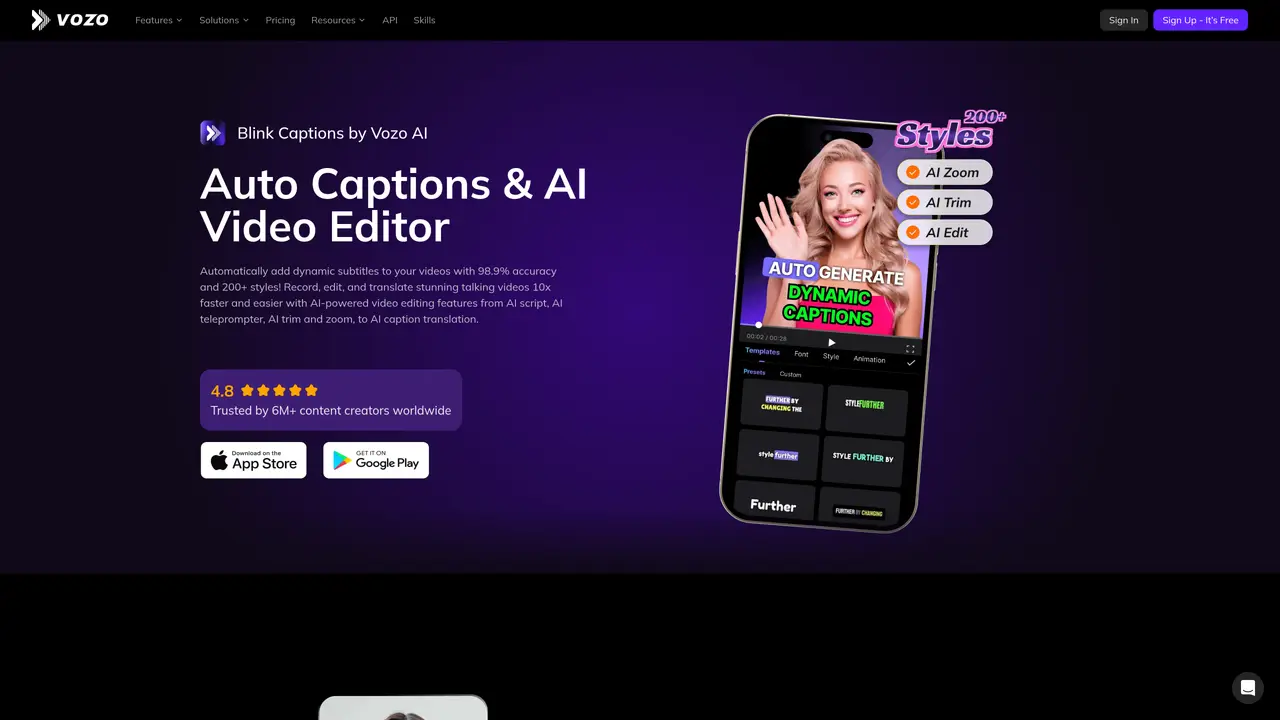
BlinkVideo is an advanced AI-powered video creation tool designed to simplify the production of high-quality, engaging videos. Ideal for content creators across various platforms such as TikTok, Instagram Reels, and YouTube Shorts, BlinkVideo provides a suite of features to streamline video production and enhance viewer engagement. Key Features: Auto-Generated Accurate Subtitles: Adds subtitles in 10 languages automatically, saving time on post-production. Customizable Captions: Provides over 200 styles for personalized captions, including different fonts, colors, and backgrounds. AI-Powered Video Trimming: Facilitates easy video trimming by editing the transcribed text and removing silence or filler words. Voice-Controlled Teleprompter: Syncs with your voice to scroll the teleprompter, ensuring smooth recording. AI-Script Writing: Converts rough ideas into polished scripts, improving content quality effortlessly. Dynamic Content Enhancement: Adds emojis, GIFs, and sound effects with a click to increase video engagement. Real-Time Background Swap: Uses Chromakey technology for instant background changes during recording. Beauty Filters: Offers a variety of filters to enhance appearance on camera. Pros Efficiency in Video Production: Significantly reduces editing and post-production time. Ease of Use: Features an intuitive interface suitable for both beginners and professionals. Versatility: Useful across different social media platforms. Enhanced Engagement: Customizable captions and dynamic content features boost viewer interaction. Cons Feature Overload: New users may initially find the range of features overwhelming. Language Limitations: Auto-captioning is available in only 10 languages, which might not cover all user needs. Platform Dependency: Optimized for short-form video platforms, potentially less suitable for longer video formats. Who is Using BlinkVideo? Social Media Influencers: Creating engaging content for their followers. Digital Marketers: Producing effective video ads quickly. Educators and Trainers: Enhancing instructional videos with clear captions and visuals. Freelancers: Providing professional video editing services efficiently. Uncommon Use Cases: Non-profits creating awareness videos; startups using it for pitch videos.
BlinkVideo is an AI-powered video creation tool that automates captioning, script writing, video trimming, and background swapping. It also offers features like voice-synced teleprompters, beauty filters, and real-time background changes to enhance video production.
The tool is designed for content creators, social media influencers, digital marketers, educators, and freelancers who need to produce engaging videos quickly for platforms like TikTok, Instagram Reels, and YouTube Shorts.
Yes, BlinkVideo supports auto-captioning in over 120 languages and can translate subtitles instantly. It also offers video and audio translation with natural dubbing and optional lip sync.
Yes, BlinkVideo allows users to download videos from TikTok, Instagram, and YouTube without watermarks in their original quality for further editing or reposting.
The voice-synced teleprompter listens to the user's speech and scrolls the script in real time, enabling smooth recording while maintaining eye contact with the camera.
While BlinkVideo offers high accuracy in auto-captioning, users creating music videos may encounter issues with lyric detection, leading to blank spots where manual text insertion is required.
blinkvideo.ai · third-party estimates from Similarweb
Last 4 months · grows by one month every month
Share of visits · estimated visits
Video & Animation · Sep 2026
Traffic figures are third-party estimates, good for scale and trends; they can differ from a company's own numbers. Updated monthly.
We use essential cookies to run aitoolnavio™, and optional cookies to analyze traffic and measure our marketing. You choose what we use — optional cookies stay off unless you turn them on. See our Privacy Policy.
One short email a week: fresh tools worth trying, honest takes and the updates that actually matter. No spam, unsubscribe any time.
Generate lifelike human videos with AI, making professional video creation fast and accessible for any user.
xAI builds Grok frontier AI models for reasoning, coding, voice, images, video, enterprise workflows, and developer APIs.
AI-powered video messaging tool that records, shares, and manages video messages with AI-generated titles, summaries, and tasks.
Explore and test Google’s experimental AI tools and prototypes before they become products.
Creates licensed videos, images, music.
Web and mobile AI platform for generating, editing, and training custom visuals from prompts with community models and face-swap tools.
Create stunning videos in a few clicks, customize with powerful tools, and automate editing without experience.
Create, convert, and enhance videos effortlessly with professional effects and royalty-free music.
Create engaging videos with voiceovers, music, and customizations using a library of royalty-free assets.
Create auto-resized campaign images and videos with DaVinci AI's generative media suite.
Freemium, uncensored AI video and image creation for individual creators with text-to-video, image effects, and gem-based upgrades for HD and no watermarks.
Generate cinematic video clips from text or images and refine them with AI-powered editing tools for creators and visual professionals.
Matched on what this tool does — grouped by the job you would be replacing.
matches Auto-generated accurate subtitles · Customizable captions · AI-powered video trimming
Free online AI video editor for beginners to create videos with text, music, animations, and effects.
RecCloud is a comprehensive tool for AI-driven video creation, editing, and enhancement.
Turn text descriptions into faceless social media videos automatically with AI-generated visuals, music, and captions.
AI-powered video creator that turns images, PDFs, and videos into professional videos with zoom effects, backgrounds, and audio in minutes.
matches Auto-generated accurate subtitles · Customizable captions
Web-based AI video editor that repurposes YouTube or TikTok clips into scroll-stopping short-form videos with AI voiceovers and viral subtitles.
AI web app that generates faceless reels and shorts with scripts, voices, subtitles, and scheduling for TikTok, YouTube, Instagram, and Facebook.
AI video repurposing tool that converts long-form videos into YouTube Shorts, TikTok, and Instagram Reels with auto clipping, smart cropping, and captions.
AI platform that repurposes long videos into short clips, auto-generates SEO assets, and schedules cross-platform publishing.