

Generate lifelike human videos with AI, making professional video creation fast and accessible for any user.
41M visits/mo+26.2%#1 Video & Animation
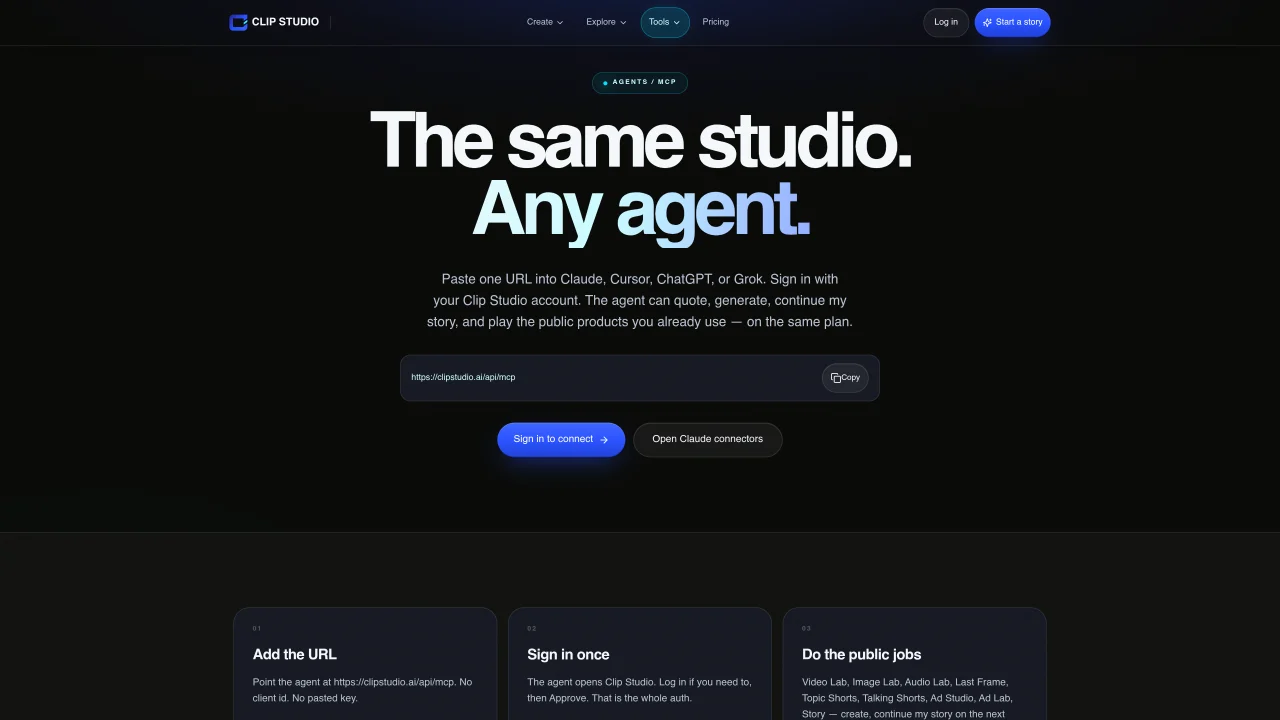
Clip Studio MCP is an MCP server that exposes Clip Studio’s public generation endpoints to AI agents such as Claude, Cursor, ChatGPT, and Grok. Users point an agent’s MCP connector to the URL https://clipstudio.ai/api/mcp and sign in once to authorize access. The server supports public jobs across Video Lab, Image Lab, Audio Lab, Last Frame, Topic Shorts, Talking Shorts, Ad Studio, Ad Lab, and Story, enabling agents to create, continue, or render content within the same generation-limit allowance as the Clip Studio site. Video Lab provides text- and image-to-video models including FLUX 3 Edit clip, with quoted setups required before paid generation. Image Lab supports still generation with models such as ChatGPT Image 2.5, Nano Banana variants, FLUX.2 Pro, MAI Image 2.5 variants, Seedream 5 Lite, Muse Image, Grok Imagine Image 2.0, Qwen Image 3, and Kling Omni 3. Audio Lab converts scripts into downloadable narration using Clip Studio voices. Last Frame allows turn-based film generation with quoted openings and paid shot selections.
Clip Studio MCP is an MCP server that connects AI agents like Claude, Cursor, ChatGPT, and Grok to Clip Studio’s public generation endpoints. It allows agents to create, continue, or render content across Video Lab, Image Lab, Audio Lab, Last Frame, and other tools using the same generation allowance as the Clip Studio website.
To connect an agent, point its MCP connector to the URL https://clipstudio.ai/api/mcp and sign in once to authorize access. No client ID or pasted API key is required; the agent handles authentication via Clip Studio’s OAuth flow.
Clip Studio MCP supports generating videos, still images, narrations, and interactive films. Video Lab handles text- and image-to-video models, Image Lab creates still images, Audio Lab converts scripts into narration, and Last Frame enables turn-based film generation.
Clip Studio MCP uses the same generation allowance as your Clip Studio account. Public jobs are available on the same plan, but paid generation requires an active Clip Studio subscription and follows the platform’s usage limits.
Clip Studio MCP works with agents that support the MCP protocol, including Claude, Cursor, ChatGPT, and Grok. Each agent requires configuring its MCP connector with the URL https://clipstudio.ai/api/mcp.
Yes, Clip Studio MCP enables commercial content creation through its public generation endpoints. However, usage is subject to Clip Studio’s terms of service and generation limits, which apply to both personal and commercial projects.
We use essential cookies to run aitoolnavio™, and optional cookies to analyze traffic and measure our marketing. You choose what we use — optional cookies stay off unless you turn them on. See our Privacy Policy.
One short email a week: fresh tools worth trying, honest takes and the updates that actually matter. No spam, unsubscribe any time.
Generate lifelike human videos with AI, making professional video creation fast and accessible for any user.
xAI builds Grok frontier AI models for reasoning, coding, voice, images, video, enterprise workflows, and developer APIs.
AI-powered video messaging tool that records, shares, and manages video messages with AI-generated titles, summaries, and tasks.
Explore and test Google’s experimental AI tools and prototypes before they become products.
Creates licensed videos, images, music.
Web and mobile AI platform for generating, editing, and training custom visuals from prompts with community models and face-swap tools.
Create stunning videos in a few clicks, customize with powerful tools, and automate editing without experience.
Create, convert, and enhance videos effortlessly with professional effects and royalty-free music.
Create engaging videos with voiceovers, music, and customizations using a library of royalty-free assets.
Create auto-resized campaign images and videos with DaVinci AI's generative media suite.
Freemium, uncensored AI video and image creation for individual creators with text-to-video, image effects, and gem-based upgrades for HD and no watermarks.
Generate cinematic video clips from text or images and refine them with AI-powered editing tools for creators and visual professionals.
Matched on what this tool does — grouped by the job you would be replacing.
matches Text-to-video generation with frontier models · Image-to-video editing with FLUX 3 Edit clip · Still image generation with multiple AI models
An AI image and video generator for creators and professionals with 70+ text-to-image models, video generation, and commercial usage rights.
Direct cinematic clips from prompts and references.
AI platform for generating images, videos, audio and text without watermarks
AI platform for generating and editing images and videos with multiple models and credit-based pricing
matches Script-to-narration conversion with Clip Studio voices · Turn-based film generation with Last Frame · Quoting system for cost control before generation
matches Script-to-narration conversion with Clip Studio voices
AI suite for generating images, video, audio and 3D assets in one workspace
Online AI tool that turns still images into short videos from text prompts
AI-powered image generation, editing, and animation with private project storage
Transform videos, enhance images, animate characters effortlessly.
AI video creation platform that turns scripts, prompts, and blog posts into edited videos with AI voices, avatars, and 1080p exports.