

AI video clipping and editing tool that turns long videos into short clips with captions, reframing, and one-click social publishing.
5.1M visits/mo-0.4%#9 Video & Animation
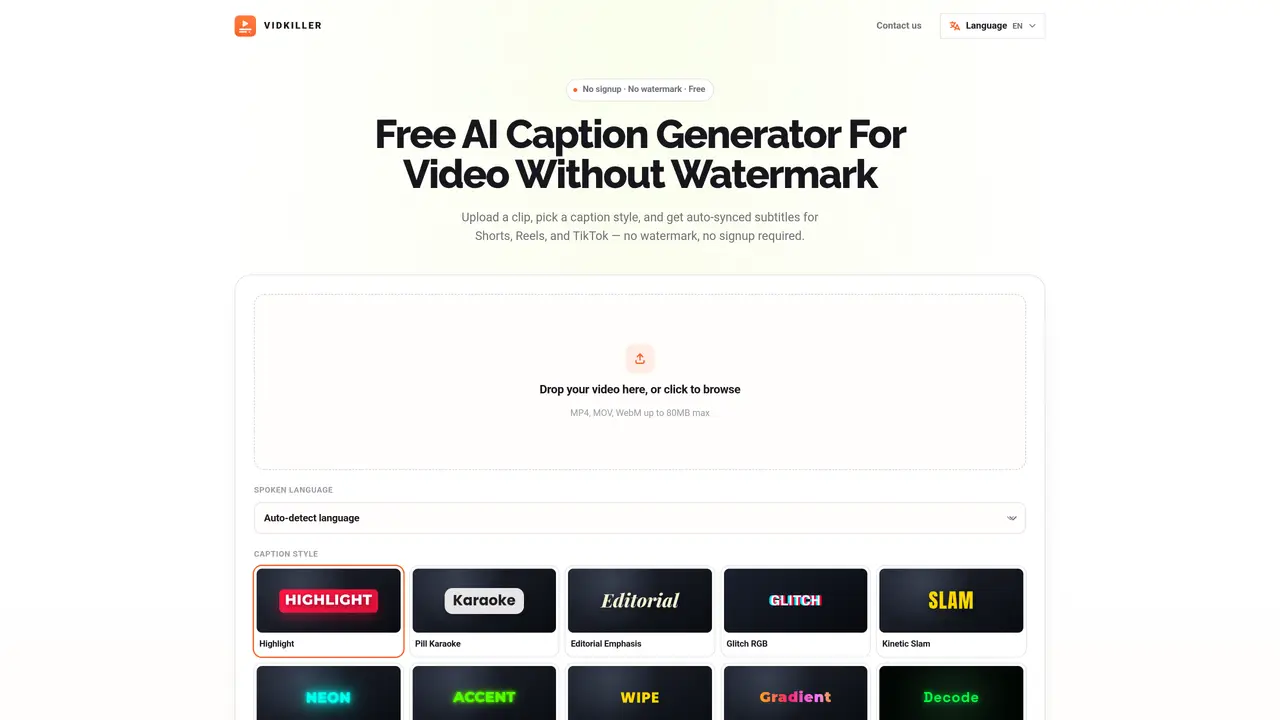
Vidkiller is a web-based service that automatically generates subtitles for videos and overlays them in various styles. Users upload a video file in MP4, MOV, or WebM format up to 100 MB and select from multiple caption styles such as karaoke, neon, glitch, or editorial. The tool uses speech recognition to detect spoken language and produce a transcript with word-level timestamps, ensuring accurate synchronization. After generation, users can review and edit the subtitles, adjusting text, timing, fonts, colors, and positioning before exporting. The output is a vertical video in 1080×1920 resolution, optimized for social media platforms like TikTok, Instagram Reels, and YouTube Shorts. No account creation or watermark is added to the final video.
Vidkiller supports MP4, MOV, and WebM video formats for upload.
Free subtitle videos can be up to 61 seconds long, which is suitable for short-form content on platforms like TikTok, Instagram Reels, and YouTube Shorts.
No, Vidkiller does not add a watermark to the final exported video.
No account creation is required to upload a video and generate subtitles.
Yes, users can review and edit the subtitles, including adjusting text, timing, fonts, colors, and positioning before exporting.
Vidkiller supports a wide range of languages, including English, Spanish, Hindi, French, German, Portuguese, Japanese, and many others.
vidkiller.co · third-party estimates from Similarweb
Last 2 months · grows by one month every month
Share of visits by channel
Share of visits · estimated visits
Writing & Content · Sep 2026
Traffic figures are third-party estimates, good for scale and trends; they can differ from a company's own numbers. Updated monthly.
We use essential cookies to run aitoolnavio™, and optional cookies to analyze traffic and measure our marketing. You choose what we use — optional cookies stay off unless you turn them on. See our Privacy Policy.
One short email a week: fresh tools worth trying, honest takes and the updates that actually matter. No spam, unsubscribe any time.
AI video clipping and editing tool that turns long videos into short clips with captions, reframing, and one-click social publishing.
AI-powered video clipping and editing tool that extracts viral moments, adds captions, and schedules shorts for TikTok, YouTube, and Instagram.
Cloud-based video editor with AI-powered clip generation, voiceovers, and auto-subtitles for fast, browser-based editing.
Free online AI video editor for beginners to create videos with text, music, animations, and effects.
Create captivating videos with AI-based captions, edit and customize them, and easily share on social media.
Submagic is an AI tool that helps content creators create viral reels and shorts 10 times faster than any other video editing tool.
AI-powered tool for accurate captions, video clipping, and impactful face centering.
Web-based AI editor that upscales videos to 4K, removes backgrounds and watermarks, generates subtitles, makes clips, and translates videos.
AI video generator that turns scripts or prompts into faceless TikTok and YouTube Shorts with voiceovers, captions, and music for creators and small businesses.
Web-based drag-and-drop video editor for adding animated text, templates, and AI captions to social and marketing videos.
Turn long videos or text into viral short-form clips with AI avatars, captions, and auto-scheduling for TikTok, Reels, and YouTube Shorts.
AI-powered video editor for clips, captions, supercuts and web animations
Matched on what this tool does — grouped by the job you would be replacing.
matches Auto-detects spoken language · Word-level timestamp accuracy · Customizable font, size, position, and colors
On-device subtitle and caption generator for videos with animated styles
Browser-based tool that adds timed captions to short-form videos
AI-powered video captioning tool supporting 11 languages with frame-accurate timing
AI captioning and transcription web app that generates, edits, and exports subtitles and 4K videos with viral templates for creators and marketers.
matches Vertical video output for social media · AI-based identification of engaging video moments · Auto-subtitles for generated shorts
AI tool that extracts and ranks short clips from long videos for social media
AI tool that converts long videos into captioned, vertical clips automatically
Free online AI tool to convert long videos into viral shorts without watermarks
AI-powered video clipping tool that extracts and reframes key moments from long recordings