Design, automate, and analyze email campaigns with drag-and-drop builders, AI editing, and real-time analytics.
5.2M visits/mo+4.7%#21 Business & Marketing

Turns messy drafts into polished replies by selecting tone and shortening text
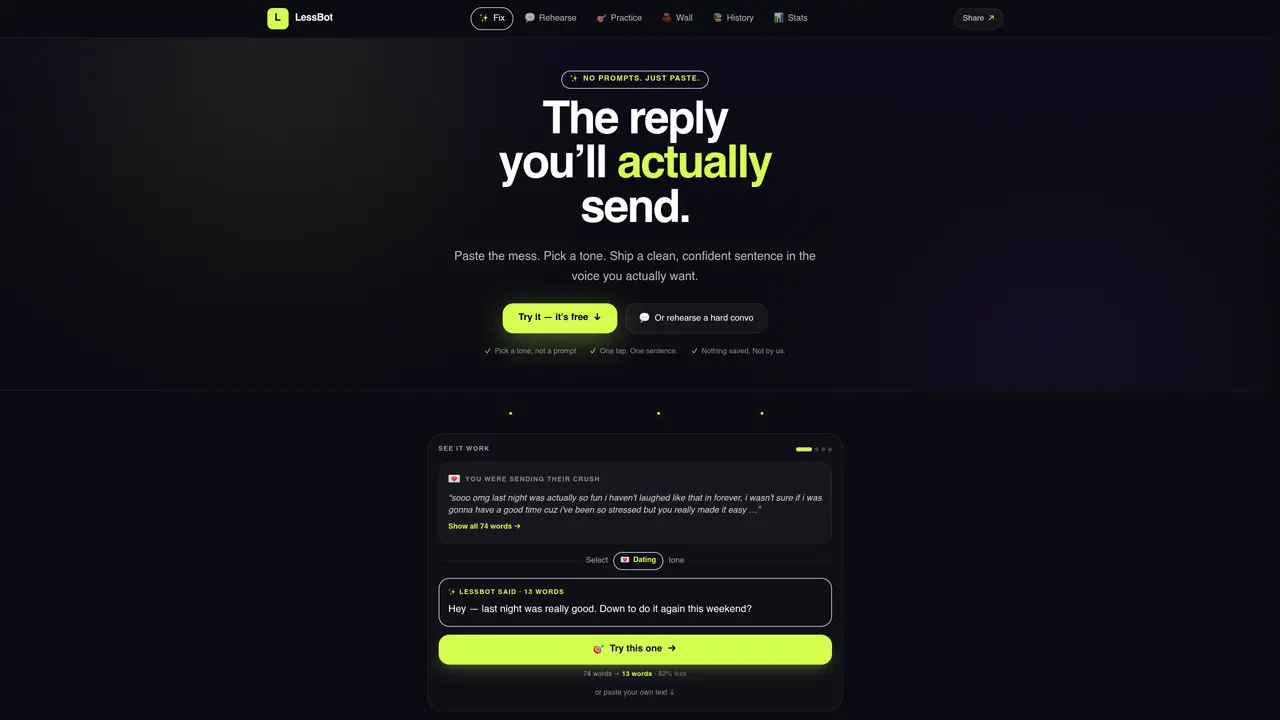
LessBot accepts pasted text and condenses it into a shorter version while letting the user choose a tone for the reply. The interface provides one-tap options such as “Just shorter,” “Sound smarter,” or “Just kinder,” producing a clean sentence in the selected voice. Users can rehearse difficult conversations by testing different tones before sending. The tool also includes a beta chat feature for practicing conversations with AI-generated responses in specific roles like boss, crush, or friend. A community wall allows anonymous users to share and react to fixes, and a playground offers tone practice across multiple scenarios. Desktop templates and an iPhone shortcut are available for quick access.
LessBot is a text refinement tool that allows users to paste any text and instantly generate a shorter, clearer version in a chosen tone. It operates without prompts, offering one-tap options like 'Just shorter,' 'Sound smarter,' or 'Just kinder' to produce a polished sentence.
LessBot is designed for anyone who needs to communicate more effectively, including professionals drafting emails, individuals preparing for difficult conversations, or users refining messages for social media or messaging platforms.
No, LessBot does not save or store user text. The tool emphasizes privacy by ensuring that pasted content is not retained after the session.
The LessBot Chat beta allows users to practice conversations with AI-generated responses in specific roles, such as boss, crush, or friend, helping them rehearse real-life interactions before having them.
Yes, LessBot offers an iPhone shortcut and desktop templates for quick access, enabling users to streamline their workflow and use the tool across different devices.
LessBot focuses specifically on condensing and refining text in a user's chosen tone without requiring prompts, offering a more streamlined and direct approach compared to general AI chat tools like ChatGPT.
We use essential cookies to run aitoolnavio™, and optional cookies to analyze traffic and measure our marketing. You choose what we use — optional cookies stay off unless you turn them on. See our Privacy Policy.
One short email a week: fresh tools worth trying, honest takes and the updates that actually matter. No spam, unsubscribe any time.
Design, automate, and analyze email campaigns with drag-and-drop builders, AI editing, and real-time analytics.
Identify contacts, generate emails, track prospects and accounts based on key signals.
AI assistant that automates routine work across email, calendar, Slack, files and other tools with human oversight.
Schedule events, streamline projects, and draft emails efficiently with its features.
AI-powered email assistant that organizes inboxes, drafts replies, and automates routine tasks for professionals.
Generate SEO-friendly YouTube video scripts and descriptions for blog posts.
Create personalized emails, follow up automatically, and analyze for optimization and insights.
AI-powered email management for Gmail and Google Workspace teams with shared inboxes, AI drafting, automation, and analytics.
Cross-platform email client with unified inbox, calendar, and optional AI assistance for students, professionals, and small teams.
AI executive assistant that organizes Gmail and Outlook inboxes, drafts replies in your voice, schedules meetings, and tracks follow-ups for busy professionals.
Create interactive email campaigns with automated personalization.
Automate responses, personalize emails, and enjoy an intuitive interface for efficient email management.
Matched on what this tool does — grouped by the job you would be replacing.
matches Paste text for instant shortening · Select from predefined tones · One-tap reply generation
AI email assistant that rewrites, drafts, and improves messages in Outlook, Gmail, Chrome, and iOS with tone control and grammar fixes.
Chrome extension that drafts AI-generated replies to Google Maps, Yelp, and Tripadvisor reviews
AI software that automatically replies to Google reviews in the business owner’s voice
matches Paste text for instant shortening · Select from predefined tones
matches Playground with tone practice scenarios · Beta chat for conversation practice
AI-powered writing tool for paraphrasing, summarizing, and enhancing writing effortlessly.
Chrome extension that rewrites typed text in place with one keystroke
AI-powered tool to fix grammar or change writing style
An AI chat platform for roleplaying, storytelling, and learning by chatting with millions of user-created AI characters.
Generate charming date replies, gain insights, and improve communication with AI-powered suggestions and objective ratings.
AI-powered app that generates text replies from screenshots of conversations