
Generate captions, optimize content, and enhance with custom images for maximum engagement.
46M visits/mo-10%#3 Image & Design
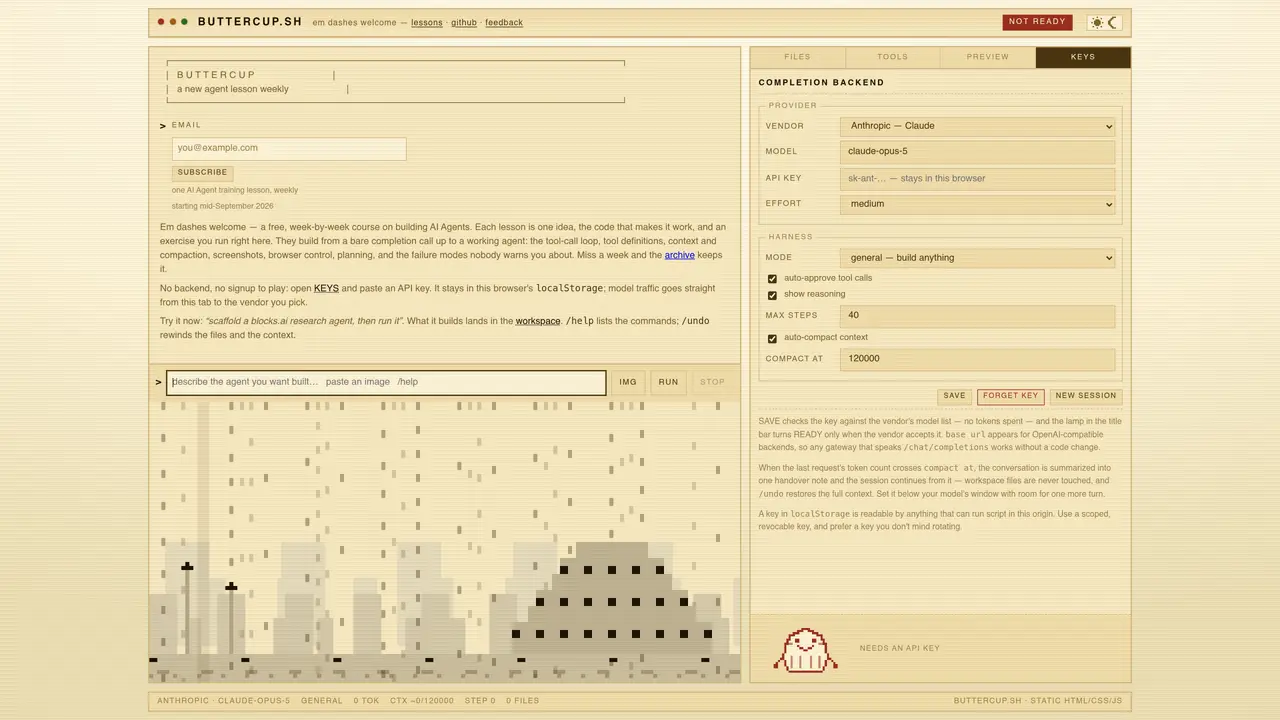
buttercup.sh is a static HTML/CSS/JS web application that provides a sandboxed workspace for constructing and executing AI agents entirely within the browser. It offers a structured, week-by-week course format where each lesson introduces a single concept—such as tool-call loops, context compaction, or browser control—paired with executable code and hands-on exercises. Users can drag and drop text files into the workspace, define tools as plain JavaScript functions, and preview agent behavior in a sandboxed iframe. The tool supports multiple completion backends, including local models via Ollama, vLLM, or WebLLM, as well as cloud providers like Anthropic, OpenAI, or Google, with API keys stored in localStorage. Agents can perform tasks such as taking screenshots, navigating interfaces, and sending results back to the model, all while maintaining strict isolation between the workspace and the sandboxed preview. Sessions can be saved, undone, or exported as ZIP files, and context is automatically compacted to stay within model window limits. The interface includes commands like /help, /undo, and /new session for managing workflows.
buttercup.sh is a static web application that provides a sandboxed workspace for building and running AI agents entirely within the browser. It offers a structured, week-by-week course format where each lesson introduces a single concept paired with executable code and hands-on exercises.
The tool is designed for anyone interested in learning how to build AI agents, from beginners to more experienced developers. It is particularly useful for those who want to experiment with agent development without requiring a backend or signup.
API keys are stored in the browser's localStorage, and model traffic is sent directly from the tab to the selected vendor. It supports multiple completion backends, including local models via Ollama, vLLM, or WebLLM, as well as cloud providers like Anthropic, OpenAI, or Google.
Yes, once the model weights are downloaded into the browser's cache, the tool can work offline. Local models like those from Ollama, vLLM, or WebLLM are supported for offline use.
Users can define tools as plain JavaScript functions, drag and drop text files into the workspace, and preview agent behavior in a sandboxed iframe. Agents can perform tasks such as taking screenshots, navigating interfaces, and sending results back to the model.
To get started, open the tool in a browser, paste an API key (if using a cloud provider), and begin with the weekly lessons. The interface includes commands like /help, /undo, and /new session for managing workflows.
We use essential cookies to run aitoolnavio™, and optional cookies to analyze traffic and measure our marketing. You choose what we use — optional cookies stay off unless you turn them on. See our Privacy Policy.
One short email a week: fresh tools worth trying, honest takes and the updates that actually matter. No spam, unsubscribe any time.
Generate captions, optimize content, and enhance with custom images for maximum engagement.
Build conversational forms, capture rich responses, and automate follow-ups with AI-powered surveys and workflows.
Automate code, research, and documents using agents.
AI-powered IDE for autonomous coding tasks and agentic development workflows
Source, match, and manage talent with predictive analytics for effortless recruiting.
Automate workflow, optimize operations, and detect potential issues with this efficient AI-driven solution.
Transforms thoughts into actions, enhancing productivity and efficiency.
AI Recruitment engine to hire top global talent
All-in-one team productivity platform combining chat, docs, video meetings, workflows, and AI tools in one place.
Personal assistant that coordinates tasks across apps and devices via text or call
AI automation and agent-building platform with 3,000+ app integrations
AI job search copilot that matches roles to skills, optimizes resumes for ATS, generates cover letters, and autofills applications with real-time insights.
Matched on what this tool does — grouped by the job you would be replacing.
matches Browser-based environment for building and running AI agents locally · Sandboxed iframe for agent preview and interaction · Drag-and-drop file import for workspace
Local desktop app that consolidates multiple coding agents into one window
Desktop workspace for running AI agents on local files and code
Unified local workspace for running AI models, automations and custom tools on a computer
A local browser for running AI agents with real user logins and session replay
matches Local file processing and editing · Session and memory tracking · Model switching at any time
Desktop app for multi-agent coding sessions with AI PR review and CI debugging
Desktop AI coding agent for Mac and Windows that writes files from natural language instructions