Generate captions, optimize content, and enhance with custom images for maximum engagement.
46M visits/mo-10%#3 Image & Design

Hosted Chromium API that maintains persistent, authenticated browser sessions for AI agents and automation scripts.
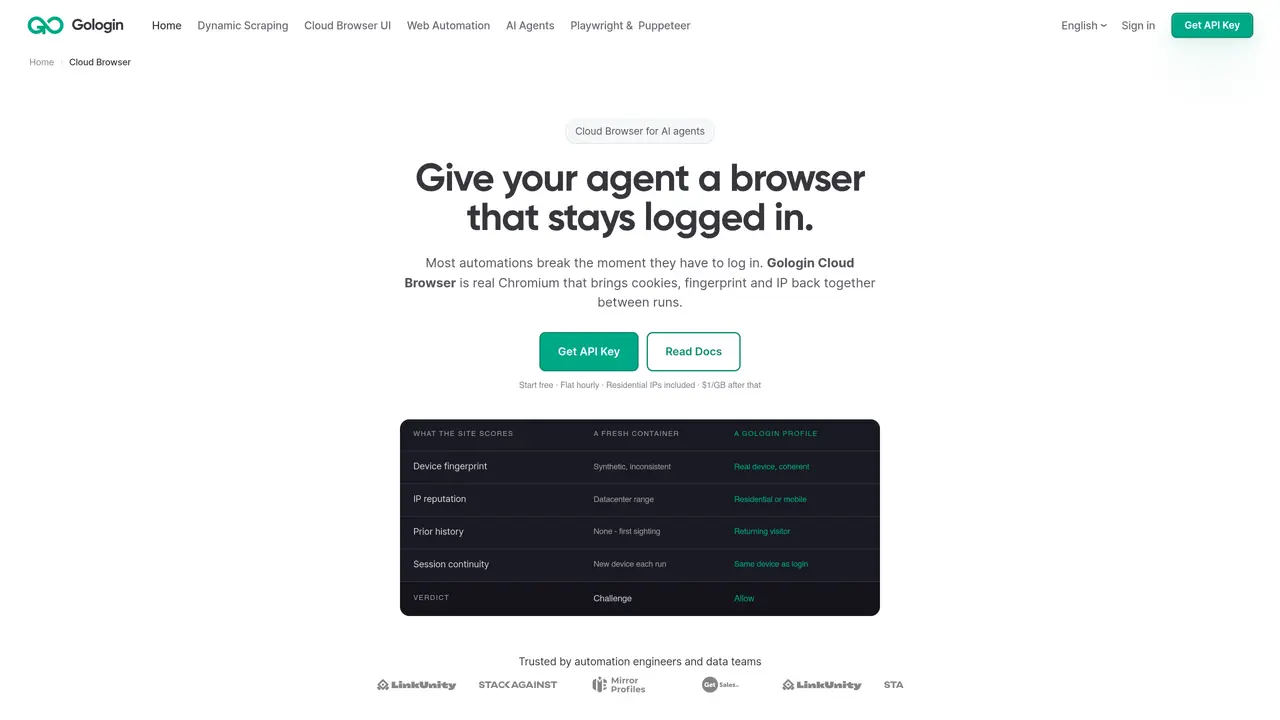
Gologin Cloud Browser is a hosted Chromium API designed to keep AI agents and automation scripts logged into accounts between runs. It serves automation engineers, data teams, and AI developers who require stable, authenticated browsers for tasks like web scraping, multi-account operations, and internal tools that must appear as returning users. The service provides persistent logged-in profiles that reuse cookies, storage, fingerprint, and IP for each profile, ensuring sessions remain active for extended periods. It combines real-device fingerprints with residential or mobile IPs to present a coherent returning-user identity to websites, reducing the likelihood of detection or blocking. The tool integrates seamlessly with existing Playwright or Puppeteer scripts by changing only the connection line, enabling low-friction migration for teams already using these automation libraries. Additionally, it offers a Gologin MCP server and Claude Code skills, allowing AI agents like Claude to dynamically create profiles, manage proxies, and orchestrate workflows. This makes it particularly useful for developers building agentic systems that require persistent browser identities without manual re-authentication.
Gologin Cloud Browser is a hosted Chromium API that provides persistent, authenticated browser sessions for automation tasks. It maintains cookies, device fingerprints, and IP addresses between runs to mimic returning-user behavior and reduce detection or blocking.
The tool is designed for automation engineers, data teams, and AI developers who need stable, logged-in browser sessions for tasks like web scraping, multi-account operations, or internal tools that must appear as returning users.
Integration is achieved by replacing the local browser launch call with a connection to Gologin’s endpoint. The same selectors, assertions, and CI workflows remain unchanged, requiring only a single line of code adjustment.
Yes, it offers a Gologin MCP server and Claude Code skills, allowing AI agents like Claude to dynamically create profiles, manage proxies, and orchestrate workflows without manual intervention.
The service includes residential or mobile IPs by default, with datacenter IPs available as an option. Residential IPs are particularly effective for reducing detection due to their shared carrier NAT origins.
Start by signing up with Google to obtain an API token from the dashboard. Then, replace the local browser launch call in your script with the Gologin endpoint connection, specifying an optional profile ID for persistent sessions.
We use essential cookies to run aitoolnavio™, and optional cookies to analyze traffic and measure our marketing. You choose what we use — optional cookies stay off unless you turn them on. See our Privacy Policy.
One short email a week: fresh tools worth trying, honest takes and the updates that actually matter. No spam, unsubscribe any time.
Generate captions, optimize content, and enhance with custom images for maximum engagement.
Build conversational forms, capture rich responses, and automate follow-ups with AI-powered surveys and workflows.
Automate code, research, and documents using agents.
AI-powered IDE for autonomous coding tasks and agentic development workflows
Source, match, and manage talent with predictive analytics for effortless recruiting.
Automate workflow, optimize operations, and detect potential issues with this efficient AI-driven solution.
Transforms thoughts into actions, enhancing productivity and efficiency.
AI Recruitment engine to hire top global talent
All-in-one team productivity platform combining chat, docs, video meetings, workflows, and AI tools in one place.
Personal assistant that coordinates tasks across apps and devices via text or call
AI automation and agent-building platform with 3,000+ app integrations
AI job search copilot that matches roles to skills, optimizes resumes for ATS, generates cover letters, and autofills applications with real-time insights.
Matched on what this tool does — grouped by the job you would be replacing.
matches Persistent logged-in profiles with reusable cookies, storage, fingerprint, and IP · Real-device fingerprints and residential or mobile IPs for returning-user appearance · Playwright and Puppeteer API compatibility with minimal code changes
Cloud browser for AI agents that runs reliably, connects via MCP/Puppeteer/Playwright, and includes stealth and authenticated profiles.
Cloud-hosted browser automation platform for engineers and teams building AI agents that navigate authenticated websites and run scalable workflows via API.
Routes and manages cloud browser sessions across multiple providers with failover and session replay
Browser Cloud gives AI agents real Chrome sessions on demand, no headless fleet to babysit.
matches Cloud-hosted Chromium API for scalable automation · Managed profiles, fingerprints, and proxies for multi-account operations
matches Playwright and Puppeteer API compatibility with minimal code changes · Gologin MCP server and Claude Code skills for AI agent integration
Web scraping API that automates data extraction from websites, including those that block scraping, designed for developers.
An AI-powered web scraping toolkit offering APIs, cloud browsers, CAPTCHA solving, and proxy rotation for reliable public data extraction.
Cloud-based headless browsers for AI agents, web scraping, and automated testing with fast launches and CAPTCHA handling.
A cloud-based browser automation tool that bypasses anti-bot systems for reliable web scraping and data extraction.
Automate real web workflows with reusable browser skills.
An MCP that drives a real, logged-in browser for AI agents
Desktop browser that persists agent workspaces with sign-ins and tabs