Generate captions, optimize content, and enhance with custom images for maximum engagement.
46M visits/mo-10%#3 Image & Design

A spatial knowledge-management workspace that combines visual organization with AI-powered automation to help users recall information and automate routine tasks.
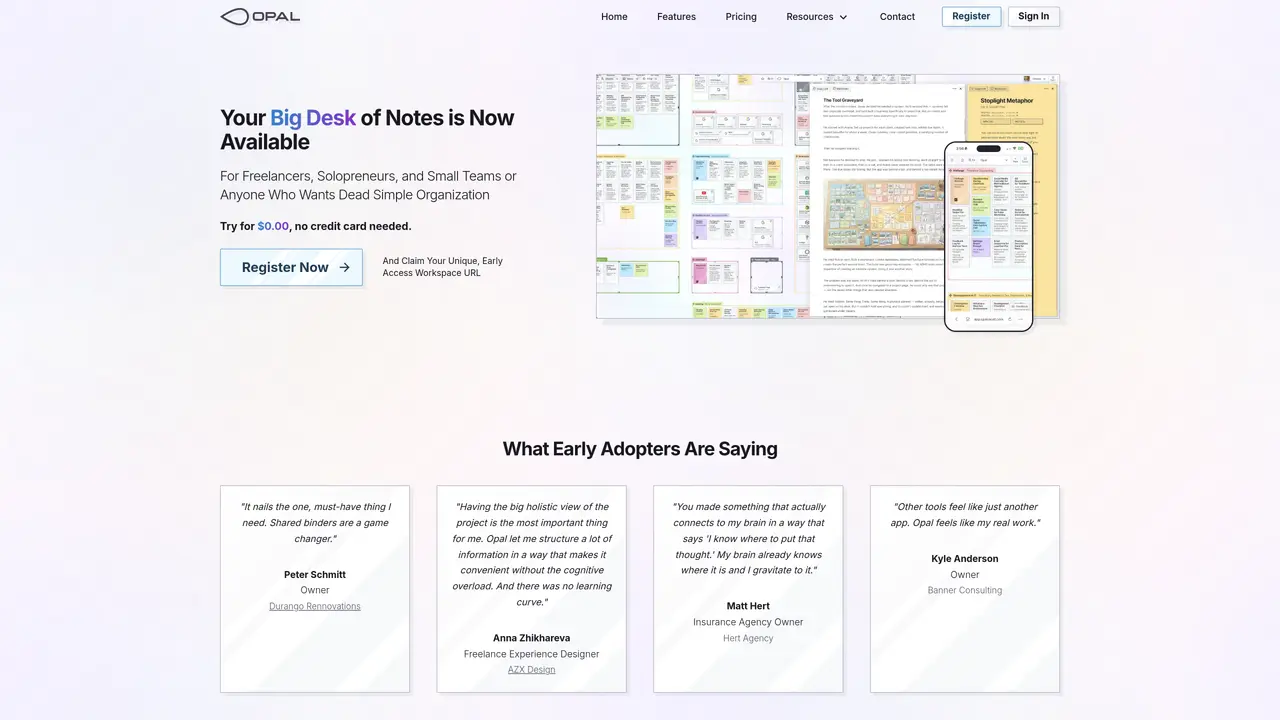
Opal is a spatial knowledge-management workspace designed to help users organize notes, clients, tasks, SOPs, and links on a draggable canvas for quick recall and visibility. By placing work in a visual space where the brain naturally expects it, Opal reduces the time lost to searching and keeps critical information in view. The tool already offers an API for AI agents and integrates with AI-driven services like AI-transcribed notes via CRUSH. It is also developing one-click AI agent creation for platforms such as Claude, Perplexity, OpenClaw, and Opal Recall SKILL, enabling users to automate summaries, recall, and routine work through drag-and-drop or proximity-based contextual content. Opal is ideal for individuals or teams seeking a low-friction hub that merges spatial organization with AI-powered automation and contextual assistants. The platform aims to eliminate information loss and accelerate decision-making by keeping everything organized and accessible in one visual workspace.
Opal is a spatial knowledge-management workspace designed for freelancers, solopreneurs, and small teams who need a low-friction way to organize notes, documents, links, and tasks visually.
Opal leverages spatial memory by allowing users to place items on a draggable canvas where their brain naturally expects to find them, reducing reliance on search functions.
Yes, Opal integrates with AI-driven services like CRUSH for transcription and offers an API for AI agents, enabling automation of summaries and routine tasks.
Yes, Opal allows users to share notes, documents, or binders with others and edit them together in real-time.
Opal offers a free tier with no credit card required, though qualified users are invited in batches during early access.
Users can register for early access and claim a unique workspace URL to begin organizing their work spatially on Opal's canvas.
opalrecall.com · third-party estimates from Similarweb
Last 3 months · grows by one month every month
Share of visits by channel
Share of visits · estimated visits
Automation & Agents · Sep 2026
Traffic figures are third-party estimates, good for scale and trends; they can differ from a company's own numbers. Updated monthly.
We use essential cookies to run aitoolnavio™, and optional cookies to analyze traffic and measure our marketing. You choose what we use — optional cookies stay off unless you turn them on. See our Privacy Policy.
Generate captions, optimize content, and enhance with custom images for maximum engagement.
Build conversational forms, capture rich responses, and automate follow-ups with AI-powered surveys and workflows.
Automate code, research, and documents using agents.
AI-powered IDE for autonomous coding tasks and agentic development workflows
Source, match, and manage talent with predictive analytics for effortless recruiting.
Automate workflow, optimize operations, and detect potential issues with this efficient AI-driven solution.
Transforms thoughts into actions, enhancing productivity and efficiency.
AI Recruitment engine to hire top global talent
All-in-one team productivity platform combining chat, docs, video meetings, workflows, and AI tools in one place.
Personal assistant that coordinates tasks across apps and devices via text or call
AI automation and agent-building platform with 3,000+ app integrations
AI job search copilot that matches roles to skills, optimizes resumes for ATS, generates cover letters, and autofills applications with real-time insights.
One short email a week: fresh tools worth trying, honest takes and the updates that actually matter. No spam, unsubscribe any time.
Matched on what this tool does — grouped by the job you would be replacing.
matches Spatial canvas for organizing notes, tasks, and links · Visual hub for reducing information search time · Proximity-based automation triggers
ADHD-friendly visual workspace for planning projects, managing tasks, and organizing notes with drag-and-drop tiles and templates.
AI-powered visual workspace for organizing research and creative projects on one canvas
Visual note-taking and research tool for organizing ideas with linked docs, boards, and real-time collaboration.
AI-powered canvas workspace for organizing ideas, notes and plans in one place
matches API for AI agent integration · Integration with AI-transcribed notes services · One-click AI agent creation for automation
Centralize knowledge, collaborate in real time, and edit documents with AI-powered tools in one cloud workspace.
No-code AI workflow automation platform to build chatbots, AI agents, and internal tools with drag-and-drop workflows and real-time research.
Unify note-taking, content creation, and knowledge management in one AI-powered workspace.
A project management platform that unifies tasks, docs, and AI-powered meeting transcription for teams in one workspace.