Automate complex processes, leverage real-time analytics, customize workflow with powerful tools.
1.1M visits/mo-5.1%#31 Automation & Agents

Browser with an AI agent that performs repetitive web tasks and file actions on request
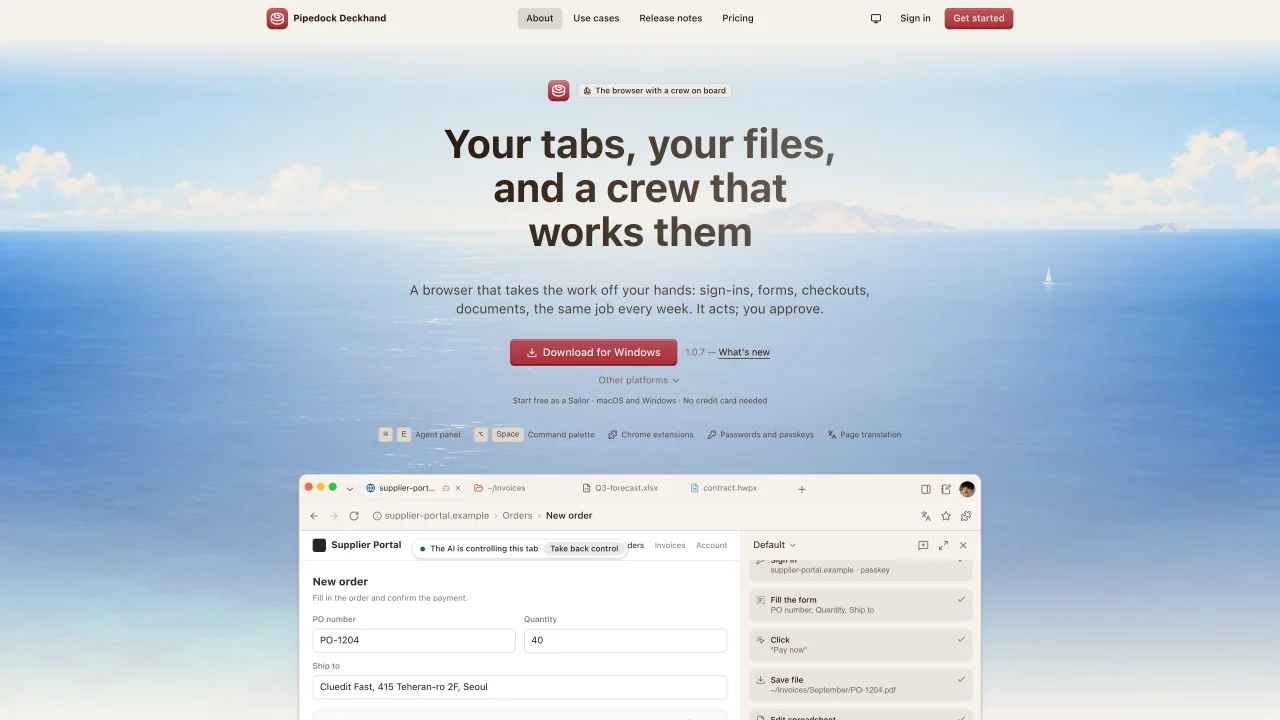
Pipedock Deckhand is a Chromium-based browser that integrates an AI agent capable of handling routine online tasks such as signing in, filling forms, completing checkouts, and processing documents. The agent operates within open tabs, reading and interacting with web pages directly rather than through pasted content. It can manage files through a built-in Finder-style explorer, supporting operations like opening, moving, renaming, and creating files or folders with user-defined permissions. The browser supports document types including PDF, DOCX, XLSX, PPTX, HWP, and HWPX, allowing in-tab viewing and editing with real-time updates. Users can schedule tasks or trigger them via events, with the agent continuing to run even when the application is minimized. The agent can be instructed via keyboard or voice, and it pauses before executing actions that require confirmation. Extensions such as 1Password and Bitwarden are supported, and the agent can utilize them without exposing sensitive data. The browser also includes a Markdown editor with features like tables, images, and Mermaid diagrams, enabling users to generate, execute, and save scripts or documents with version control.
Pipedock Deckhand is a Chromium-based browser that integrates an AI agent to automate routine online tasks such as signing in, filling forms, completing checkouts, and processing documents directly within open tabs.
It is designed for users who need to automate repetitive web-based workflows, manage files, or handle document processing while maintaining control over sensitive data like passwords and passkeys.
The agent reads and interacts with web pages in real time, signs in using saved credentials or password managers, and manages files through a built-in Finder-style explorer for operations like opening, moving, or renaming.
Yes, it supports extensions such as 1Password and Bitwarden, allowing the agent to use them without exposing sensitive data, and passwords remain managed securely within the browser.
Yes, it supports in-tab viewing and editing of documents including PDF, DOCX, XLSX, PPTX, HWP, and HWPX, with real-time updates and the ability to highlight specific sections for targeted interactions.
Download and install the application, sign in to bring over bookmarks and passwords, then use the agent to automate tasks by keyboard or voice commands, with the option to schedule or trigger tasks via events.
We use essential cookies to run Aitoolnavio, and optional cookies to analyze traffic and measure our marketing. You choose what we use — optional cookies stay off unless you turn them on. See our Privacy Policy.
One short email a week: fresh tools worth trying, honest takes and the updates that actually matter. No spam, unsubscribe any time.
Automate complex processes, leverage real-time analytics, customize workflow with powerful tools.
Automate tasks on websites with Browser-Use's AI browser control.
AI-powered platform for optimizing delivery routes, tracking shipments in real time, and managing driver operations to streamline last-mile logistics.
Create custom templates, automate contract workflow, and use analytics to optimize contracts.
Runable lets users automate computer tasks by typing plain-language commands instead of writing code.
Continuous integration and delivery platform that automates builds, tests, and deployments to accelerate software delivery.
Create personalized schedules, prioritize tasks, set goals, and track progress with reminders and ease.
Kissflow automates workflows, lets teams customize processes, track tasks in real time, and collaborate without switching tools.
AI assistant that automates routine work across email, calendar, Slack, files and other tools with human oversight.
Automate processes, generate insights, and interact with data conversationally.
Browse sites, pull data, and finish workflows with TinyFish AI.
A project management and capacity planning platform for agencies and service teams, combining timelines, workload planning, time tracking, and AI-assisted scheduling.
Matched on what this tool does — grouped by the job you would be replacing.
matches AI agent performs sign-ins, form filling, and checkouts within open tabs · Task scheduling and event-triggered agent execution · Voice and keyboard input for agent instructions
AI-powered browser autopilot that automates web tasks like form-filling, research, and job applications using plain English commands.
AI agent that performs tasks in connected apps and returns finished work
Browser extension that runs an AI agent inside Chrome to read pages, fill forms and work across tabs
An AI-powered browser that summarizes pages, answers questions, and automates online tasks through natural language commands.
matches In-tab document viewing and editing for PDF, DOCX, XLSX, PPTX, HWP, and HWPX · Markdown editor with tables, images, and Mermaid diagrams
matches Built-in Finder-style file explorer for managing documents and folders · Multi-profile support with separate sign-ins, folders, and agents
AI assistant for safe, reliable productivity with code, collaboration, and integrations.
Online editor for Mermaid diagrams with live previews, AI-assisted code generation, and export to SVG, PNG, or Markdown.
Browser-based diagram builder with AI text-to-diagram and local-first storage
AI agent for macOS that automates tasks across apps, files and system via plain English prompts
A macOS desktop app for deploying and managing OpenClaw autonomous agents and no-code workflows locally without terminal setup.
Open-source AI-integrated browser with local LLM and OS automation