
Design, distribute, and analyze surveys online or via email with real-time insights using Survey Monkey.
38M visits/mo-3.9%#2 Business & Marketing

Centralizes and analyses AI software spending across teams and vendors
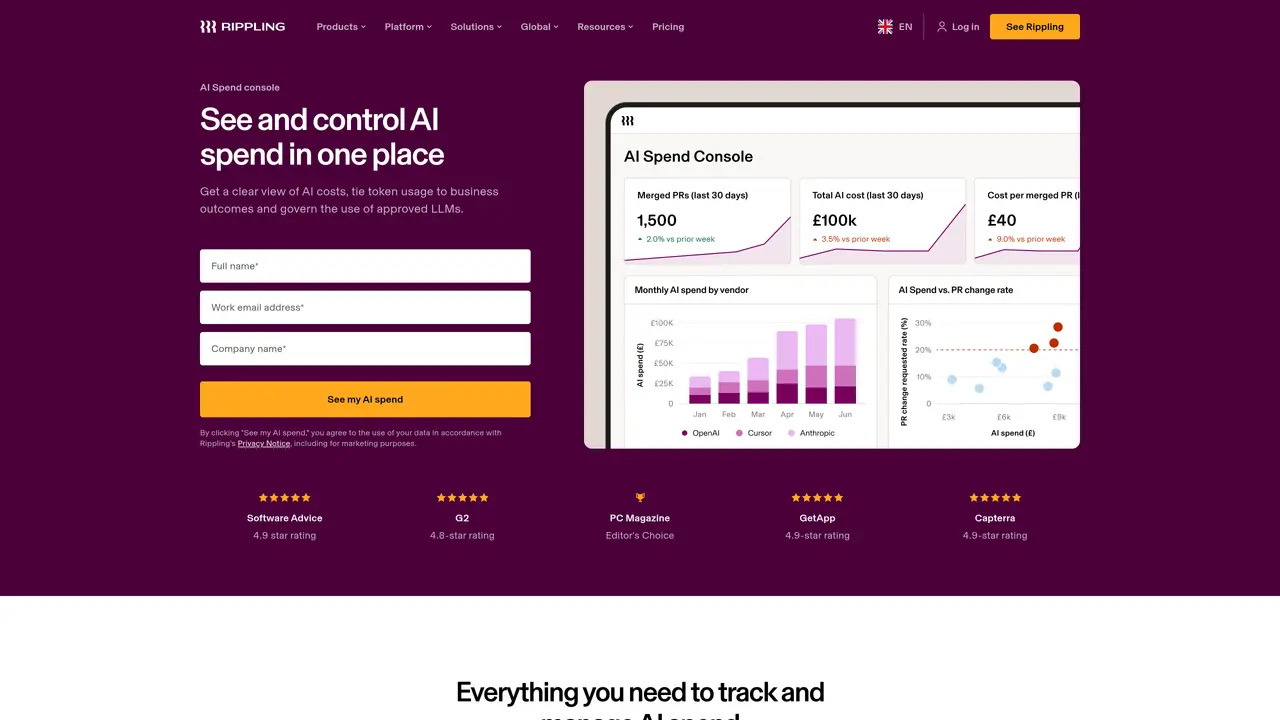
AI Spend Console provides a unified view of AI-related costs by aggregating usage data from multiple vendors such as Anthropic, OpenAI and Cursor. The tool breaks down spend by employee attributes including team or department, enabling finance and IT leaders to identify who is spending what. Token usage can be mapped to specific business activities like pull requests and code reviews, allowing organizations to assess efficiency and flag inefficient spending patterns. Users can query spend data in plain language and generate dashboards without writing SQL. The platform supports governance by logging every AI request with details on who made it, the associated cost and its business impact. Spend controls can be configured to route requests to specific models and limit token expenditure based on employee attributes. Data access is managed through configurable permissions aligned with organizational hierarchy, ensuring appropriate visibility for employees, managers and executives.
Rippling AI Spend Console maps AI spend to employee identities, enabling tracking of spend by roles, departments or teams. It ties AI costs to GitHub and performance management data to identify inefficient usage and allows users to ask follow-up questions in natural language to generate dashboards without SQL.
Rippling connects to top AI vendors including Cursor, OpenAI and Anthropic to aggregate and track AI-related costs in one place.
Rippling AI Spend Console is designed for Finance and IT leaders who need to track, understand and control AI spend across their organization.
Yes, you can invite colleagues to Rippling AI Spend Console. They can view existing dashboards or create their own based on their access permissions.
No, you do not need to be a Rippling customer to get started with AI Spend Console.
Rippling allows configuration of data access permissions based on organizational hierarchy, ensuring employees, managers and executives see only the relevant scope of data. Security measures comply with global privacy laws and include a Security Whitepaper and Security & Trust Center documentation.
We use essential cookies to run aitoolnavio™, and optional cookies to analyze traffic and measure our marketing. You choose what we use — optional cookies stay off unless you turn them on. See our Privacy Policy.
One short email a week: fresh tools worth trying, honest takes and the updates that actually matter. No spam, unsubscribe any time.
Design, distribute, and analyze surveys online or via email with real-time insights using Survey Monkey.
Create targeted campaigns, automate email campaigns, and analyze performance for maximum ROI.
Discover keywords, analyze competitors' SEO strategies, and make data-driven decisions for website performance.
Analyze website performance, track competitors' tactics, and access comprehensive analytics and optimization features.
YouTube and Instagram growth toolkit with AI-powered optimization and analytics
Develop, run data jobs, transform datasets, leverage ML algorithms for actionable insights.
Streamline hiring, monitor job performance, and choose flexible pricing plans.
Unified AI-powered platform for real-time monitoring, analytics, and security across cloud infrastructure, applications, and services.
Securely store, analyze, and scale data while enhancing security and performance with encryption and automated backups.
AI-powered customer feedback platform for mid-market businesses to run conversational surveys and extract insights.
Automate review requests, analyze sentiment, and monitor ratings with a streamlined dashboard for improved customer feedback.
Monitor brand performance, create content for social media, and gain insights with deep analytics.
Matched on what this tool does — grouped by the job you would be replacing.
matches Centralized AI spend dashboard · Spend breakdown by team, department or role · Natural language query support
Tracks and attributes AI costs across multiple LLM providers with budget controls
Centralizes tracking and optimization of AI service spending across multiple platforms through a single dashboard.
Tracks and alerts on AI provider spend across models and projects
Self-hosted gateway for tracking and capping LLM spending by project, agent and model
matches Vendor integration for Anthropic, OpenAI and Cursor · Token usage mapping to business activities · Configurable spend limits and model routing
Unified API layer for multiple AI model vendors with pay-per-request billing
Enterprise LLM gateway providing a single API key for multiple AI model providers
Unified API endpoint that routes LLM requests across multiple providers with cost tracking
Unified API for routing AI models with spend control and usage tracking