
Design, distribute, and analyze surveys online or via email with real-time insights using Survey Monkey.
38M visits/mo-3.9%#2 Business & Marketing
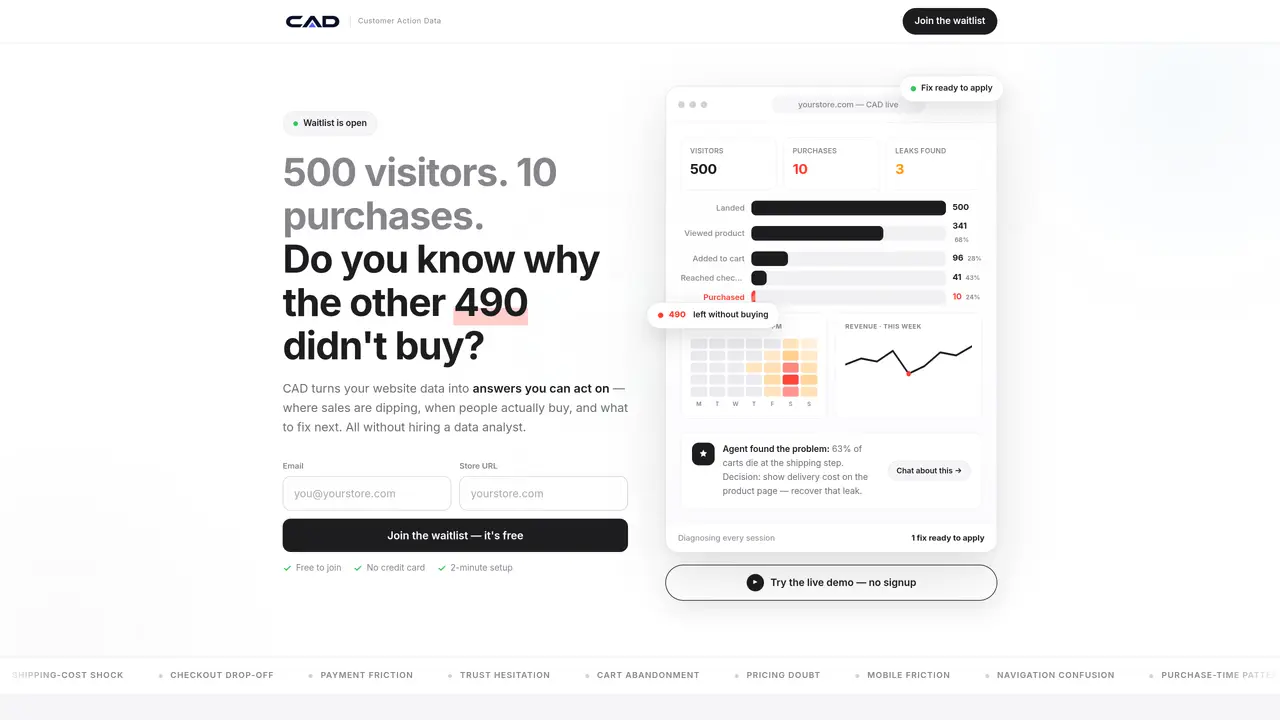
CAD analyzes customer behavior on e-commerce websites to identify where visitors drop off and why purchases are not converting. It tracks every session from first click to checkout, highlighting specific friction points such as shipping costs, checkout steps, or product page issues. The tool uses an AI agent to interpret the data and provide actionable insights in plain language, eliminating the need for manual analysis or a dedicated data team. Founders and marketers can ask questions about sales patterns, conversion drops, or product performance and receive real-time answers based on live customer actions. CAD is designed for users without technical or analytics expertise, offering a simple setup process and direct recommendations for improving revenue. The system prioritizes fixes by impact, helping users address the most critical issues first.
CAD identifies where customers drop off on an e-commerce website and explains why they did not complete a purchase. It analyzes every session from first click to checkout, pinpointing specific friction points such as shipping costs, checkout steps, or product page issues.
Google Analytics and Hotjar provide numerical data or session recordings, but CAD acts as a diagnosis layer by interpreting the data and naming the exact problem behind customer drop-offs. It delivers actionable insights in plain language without requiring manual analysis.
No developer is required. Users simply generate a tracking code from CAD, paste it into their website header, and the tool begins recording customer actions immediately.
CAD is built for founders and marketers who manage e-commerce stores and lack a dedicated data analyst. It is designed for users without technical or analytics expertise.
Yes, CAD includes an AI agent that reads every session and answers questions in plain language, such as when most people buy, where sales dip, or which products to push more.
Yes, CAD updates insights in real time as customer actions are recorded, allowing users to make immediate decisions based on live data.
We use essential cookies to run aitoolnavio™, and optional cookies to analyze traffic and measure our marketing. You choose what we use — optional cookies stay off unless you turn them on. See our Privacy Policy.
One short email a week: fresh tools worth trying, honest takes and the updates that actually matter. No spam, unsubscribe any time.
Design, distribute, and analyze surveys online or via email with real-time insights using Survey Monkey.
Create targeted campaigns, automate email campaigns, and analyze performance for maximum ROI.
Discover keywords, analyze competitors' SEO strategies, and make data-driven decisions for website performance.
Analyze website performance, track competitors' tactics, and access comprehensive analytics and optimization features.
YouTube and Instagram growth toolkit with AI-powered optimization and analytics
Develop, run data jobs, transform datasets, leverage ML algorithms for actionable insights.
Streamline hiring, monitor job performance, and choose flexible pricing plans.
Unified AI-powered platform for real-time monitoring, analytics, and security across cloud infrastructure, applications, and services.
Securely store, analyze, and scale data while enhancing security and performance with encryption and automated backups.
AI-powered customer feedback platform for mid-market businesses to run conversational surveys and extract insights.
Automate review requests, analyze sentiment, and monitor ratings with a streamlined dashboard for improved customer feedback.
Monitor brand performance, create content for social media, and gain insights with deep analytics.
Matched on what this tool does — grouped by the job you would be replacing.
matches Session tracking from first click to checkout · AI agent that reads and diagnoses customer behavior · Real-time identification of sales leaks
Spot revenue leaks, grow traffic, auto-create store content.
AI-powered platform for website conversion optimization and growth automation
Revolutionize website performance with AI-driven user behavior insights and real-time analytics.
Web analytics platform that combines quantitative metrics with qualitative insights to identify and fix