

Design, distribute, and analyze surveys online or via email with real-time insights using Survey Monkey.
38M visits/mo-3.9%#2 Business & Marketing
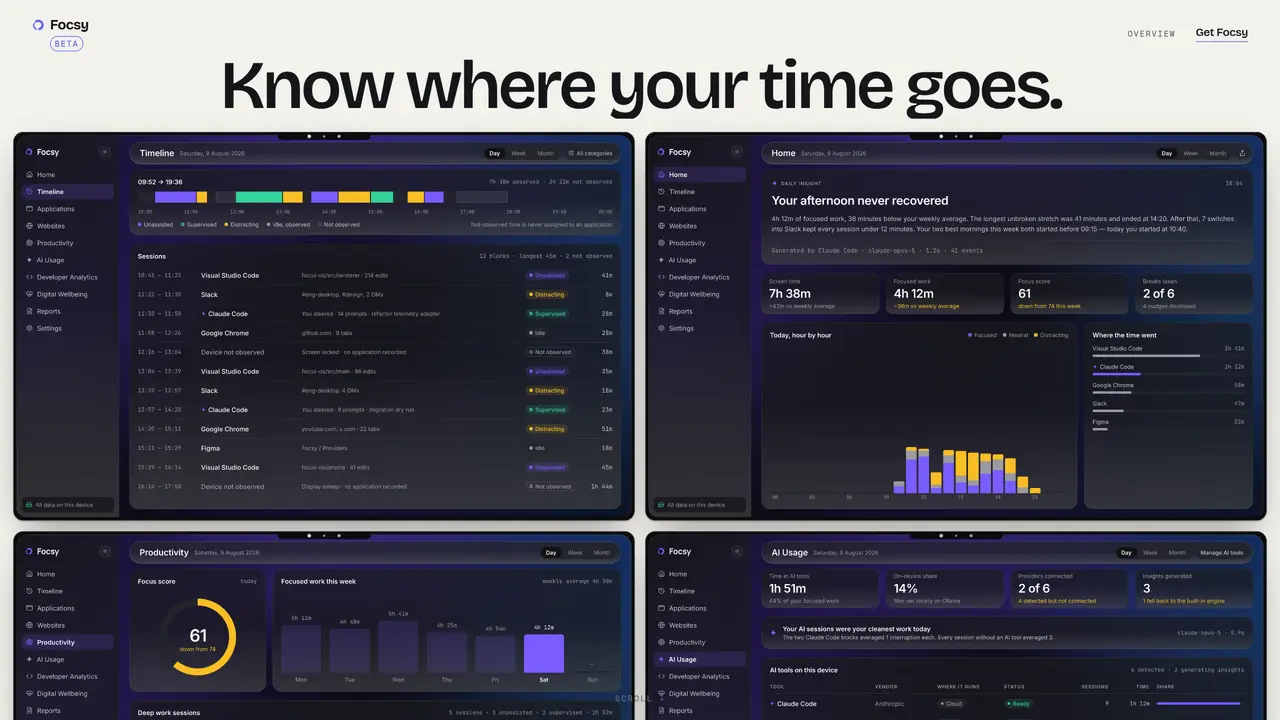
Focsy records and visualizes computer usage to provide an accurate picture of how time is spent. It captures every app, document, and window in chronological order, including interruptions, and presents this data in a timeline view. The tool measures productivity through focus scores, protected work stretches, and context-switching costs. It also tracks AI assistant usage, including sessions, tools, and waiting time, all processed locally without uploading data. Reports summarize weekly activity in a concise format for quick review. The application operates entirely offline with no account required, ensuring all recorded data remains on the user’s device. It supports Windows and macOS, running on 64-bit systems with Windows 10 or 11.
Focsy records and visualizes computer usage by capturing every app, document, window, and interruption in chronological order. It provides a timeline view of activity, measures productivity through focus scores and context-switching costs, and tracks AI assistant usage locally without uploading data.
Focsy is designed for individuals seeking to understand and improve their time management, productivity, and digital well-being. It suits anyone who wants a detailed, offline-first record of their computer usage without account requirements.
No, Focsy operates entirely offline and does not require an account. All recorded data remains on the user’s device, and no personal usage data is uploaded.
Focsy measures productivity through focus scores, protected work stretches, and context-switching costs. It also tracks AI assistant usage, including sessions, tools, and waiting time, all processed locally.
Focsy supports Windows and macOS, running on 64-bit systems with Windows 10 or 11. It is designed to work entirely offline.
To get started, download Focsy for your operating system from the provided links. Work through a normal day, then review the timeline and reports to see where your time went. No account or setup is required.
We use essential cookies to run aitoolnavio™, and optional cookies to analyze traffic and measure our marketing. You choose what we use — optional cookies stay off unless you turn them on. See our Privacy Policy.
One short email a week: fresh tools worth trying, honest takes and the updates that actually matter. No spam, unsubscribe any time.
Design, distribute, and analyze surveys online or via email with real-time insights using Survey Monkey.
Create targeted campaigns, automate email campaigns, and analyze performance for maximum ROI.
Discover keywords, analyze competitors' SEO strategies, and make data-driven decisions for website performance.
Analyze website performance, track competitors' tactics, and access comprehensive analytics and optimization features.
YouTube and Instagram growth toolkit with AI-powered optimization and analytics
Develop, run data jobs, transform datasets, leverage ML algorithms for actionable insights.
Streamline hiring, monitor job performance, and choose flexible pricing plans.
Unified AI-powered platform for real-time monitoring, analytics, and security across cloud infrastructure, applications, and services.
Securely store, analyze, and scale data while enhancing security and performance with encryption and automated backups.
AI-powered customer feedback platform for mid-market businesses to run conversational surveys and extract insights.
Automate review requests, analyze sentiment, and monitor ratings with a streamlined dashboard for improved customer feedback.
Monitor brand performance, create content for social media, and gain insights with deep analytics.
Matched on what this tool does — grouped by the job you would be replacing.
matches Timeline view of all applications and documents · Focus score and productivity tracking · Weekly activity reports
Automated AI time tracker for Mac that captures and classifies work activity without manual input
Monitor performance, identify issues, take preventive measures, provide 24/7 coverage, offer custom reporting and analytics.
Automate employee time tracking, monitor productivity in real-time, and identify areas of improvement with analytics.
matches AI assistant usage measurement · Offline operation without internet dependency · No account creation required
Desktop AI agent that queries local files and connected apps without cloud processing
Local AI chat app for Apple Silicon Macs with no account or internet required