
Real-time customer support with personalized service, accessible through a mobile app.

FAQ Ally
$9Starting price
2.5KMonthly visits
7Popularity
About FAQ Ally
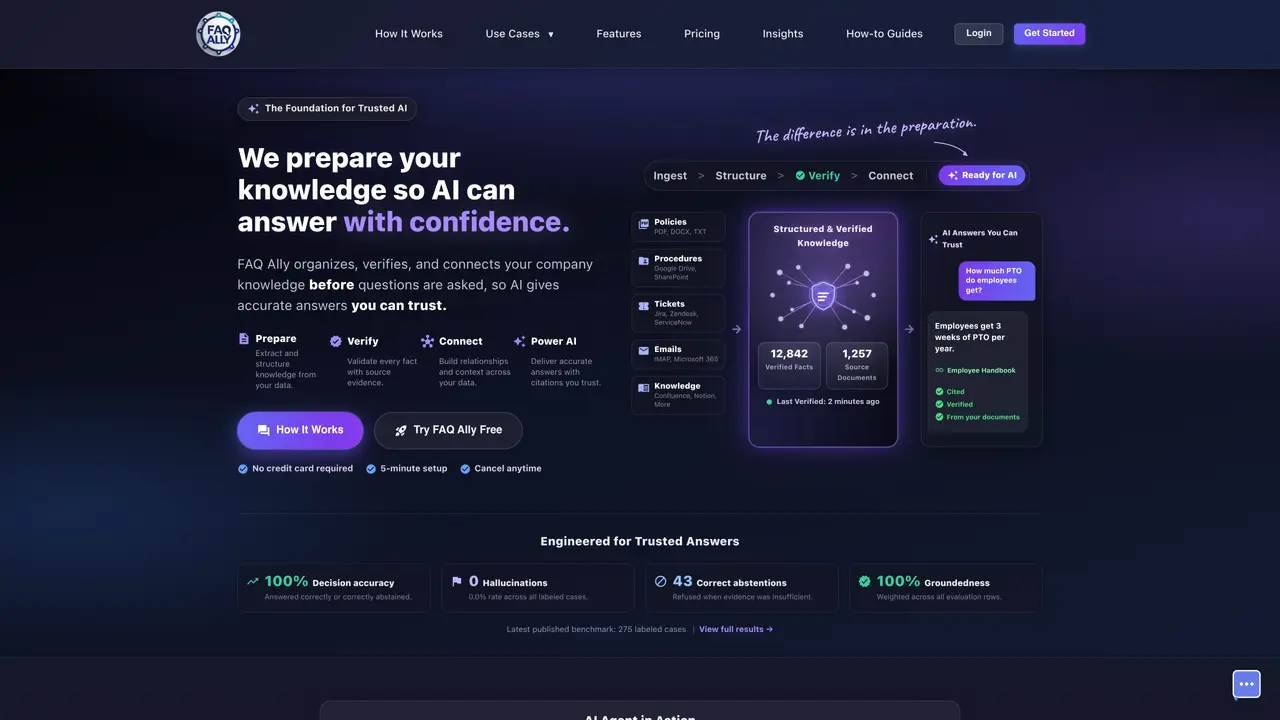
FAQ Ally transforms PDFs, Word files and other company documents into a searchable, AI-trained knowledge base and conversational virtual assistants. Using NLP and AI agent training, it ingests, structures and grounds answers in your real documents so chatbots and embedded assistants can provide accurate, document-backed responses. The platform handles document parsing, vectorization and conversational AI deployment, eliminating the need for businesses to build their own LLM stack. Small businesses use FAQ Ally to reduce repetitive support tickets, speed up employee onboarding and deliver consistent answers without manual intervention. It supports 24/7 customer and internal support by deploying AI assistants trained on proprietary company knowledge. The tool is designed for teams that rely on internal or customer-facing documentation but lack the resources to develop custom AI solutions.
Key features
- Converts documents into a searchable AI knowledge base
- Deploys conversational virtual assistants
- Uses NLP and AI agent training
- Handles document parsing and vectorization
- Grounds answers in original documents
- Supports PDFs, Word files and other formats
- Enables 24/7 customer and internal support
- Reduces repetitive support tickets
- Speeds up employee onboarding
Use cases
- Automate customer support with AI trained on company documents
- Accelerate employee onboarding with searchable internal knowledge
- Deploy embedded assistants for 24/7 internal and external support
Pros
- Structures and verifies company knowledge before AI answers are generated, ensuring accuracy and reducing hallucinations
- Supports multiple document types including PDFs, Word files, Excel, text, HTML, Markdown, Slack messages, and emails
- Provides cited answers with source evidence, enabling users to verify responses
- Offers operational intelligence tools to monitor knowledge health and agent performance
- Includes security features such as audit logs and optional two-step login for account protection
Cons
- Limited to the number of queries and storage capacity per pricing tier, which may require upgrades for high-volume use
- Requires initial setup and document preparation, which may involve manual review and verification steps
Frequently asked questions about FAQ Ally
What is FAQ Ally and what does it do?
FAQ Ally prepares company knowledge by organizing, verifying, and connecting documents so AI can deliver accurate, cited answers. It supports various document types and integrates with tools like Slack, email, and cloud storage.
Who is FAQ Ally designed for?
The tool is designed for businesses that rely on internal or customer-facing documentation but lack the resources to develop custom AI solutions. It suits teams needing trusted AI for support, onboarding, or knowledge management.
How does FAQ Ally ensure answer accuracy?
FAQ Ally verifies every fact with source evidence and abstains from answering when evidence is insufficient. It maintains a 100% decision accuracy rate and 0% hallucination rate in published benchmarks.
Can FAQ Ally integrate with existing applications?
Yes, FAQ Ally offers a REST API to bring trusted, cited AI answers into existing applications. It also supports embedding widgets on websites for seamless integration.
What types of documents does FAQ Ally support?
FAQ Ally supports PDFs, Word files, Excel spreadsheets, text, HTML, Markdown, Slack messages, and emails. It can also extract text and visual content from images within documents.
How do I get started with FAQ Ally?
Users can start with a free trial that includes all features for 30 days. The setup process takes about 5 minutes, and no credit card is required to begin. After the trial, users can choose a paid plan based on their needs.
FAQ Ally Website Engagement
Last Update: 9 days ago
Total Monthly Visits
0
Bounce Rate
0%
Visit Duration (avg)
0.00s
Pages Per Visit
0
Country Rank
0
United States
Global Rank
0
Monthly Traffic
Traffic Sources
Traffic Share By Country
- United States100%