Summarizes, extracts, and rewrites content from files.
89M visits/mo+8.7%#2 Productivity & Office

Turn PDFs, DOCX, TXT and Markdown into searchable AI assistants with source-backed answers and citations.
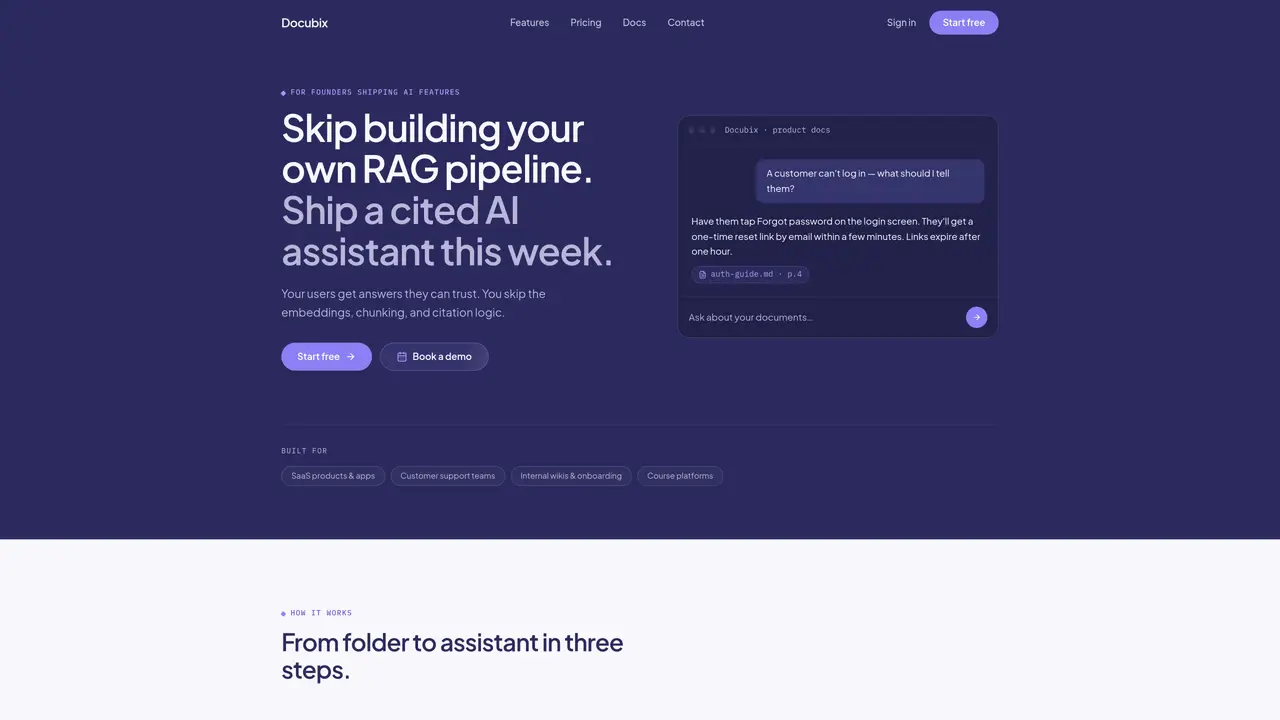
Docubix is a document AI platform designed to transform static documents into interactive, searchable AI assistants without requiring machine learning expertise. The tool automates the process of uploading and processing documents in formats such as PDF, DOCX, TXT, and Markdown, handling tasks like chunking, embedding, and indexing behind the scenes. Users can configure system prompts and select AI models to tailor responses, ensuring answers are grounded in the original documents with citations to exact sections. Docubix provides a REST API and embeddable widget, enabling teams to integrate chat, search, and source-backed replies into support centers, internal wikis, onboarding materials, and other knowledge bases. The platform is built for SaaS products, customer support teams, internal documentation, and course platforms, offering a streamlined way to deploy cited AI assistants quickly. By abstracting the complexity of RAG pipelines, Docubix allows users to focus on delivering trusted AI-powered experiences to their end users.
Docubix currently supports PDF, DOCX, TXT, and Markdown files. HTML and Notion sync are listed as upcoming features.
Yes, every response generated by Docubix includes at least one citation linking back to the exact document and section used as the source.
Yes, the API is accessible on all plans, allowing you to integrate chat, search, and retrieval functionalities directly into your application or backend.
Conversations are saved per user, enabling users to resume where they left off and allowing administrators to review past interactions.
The Free plan allows for one knowledge base, while the Pro plan supports unlimited knowledge bases, each with its own documents, settings, and API key.
No, Docubix handles all aspects of the RAG pipeline, including chunking, embeddings, and retrieval, so users do not need ML expertise to get started.
We use essential cookies to run aitoolnavio™, and optional cookies to analyze traffic and measure our marketing. You choose what we use — optional cookies stay off unless you turn them on. See our Privacy Policy.
One short email a week: fresh tools worth trying, honest takes and the updates that actually matter. No spam, unsubscribe any time.
Summarizes, extracts, and rewrites content from files.
Free tool to collect, organize, cite and share research sources
An AI-powered PDF editor and converter for editing, OCR, signing, annotating, merging, and chatting with documents across devices.
Browser-based PDF editor that edits, signs, converts, merges, compresses, and shares files, with AI for form filling, document chat, and PDF creation.
Streamline PDF interaction with AI summarization, batch processing, and secure Q&A.
Efficiently find data, extract key topics, map entities, analyze sentiment, and highlight important points in your PDF documents.
All-in-one AI platform for writing, image, music, and analysis.
AI-powered PDF editor with built-in agents for summarization, translation, and document analysis.
Obtain information, navigate documents, and customize responses with an AI-powered chatbot and user-friendly interface.
Summarize, chat with, and clean up PDFs.
Find sections, analyze & extract content, and interact with documents efficiently using AI-powered technology.
Generate comprehensive PDF reports, leverage NLP and ML to understand documents, save time and money with faster decision-making.
Matched on what this tool does — grouped by the job you would be replacing.
matches Automatic document processing for PDFs, DOCX, TXT, and Markdown · Retrieval-augmented generation for source-backed answers · Citations to exact document sections in responses
Turn company documents into RAG assistants that deliver sourced answers via API, widget, or MCP for support, research, and workflow automation.
Turns PDFs and documents into searchable Q&A with page-level citations
Creates a custom GPT assistant from uploaded documents or URLs
Local document AI for querying PDFs, Markdown, and text files with citations
matches Local retrieval and generation of answers · Citations linking answers to original document pages · Source citations for verification
matches REST API and embeddable widget for integration · Multimodal indexing and search across text, PDFs, images, and structured data · Hybrid search and advanced metadata filtering
matches Open-source RAG engine with agentic capabilities · AI-powered deep document understanding · Configurable LLMs and embedding models
Private AI appliance for local document search and Q&A with source citations
Creates a personalized local chatbot from your documents, notes, or videos using RTX acceleration for fast, private responses.
A fully managed AI retrieval and RAG infrastructure for fast, accurate multimodal search across text, PDFs, images, and structured data.
AI-powered workspace that unifies documents, chats, and files from tools like Google Drive and Slack into a single searchable knowledge base.
A cloud-based document transformation tool that converts files and web content into AI-ready Markdown or structured JSON for developers and data teams.
Open-source RAG engine that builds production-grade agents from documents with deep understanding and grounded citations.