
AI-powered video messaging tool that records, shares, and manages video messages with AI-generated titles, summaries, and tasks.
16M visits/mo-3.4%#5 Chatbots & Assistants
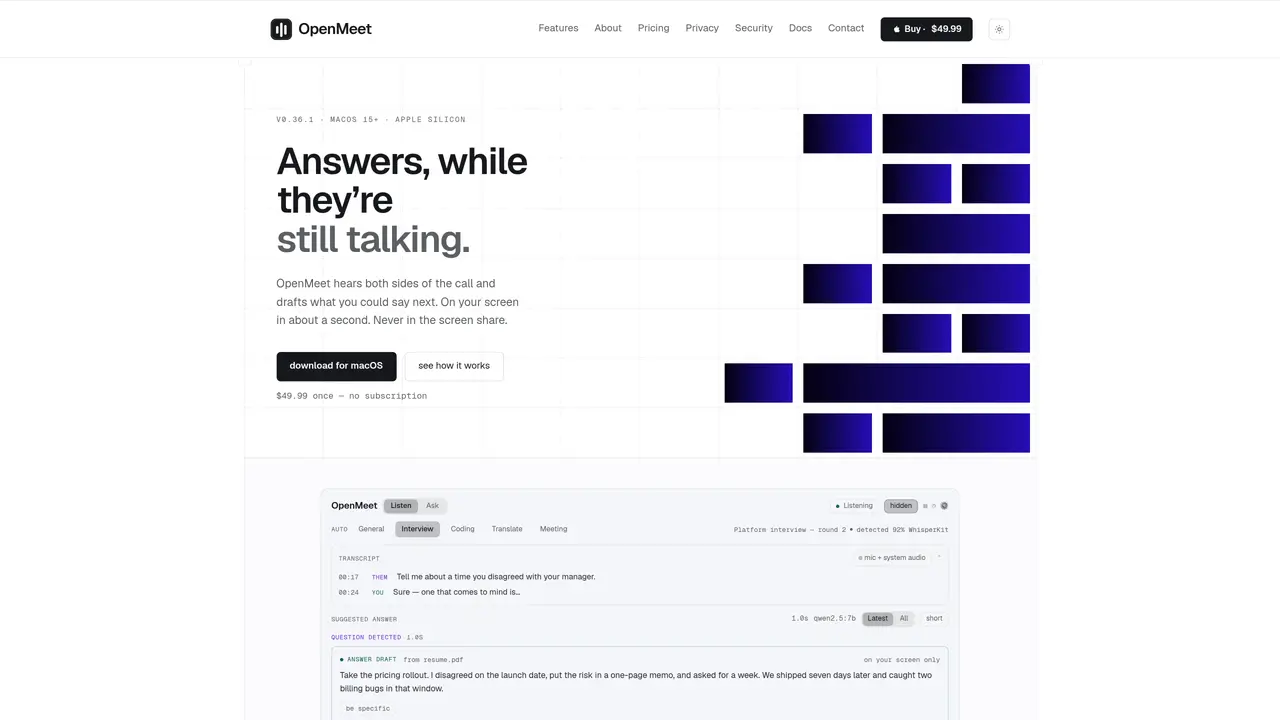
OpenMeet is a macOS application that acts as an invisible interview assistant during video calls. It listens to both the user’s microphone and the call audio separately, detecting questions in real time and drafting suggested answers within about a second. The tool operates entirely on the user’s machine using local models, ensuring no audio or data leaves the device unless the user explicitly connects to a cloud transcription service. Sessions are saved locally in Markdown and JSON formats, with transcripts and drafts searchable by content. The application supports multiple call platforms such as Zoom, Google Meet, and Discord, while remaining invisible in screen shares and recordings. It offers different modes tailored to general interviews, coding sessions, translation tasks, or meetings, and allows users to attach documents or capture screen regions for context.
OpenMeet is a macOS application that acts as an invisible interview assistant during video calls. It listens to both the user’s microphone and the call audio separately, detecting questions in real time and drafting suggested answers within about a second. The tool operates entirely on the user’s machine using local models.
Yes, OpenMeet supports multiple call platforms such as Zoom, Google Meet, Discord, Webex, QuickTime, OBS Studio, Loom, Teams, and Slack. It remains invisible in screen shares and recordings.
Yes, OpenMeet allows users to attach documents or capture screen regions for context. It can draft answers based on the content visible on the user’s screen, such as resumes or notes.
OpenMeet operates entirely on the user’s machine using local models. Audio or data only leaves the device if the user explicitly connects to a cloud transcription service.
OpenMeet offers different modes tailored to general interviews, coding sessions, translation tasks, or meetings. Each mode adjusts the model’s behavior to suit the specific context of the call.
Sessions are saved locally in Markdown and JSON formats. Transcripts and drafts are searchable by content, allowing users to review past calls and answers.
We use essential cookies to run aitoolnavio™, and optional cookies to analyze traffic and measure our marketing. You choose what we use — optional cookies stay off unless you turn them on. See our Privacy Policy.
One short email a week: fresh tools worth trying, honest takes and the updates that actually matter. No spam, unsubscribe any time.
AI-powered video messaging tool that records, shares, and manages video messages with AI-generated titles, summaries, and tasks.
Hardware device that records conversations and converts them into searchable transcripts, summaries, and notes.
Automate transcription, generate summaries, identify speakers, and timestamps for video-conferencing conversations.
AI-powered meeting recorder and summarizer that captures, transcribes, and generates actionable insights from conversations.
Automatically record, transcribe, take notes, and create summaries with key insights during meetings.
Transforms audio/video to summarized text, instantly, across platforms.
Automatically transcribe meetings, create summaries, and securely store audio files in a searchable format.
Automatically turn meetings into searchable notes and tasks.
Wearable AI device that captures conversations and meetings, then auto-generates transcripts, summaries, action items, mind maps, and searchable notes.
Record, transcribe, and share key insights from virtual trainings, online meetings, and content creation.
Record, transcribe, and summarize online meetings from Google Meet and Zoom with AI, then share insights across collaboration tools.
Transform audio/video to text with precision, supporting 1500+ platforms, enriched by AI features.
Matched on what this tool does — grouped by the job you would be replacing.
matches Real-time question detection during calls · Local model for answer drafting without cloud dependency · BM25-ranked note retrieval for cited answers
Real-time AI interview assistant that transcribes interviewer audio and provides hidden answer suggestions during live interviews on Zoom, Google Meet, Teams, and coding sessions.
AI interview assistant that provides real-time answers during live video calls without being detected
Real-time AI interview assistant that transcribes speech and suggests structured answers during live calls on Zoom, Teams, and Meet.
Real-time AI assistant that listens to interview questions and provides instant tailored answers during video
matches Session capture and searchable transcripts · Document and screen region attachment · Markdown and JSON session exports
Automatically record Mac meetings, generate notes and follow-ups.
Captures audio and screen locally, transcribes with speaker separation, and generates private AI summaries without cloud dependency.
AI meeting copilot that transcribes calls locally and streams answers in a floating panel