Scales efficient language processing with open-source accessibility.
357M visits/mo+1%#2 Coding & Development

Open-source CLI for natural-language server administration with reviewable execution
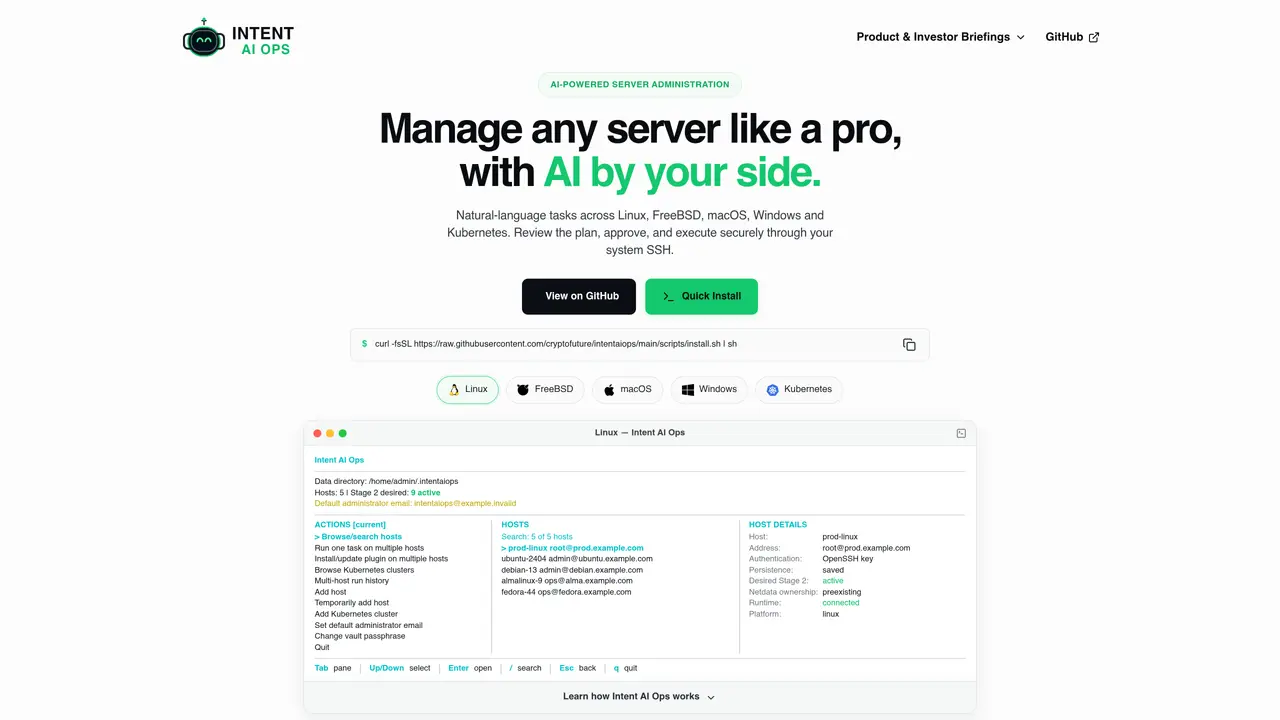
Intent AI Ops is an open-source interactive command-line tool designed for server administrators seeking natural-language automation without relinquishing control over infrastructure. It operates locally on the administrator’s computer, leveraging existing system SSH tools to translate plain-language requests into structured, inspectable execution plans. The tool supports Linux, FreeBSD, macOS, Windows, and Kubernetes, with eligibility determined by operating system, distribution, architecture, and runtime environment rather than rigid scripts. Administrators can add temporary or permanent hosts, request outcomes such as installing software or checking system health, and review proposed commands, dependencies, and revert actions before execution. Each target maintains independent results, allowing failed hosts to be diagnosed and retried without affecting successful operations elsewhere. The system records per-host history in SQLite, including requests, plans, outputs, errors, and rollback steps, enabling retries with failure evidence or execution of revert plans.
Intent AI Ops is an open-source interactive command-line tool for server administrators that translates natural-language requests into structured, inspectable execution plans. It operates locally on the administrator’s computer, using system SSH tools to manage tasks across Linux, FreeBSD, macOS, Windows, and Kubernetes without granting unrestricted AI access to infrastructure.
The tool is designed for server administrators who want the speed of natural-language automation while maintaining full control over their infrastructure. It suits users managing multiple hosts, Kubernetes clusters, or mixed environments who require reviewable, auditable, and reversible operations.
Intent AI Ops leverages your local SSH and SCP binaries and their configuration for connections. It does not use hidden tunnels or require per-host AI agents. Kubernetes clusters are managed via a direct API workflow using a vault-encrypted kubeconfig.
No, Intent AI Ops does not require a separate OpenAI API key. It uses your authenticated local Codex CLI, which runs on your system, ensuring credentials and sensitive data remain under your control.
Yes, Intent AI Ops displays proposed commands, warnings, dependencies, and revert actions for review before execution. You can approve the entire plan, review commands individually, or cancel it entirely, with conservative approval defaults keeping you in charge.
To get started, install Intent AI Ops on the computer you administer from using the provided bootstrap installer. On first launch, create a local vault, add a host, inspect its capabilities, and try a consultation by prefixing a question with ?—consultations never propose, approve, or execute commands.
We use essential cookies to run aitoolnavio™, and optional cookies to analyze traffic and measure our marketing. You choose what we use — optional cookies stay off unless you turn them on. See our Privacy Policy.
One short email a week: fresh tools worth trying, honest takes and the updates that actually matter. No spam, unsubscribe any time.
Scales efficient language processing with open-source accessibility.
Collaboration and version control platform for software development and AI model hosting.
Tesla’s AI stack powers Full Self-Driving, Optimus humanoid robots, and real-world autonomy with neural networks, custom hardware, and Dojo-scale training.
Integrates AI into Airtable to analyze data, summarize insights, draft content, and automate workflows without prior AI experience.
AI-powered website builder that generates a professional site in under a minute and includes tools for content, SEO, and analytics.
Unified platform to access and switch between hundreds of AI models like ChatGPT, Claude, and Gemini via a single API.
xAI builds Grok frontier AI models for reasoning, coding, voice, images, video, enterprise workflows, and developer APIs.
Meta AI enhances machine learning, NLP, and computer vision capabilities.
Crowdsourced platform for blind, side-by-side AI model comparisons with a public leaderboard.
Customize, deploy, and control AI models securely.
Independent benchmarks comparing AI models on quality, speed, and cost across multiple capabilities.
Chat, build, and explore with open AI models.
Matched on what this tool does — grouped by the job you would be replacing.
matches Natural-language task input across supported platforms · Temporary and permanent host addition with SSH or Kubernetes API · Structured plan generation with inspectable commands and dependencies
Open-source framework for running controllable, auditable AI agents in Docker sandboxes on your local hardware with a desktop launcher and plugin hub.
Unified terminal client for SSH, SFTP, Telnet and RDP with an AI agent
Open-source agent harness infrastructure for running AI agents locally or in production
matches Structured plan generation with inspectable commands and dependencies · SQLite-based history with rollback and retry functionality · Consultation mode for non-executing queries
Agent workflow orchestration platform for deterministic, versioned automations with step visibility, approvals, and run history.
Task orchestration tool for coding agents
Enables Claude 3.5 Sonnet to execute local computer actions via new APIs for hands-off testing and control.