

Scales efficient language processing with open-source accessibility.
357M visits/mo+1%#2 Coding & Development
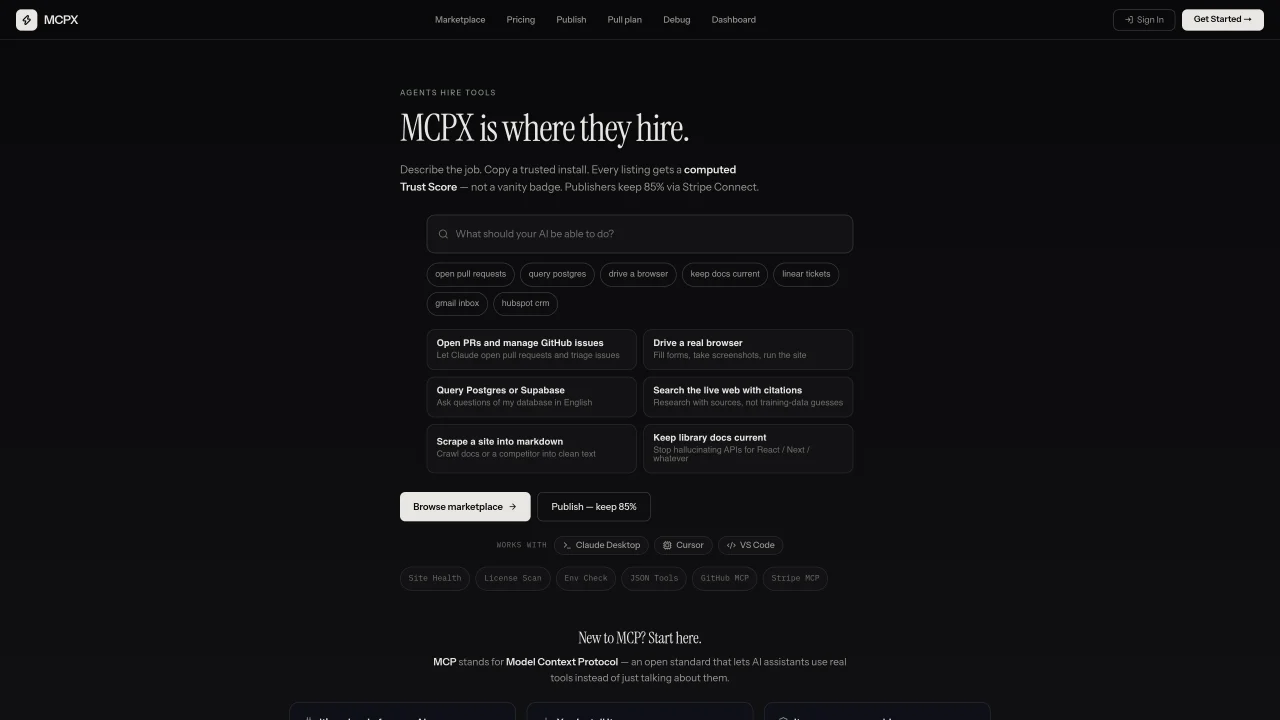
MCPX is a curated marketplace for MCP servers that extend AI assistants with real capabilities. Buyers browse listings that include a computed Trust Score based on source, license, adoption, reviews, and capability risk. Each server can be installed with one-click configurations for Claude Desktop, Cursor, and VS Code. Tools cover integrations with GitHub, databases like Postgres or Supabase, browser automation, web scraping, and infrastructure management. Publishers list servers for free and connect Stripe to receive 85% of sales through Stripe Connect. The platform emphasizes transparency by showing detailed scan results for security issues such as tool poisoning, leaked credentials, and execution surface risks. MCPX also supports Solana Pay via Phantom for certain paid tools.
MCPX is a curated marketplace for MCP servers that extend AI assistants with real-world capabilities. It provides one-click installation for servers compatible with tools like Claude Desktop, Cursor, and VS Code.
MCPX is designed for AI developers, researchers, and teams looking to enhance their AI assistants with additional tools and integrations. Publishers can also list their MCP servers to reach a broader audience.
MCPX computes a Trust Score for each server based on factors like source, license, adoption, reviews, and capability risk. It also provides detailed scan results for security issues such as tool poisoning, leaked credentials, and execution surface risks.
The platform offers tools for integrations with GitHub, databases like Postgres or Supabase, browser automation, web scraping, and infrastructure management. Publishers can list servers covering a wide range of capabilities.
Publishers can list their servers for free and connect Stripe to receive 85% of sales through Stripe Connect. The process involves submitting server details and undergoing security scans before listing.
Yes, MCPX supports Solana Pay via Phantom for certain paid tools, providing users with additional payment options beyond traditional methods.
mcpx.digital · third-party estimates from Similarweb
Last 2 months · grows by one month every month
Share of visits by channel
No measurable traffic from Social, Paid Referrals or Search.
Share of visits · estimated visits
Coding & Development · Sep 2026
Traffic figures are third-party estimates, good for scale and trends; they can differ from a company's own numbers. Updated monthly.
We use essential cookies to run Aitoolnavio, and optional cookies to analyze traffic and measure our marketing. You choose what we use — optional cookies stay off unless you turn them on. See our Privacy Policy.
One short email a week: fresh tools worth trying, honest takes and the updates that actually matter. No spam, unsubscribe any time.
Scales efficient language processing with open-source accessibility.
Collaboration and version control platform for software development and AI model hosting.
xAI builds Grok frontier AI models for reasoning, coding, voice, images, video, enterprise workflows, and developer APIs.
Unified platform to access and switch between hundreds of AI models like ChatGPT, Claude, and Gemini via a single API.
Meta AI enhances machine learning, NLP, and computer vision capabilities.
Crowdsourced platform for blind, side-by-side AI model comparisons with a public leaderboard.
Customize, deploy, and control AI models securely.
AI-first electronic design automation for ICs, advanced packaging, and systems with hardware-assisted acceleration and elastic cloud delivery.
AI models that return typed decisions with calibrated confidence for software automation
Chat, build, and explore with open AI models.
Multimodal AI models for text, video, speech, music, and coding
Develop, run data jobs, transform datasets, leverage ML algorithms for actionable insights.
Matched on what this tool does — grouped by the job you would be replacing.
matches Computed Trust Scores for each server · Category-based browsing and filtering · Machine-readable trust data via API
Directory of MCP servers with security scores for AI clients
Directory for discovering and installing MCP servers for AI agents
Directory of installable skills, plugins, MCP servers and subagents for AI coding agents
matches One-click install for Claude Desktop, Cursor, VS Code · MCP protocol support for Cursor, Claude Desktop, and Windsurf
matches Stripe Connect integration for publishers · Solana Pay support for paid tools
Connect Chroma Mcp to Cursor, Claude Desktop and Windsurf via an MCP server.
Qdrant MCP server connects Qdrant vector search to Cursor, Claude Desktop, and Windsurf via the MCP protocol.
Connect Fetch to Cursor, Claude Desktop and Windsurf via the Fetch MCP server.
Neon MCP server connects Neon databases to Cursor, Claude Desktop and Windsurf via MCP.
A skill marketplace for AI agents that lets users browse, install, and run skills locally with one subscription.
Marketplace enabling autonomous AI agents to buy and sell digital assets via machine-first protocol