
Scales efficient language processing with open-source accessibility.
357M visits/mo+1%#2 Coding & Development
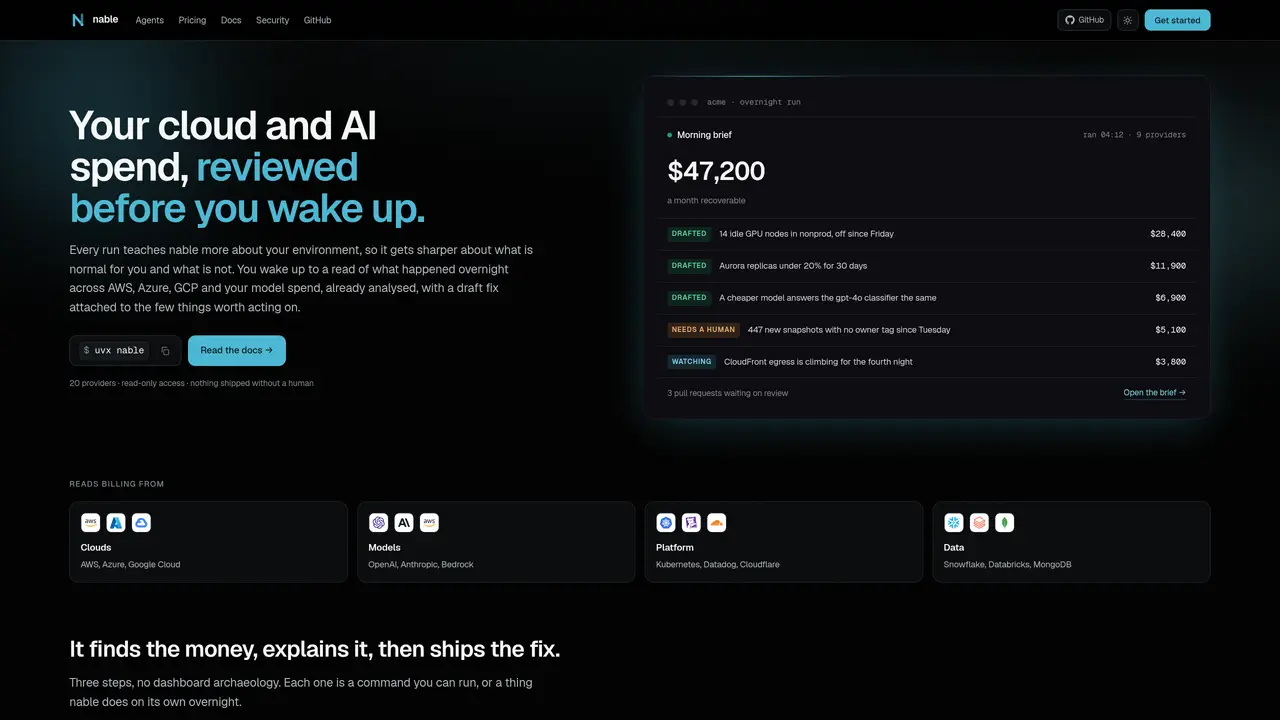
nable is a cloud and AI cost management tool that reviews spending overnight and provides analyzed reports by morning. It connects to cloud providers and model services to track billing and usage patterns. The tool identifies unusual spending spikes, explains them in plain English with supporting details, and drafts infrastructure changes to address them. Changes are proposed as pull requests against the infrastructure repository, with estimated savings and potential impact included. nable operates with read-only access by default and requires explicit opt-in for write actions. It supports multiple cloud platforms including AWS, Azure, and Google Cloud, as well as AI model providers like OpenAI and Anthropic. The tool also integrates with data platforms such as Snowflake and Databricks.
nable supports multiple cloud platforms including AWS, Azure, and Google Cloud, as well as AI model providers like OpenAI, Anthropic, and Bedrock.
nable watches every series against its own pattern rather than using static thresholds, so it alerts you to spikes the morning they occur with the cause attached.
nable operates with read-only access by default and requires explicit opt-in for write actions, ensuring changes are proposed but not applied without human approval.
Updates can be received via a Slack channel post, an email brief in your inbox, an API run, or a CI check that flags unexpected spending.
nable connects with a read-only role scoped to billing and usage data and does not touch application data, customer data, or production databases.
nable can be set up in about four minutes using a single command to connect a provider and ask an initial question.
We use essential cookies to run aitoolnavio™, and optional cookies to analyze traffic and measure our marketing. You choose what we use — optional cookies stay off unless you turn them on. See our Privacy Policy.
One short email a week: fresh tools worth trying, honest takes and the updates that actually matter. No spam, unsubscribe any time.
Scales efficient language processing with open-source accessibility.
Collaboration and version control platform for software development and AI model hosting.
Tesla’s AI stack powers Full Self-Driving, Optimus humanoid robots, and real-world autonomy with neural networks, custom hardware, and Dojo-scale training.
Integrates AI into Airtable to analyze data, summarize insights, draft content, and automate workflows without prior AI experience.
AI-powered website builder that generates a professional site in under a minute and includes tools for content, SEO, and analytics.
Unified platform to access and switch between hundreds of AI models like ChatGPT, Claude, and Gemini via a single API.
xAI builds Grok frontier AI models for reasoning, coding, voice, images, video, enterprise workflows, and developer APIs.
Meta AI enhances machine learning, NLP, and computer vision capabilities.
Crowdsourced platform for blind, side-by-side AI model comparisons with a public leaderboard.
Customize, deploy, and control AI models securely.
Independent benchmarks comparing AI models on quality, speed, and cost across multiple capabilities.
Chat, build, and explore with open AI models.
Matched on what this tool does — grouped by the job you would be replacing.
matches Read-only billing data access · Automated nightly cost reviews · Plain English explanations with analysis
Centralizes tracking and optimization of AI service spending across multiple platforms through a single dashboard.
Tracks and alerts on AI provider spend across models and projects
matches Plain English explanations with analysis · Data platform connections (Snowflake, Databricks, BigQuery)
Efficiently answer research queries, translate natural language to SQL, and utilize OpenAI WebGPT and larger language models.
Generate SQL queries effortlessly with drag-and-drop, auto-correct, auto-format, and auto-complete features.
A Slack-integrated AI tool that answers data questions in plain English and generates SQL queries for platforms like Snowflake, BigQuery, and PostgreSQL.
Turn plain-English requests into live, production-ready dashboards without writing SQL or managing BI plumbing.