AI-powered website builder that generates a professional site in under a minute and includes tools for content, SEO, and analytics.
52M visits/mo+0.7%#4 Coding & Development

Autonomous AI agent that plans, edits and verifies code across terminal, Mac and VS Code
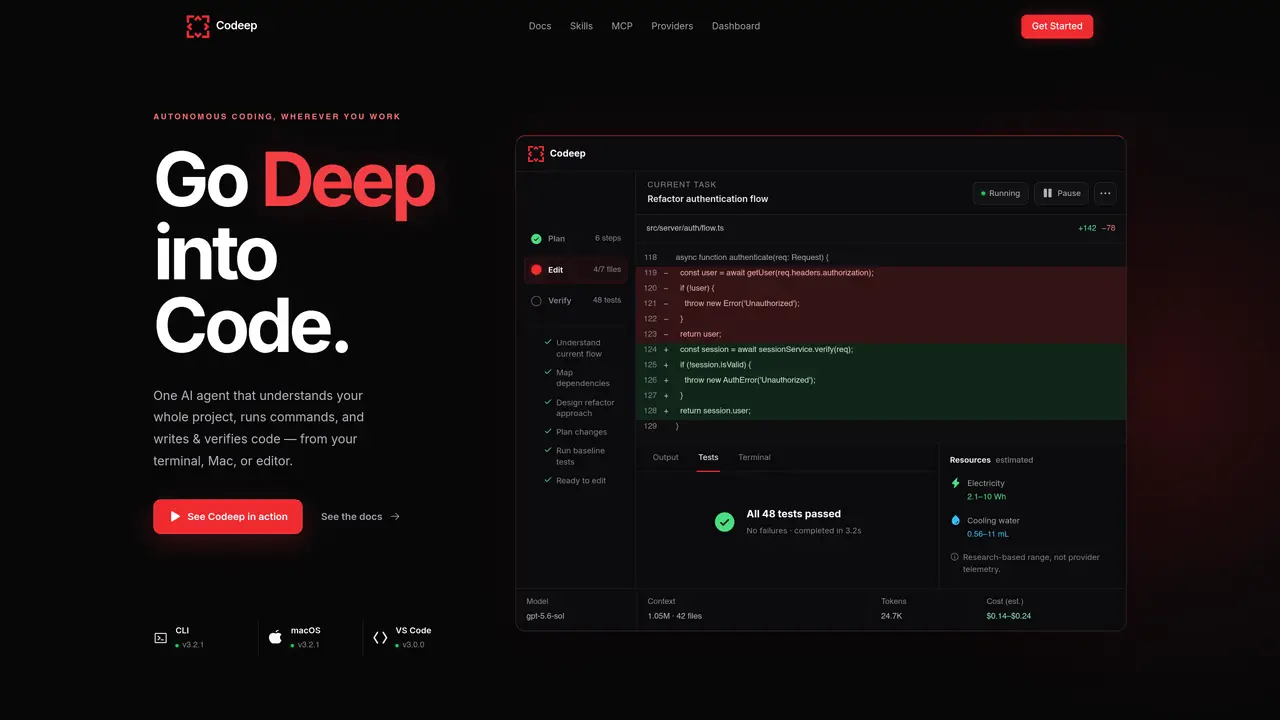
Codeep is an autonomous AI coding agent that operates across multiple interfaces including the terminal, macOS, VS Code, and a web dashboard. It reads project structure and key files automatically to understand context without manual setup. The agent accepts plain-language prompts, breaks tasks into steps, executes edits and shell commands, and verifies results through builds, type checks, or tests. Changes are validated in real time, with failures triggering automatic fixes. A live session feed shows active runs, token usage, estimated costs, and resource impact including electricity and cooling water estimates. The dashboard provides a focused cockpit for monitoring project activity and historical trends. Codeep supports sub-agents for delegating specialized tasks such as research, review, or testing, and offers plan mode for reviewing proposed changes before execution. Project memory and lifecycle hooks persist across sessions, enabling continuity between runs.
Codeep is an autonomous AI coding agent that understands an entire project, executes tasks like editing files and running commands, and verifies results through builds, tests, or type checks. It operates across terminals, macOS, VS Code, and a web dashboard without requiring manual context setup.
Codeep is designed for developers, teams, and organizations looking to automate coding tasks such as bug fixes, feature additions, refactoring, and testing. It suits users who want to reduce context switching and streamline development workflows.
Codeep provides real-time cost estimates for each run, displayed in the dashboard and terminal. It supports over 100 models via OpenRouter, with costs calculated per call and visible in the dashboard alongside invoice data.
Yes, Codeep integrates with terminals, macOS, VS Code, and git workflows. It supports semantic commit messages, AI review of diffs, and custom git hooks for gating commits based on checks.
Codeep does not execute arbitrary shell commands without verification and may refuse actions that exceed its capability boundaries. It also requires explicit approval for potentially dangerous operations, which may pause execution until confirmed.
Start by installing Codeep via the CLI, macOS app, or VS Code extension. Describe your task in plain language, and Codeep will automatically scan your project, plan the steps, and execute the changes while verifying results in real time.
codeep.dev · third-party estimates from Similarweb
Last 2 months · grows by one month every month
Share of visits by channel
Share of visits · estimated visits
Coding & Development · Sep 2026
Traffic figures are third-party estimates, good for scale and trends; they can differ from a company's own numbers. Updated monthly.
We use essential cookies to run aitoolnavio™, and optional cookies to analyze traffic and measure our marketing. You choose what we use — optional cookies stay off unless you turn them on. See our Privacy Policy.
One short email a week: fresh tools worth trying, honest takes and the updates that actually matter. No spam, unsubscribe any time.
AI-powered website builder that generates a professional site in under a minute and includes tools for content, SEO, and analytics.
AI-powered coding platform that uses agents to plan, write, and test software with real-time feedback and verifiable artifacts.
Automate code, research, and documents using agents.
AI-powered code assistant that generates, reviews, optimizes, and debugs code with natural language prompts and editor integrations.
AI assistant for safe, reliable productivity with code, collaboration, and integrations.
AI-powered IDE for autonomous coding tasks and agentic development workflows
Privacy-focused AI chatbot that generates uncensored text, code, images, and translations without storing conversations or requiring an account.
A free web-based AI chatbot and agent for writing, coding, research, and content creation with multilingual support.
Write & run code in 50+ languages, auto-complete with AI, and code faster with an intuitive interface.
An IDE that automates legacy-to-modern code migration using autonomous coding agents.
AI models that return typed decisions with calibrated confidence for software automation
Practice coding challenges, improve technical skills, get detailed explanations, compare performance with peers.
Matched on what this tool does — grouped by the job you would be replacing.
matches Autonomous agent loop for planning, editing and verification · Plan mode for reviewing proposed changes before execution · Project auto-scanning and context detection
Terminal-based AI agent for coding, data tasks and workflow automation
Terminal-based AI coding agent that reads, edits and runs code with user-controlled permissions
Autonomous terminal AI agent that executes, verifies and ships code changes
Multi-agent orchestration with shared memory and GitHub-backed planning
matches Sub-agent delegation for specialized tasks · Project memory and lifecycle hooks · Multi-agent orchestration with shared memory
matches Autonomous agent loop for planning, editing and verification · Plan mode for reviewing proposed changes before execution · Project auto-scanning and context detection
Multi-agent AI orchestration platform with a live kanban board
A macOS workspace for running and managing parallel AI coding agents with isolated shells and automatic git worktrees.
AI-powered code editor and IDE for multi-file coding tasks across platforms
A multi-agent engine that routes IM messages to local CLI processes for persistent, parallel AI coding tasks
A terminal-native AI coding agent for developers to write, refactor, and debug code in ZSH with multi-model support and Git integration.
AI pair programming tool that edits code directly in your local Git repository from the terminal.