
AI-powered website builder that generates a professional site in under a minute and includes tools for content, SEO, and analytics.
52M visits/mo+0.7%#4 Coding & Development
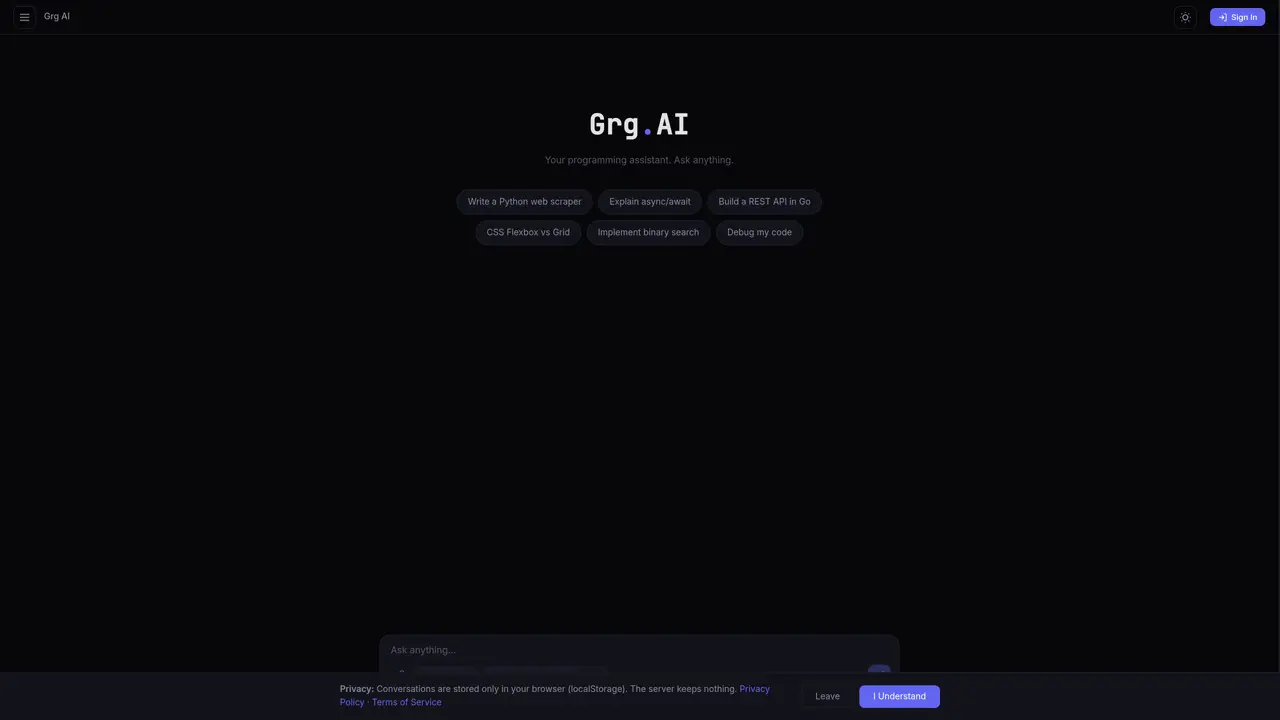
Grg AI is a browser-based AI assistant designed primarily for programming tasks and general productivity. It provides access to multiple AI models through a chat interface, supporting both local and cloud-based inference. Users can run code snippets, preview outputs, and export conversations in various formats including PDF, Markdown, and Excel. The tool emphasizes privacy by storing all conversations locally in the browser and not retaining data on servers. It offers a free tier with limited daily messages and a paid Pro version with unlimited access and priority support. The interface includes features like web search, code execution, and model selection with performance metrics.
Grg AI is a browser-based AI assistant focused on programming tasks and general productivity. It is designed for developers, power users, and anyone needing an AI tool for coding, web search, and document handling directly in the browser.
Grg AI stores all conversations locally in the browser using localStorage and does not retain data on servers. Users can also enable a private session where all data is encrypted and permanently deleted upon exiting.
Grg AI provides access to multiple AI models, including local and cloud-based options such as Llama 3.1, GPT OSS, Gemma 4, Qwen 3.6, and Nemotron Ultra. Users can select models directly in the interface, with performance metrics displayed for each.
Yes, Grg AI offers a free tier with 50 messages per day. The free version includes web search, code execution, and basic export options. Upgrading to Grg Pro removes message limits and provides priority support.
Yes, users can export conversations in PDF, Markdown, or Excel formats directly from the interface. This feature is available in both the free and Pro versions.
To get started, users can sign up for a free account on the Grg AI website. After signing in, they can begin using the chat interface to interact with AI models, run code, and manage conversations.
We use essential cookies to run aitoolnavio™, and optional cookies to analyze traffic and measure our marketing. You choose what we use — optional cookies stay off unless you turn them on. See our Privacy Policy.
One short email a week: fresh tools worth trying, honest takes and the updates that actually matter. No spam, unsubscribe any time.
AI-powered website builder that generates a professional site in under a minute and includes tools for content, SEO, and analytics.
AI-powered coding platform that uses agents to plan, write, and test software with real-time feedback and verifiable artifacts.
Automate code, research, and documents using agents.
AI-powered code assistant that generates, reviews, optimizes, and debugs code with natural language prompts and editor integrations.
AI assistant for safe, reliable productivity with code, collaboration, and integrations.
AI-powered IDE for autonomous coding tasks and agentic development workflows
Privacy-focused AI chatbot that generates uncensored text, code, images, and translations without storing conversations or requiring an account.
A free web-based AI chatbot and agent for writing, coding, research, and content creation with multilingual support.
Write & run code in 50+ languages, auto-complete with AI, and code faster with an intuitive interface.
An IDE that automates legacy-to-modern code migration using autonomous coding agents.
AI models that return typed decisions with calibrated confidence for software automation
Practice coding challenges, improve technical skills, get detailed explanations, compare performance with peers.
Matched on what this tool does — grouped by the job you would be replacing.
matches Code generation, editing, and visualization · Code execution and preview functionality
Transform ideas into fully functional applications with Lovable, a groundbreaking AI tool.
Open-source desktop AI chat app that runs local LLMs offline or connects to cloud providers via API keys.
Frontier AI model platform with multiple endpoints and agents
Guided 15-stage framework for internal teams to practice responsible AI-assisted coding in VS Code or Cursor
matches Web search integration
matches Conversation export to PDF, Markdown, and Excel
Efficiently answer research queries, translate natural language to SQL, and utilize OpenAI WebGPT and larger language models.
Search privately, customize interface, track search history, and stay in control of online activities.
Organizes web search results into AI-generated folders on macOS or Windows
Unified web interface for multiple AI models with file handling and document generation
Online editor for Mermaid diagrams with live previews, AI-assisted code generation, and export to SVG, PNG, or Markdown.
Exports ChatGPT conversations to PDF, Markdown, HTML or TXT on iPhone and iPad
A Chrome extension that exports NotebookLM chats, notes, and reports to PDF, Word, or Markdown in one click.