Summarizes, extracts, and rewrites content from files.
89M visits/mo+8.7%#2 Productivity & Office
Exports ChatGPT conversations to PDF, Markdown, HTML or TXT on iPhone and iPad
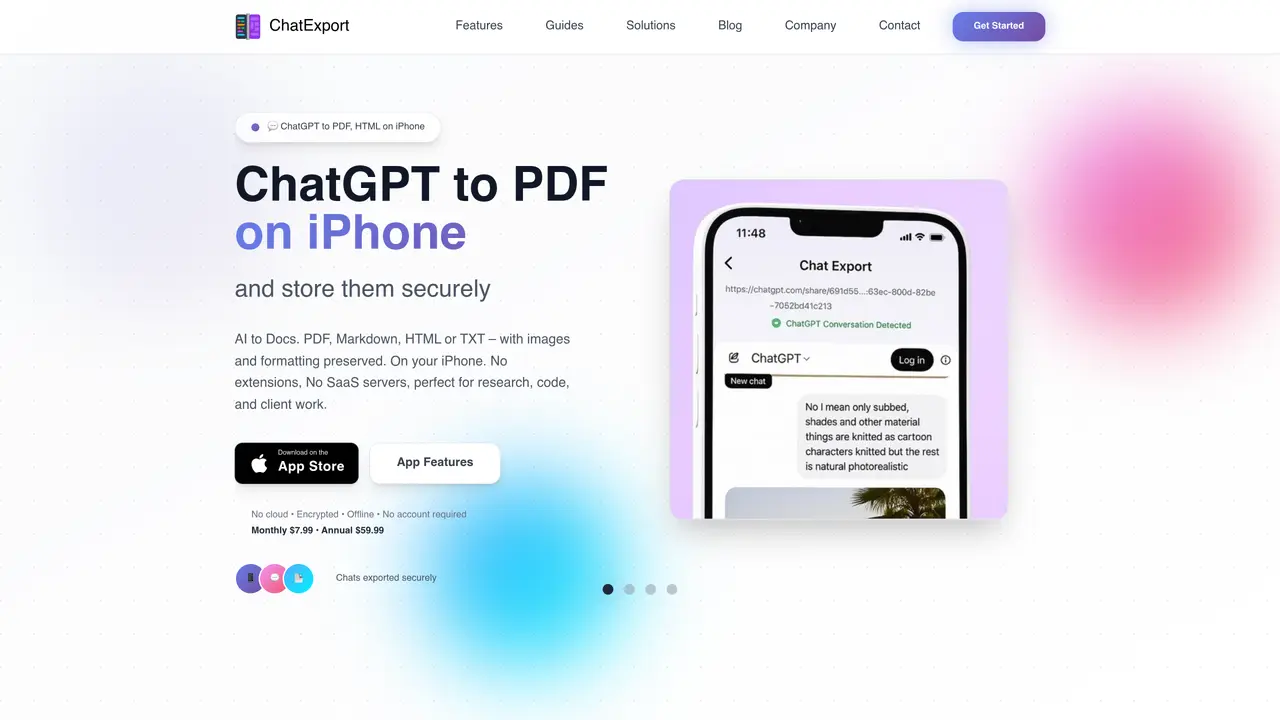
ChatExport is an iOS app that converts ChatGPT conversations into PDF, Markdown, HTML or plain text files directly on iPhone and iPad. It preserves formatting, images, code blocks and syntax highlighting across all export formats. The app operates entirely offline and encrypts data at rest, ensuring conversations remain private and stored locally without cloud uploads or account creation. Users can export full chat transcripts, search conversations, and share documents via the Files app or email. The tool integrates with ChatGPT’s native share button for one-tap imports and supports direct exports to Obsidian vaults. It is designed for researchers, developers, and creators who need clean, shareable or archivable versions of AI-generated content without desktop software or browser extensions.
ChatExport is an iOS and iPad app that converts ChatGPT conversations into PDF, Markdown, HTML, or plain text files directly on iPhone and iPad. It preserves formatting, images, code blocks, and syntax highlighting across all export formats.
The tool is designed for researchers, developers, and creators who need clean, shareable, or archivable versions of AI-generated content without using desktop software or browser extensions.
No, ChatExport operates entirely offline and encrypts data at rest, ensuring conversations remain private and stored locally without cloud uploads or account creation.
ChatExport supports PDF, Markdown, HTML, DOCX and plain text (TXT) formats, each tailored for different use cases like sharing, note-taking, web archiving, or universal compatibility.
Yes, it supports direct exports to Obsidian vaults as Markdown files and works natively with note-taking apps like Notion, Bear, and GitHub.
Download the app from the App Store, open a ChatGPT conversation, and use the native share button to import it into ChatExport for one-tap export to your desired format.
aichatexport.app · third-party estimates from Similarweb
Last 4 months · grows by one month every month
Share of visits by channel
Share of visits · estimated visits
Productivity & Office · Sep 2026
Traffic figures are third-party estimates, good for scale and trends; they can differ from a company's own numbers. Updated monthly.
We use essential cookies to run aitoolnavio™, and optional cookies to analyze traffic and measure our marketing. You choose what we use — optional cookies stay off unless you turn them on. See our Privacy Policy.
One short email a week: fresh tools worth trying, honest takes and the updates that actually matter. No spam, unsubscribe any time.
Summarizes, extracts, and rewrites content from files.
Automate citation and reference management, aid research with text and data mining, and securely store and share documents.
Capture, organize, and share ideas, notes, and documents effortlessly.
Headless CMS that lets developers manage structured content and deliver it anywhere via flexible APIs and real-time collaboration tools.
Efficiently create and manage cases, streamline workflows, securely store and share documents, and collaborate with colleagues.
Access files, collaborate, and secure your data with unbeatable customizable system.
An AI-powered PDF editor and converter for editing, OCR, signing, annotating, merging, and chatting with documents across devices.
Browser-based PDF editor that edits, signs, converts, merges, compresses, and shares files, with AI for form filling, document chat, and PDF creation.
Securely store, access, and search documents from any device with ease.
Create and customize legal documents, consult lawyers, and access legal guides all in one platform.
Centralize brand assets, automate approvals, and collaborate with external partners in a single digital asset management platform.
AI diagramming and documentation tool for engineering teams to create and update cloud architecture, ERDs, and flowcharts from prompts, code, and CI/CD workflows.
Matched on what this tool does — grouped by the job you would be replacing.
matches Export to PDF with full formatting and page layout · Export to Markdown with syntax highlighting and wikilinks · Export to HTML for web archiving and browser viewing
Chrome extension that extends Google NotebookLM with capture, organization, and export features
A Chrome extension that exports NotebookLM chats, notes, and reports to PDF, Word, or Markdown in one click.
Browser extension to export AI chat histories into PDF, Word, TXT, images, or Markdown
A Chrome extension that saves and organizes AI assistant responses as searchable Markdown files directly on your device.
matches Cross-conversation search with full-text indexing · Local storage in Files app with iCloud sync · Encrypted data at rest with no cloud uploads
Local document search engine for AI agents with full-text indexing across multiple file types
Browser extension to search and organize messages across multiple AI chat platforms locally
Local document AI for querying PDFs, Markdown, and text files with citations