Generate content, correct spelling, suggest synonyms to enhance writing.
173M visits/mo+0.1%#1 Productivity & Office

Chrome extension that extends Google NotebookLM with capture, organization, and export features
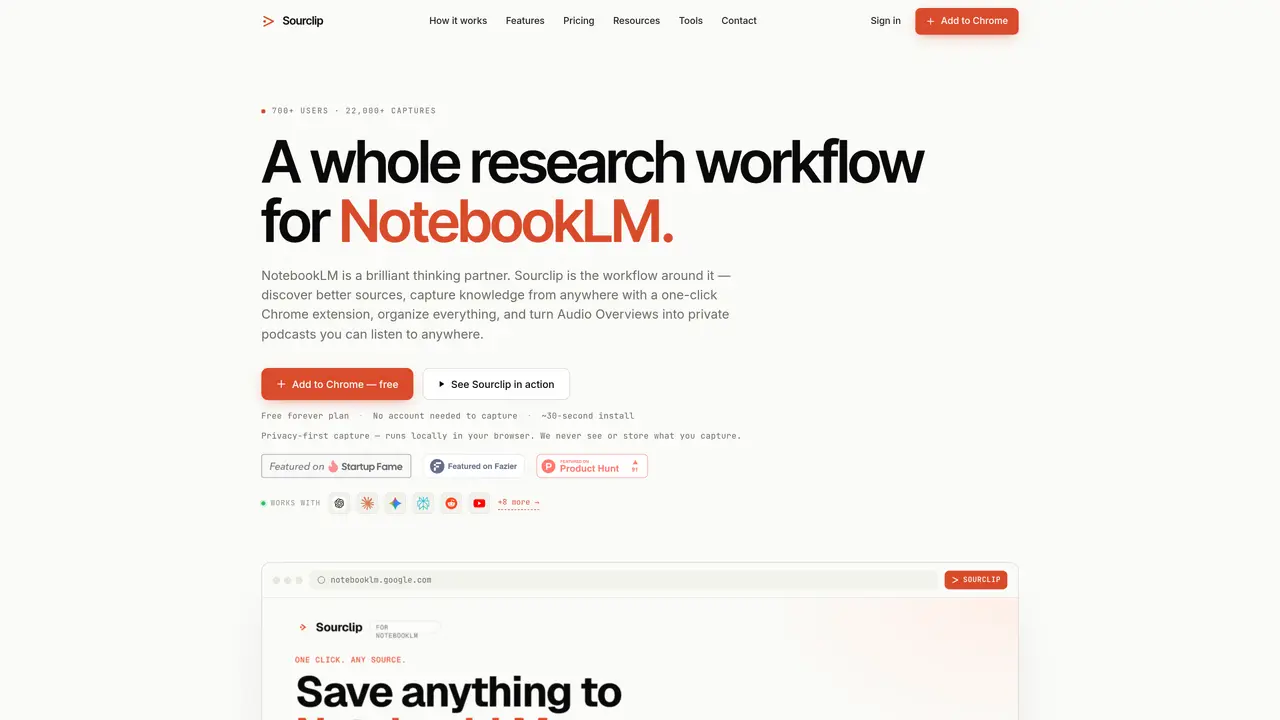
Sourclip is a Chrome extension designed to enhance Google NotebookLM by providing a workflow layer for research tasks. It enables one-click capture of web pages, YouTube videos, PDFs, Reddit posts, X (Twitter) posts, and AI chat conversations from multiple platforms such as ChatGPT, Claude, Gemini, Perplexity, Grok, and DeepSeek. Users can organize notebooks into folders, perform cross-notebook global searches, and save reusable prompts for efficient reuse. The tool also supports bulk URL imports and exports of NotebookLM artifacts, including notes, study guides, flashcards, audio overviews, videos, and slides in formats like Markdown, HTML, PDF, and MP3. Cloud sync is available for Pro users, while free users can store data locally. All capture processing occurs locally in the browser, ensuring privacy as Sourclip servers do not receive or store research content. The extension is compatible with Chrome and Chromium-based browsers such as Microsoft Edge, Brave, and Arc.
Sourclip is a Chrome extension that extends Google NotebookLM by adding a research workflow layer. It enables one-click capture of web content, AI chats, and media, organizes notebooks into folders, and allows exporting NotebookLM artifacts in multiple formats.
Sourclip captures web pages, YouTube videos (including playlists, channels, and search results), PDFs, Reddit posts, X (Twitter) posts, and full AI chat conversations from platforms like ChatGPT, Claude, Gemini, Perplexity, Grok, and DeepSeek.
Yes. Sourclip works with your existing Google NotebookLM account, allowing you to choose which notebook receives each captured item directly from the extension popup.
Yes. Sourclip offers a free plan with limited captures and exports per day, while the Pro plan unlocks unlimited features such as cloud sync and custom branding for a yearly fee.
Yes. Sourclip exports all AI-generated artifacts from NotebookLM, including notes, study guides, flashcards, audio overviews, videos, and slides in formats like Markdown, HTML, PDF, and MP3.
Yes. All capture processing runs locally in your browser, and Sourclip servers never receive, store, or process your research content. Free users store data locally, while Pro users get cloud sync for folders, prompts, and settings only.
sourclip.com · third-party estimates from Similarweb
Last 4 months · grows by one month every month
Share of visits by channel
Share of visits · estimated visits
Other countries: 29.1%
Productivity & Office · Sep 2026
Traffic figures are third-party estimates, good for scale and trends; they can differ from a company's own numbers. Updated monthly.
We use essential cookies to run aitoolnavio™, and optional cookies to analyze traffic and measure our marketing. You choose what we use — optional cookies stay off unless you turn them on. See our Privacy Policy.
One short email a week: fresh tools worth trying, honest takes and the updates that actually matter. No spam, unsubscribe any time.
Generate content, correct spelling, suggest synonyms to enhance writing.
Markdown-based note-taking and personal knowledge management app that turns notes into a connected system of ideas.
Capture, organize, and share ideas, notes, and documents effortlessly.
Easily create and track training courses, design learning environments, and access from any device with an intuitive interface.
An AI-powered note-taking app for students and professionals to write, sketch, annotate PDFs, record audio, and generate summaries, quizzes, and flashcards.
Handwritten note-taking app with searchable ink, PDF annotation, synced audio, and AI-powered study tools.
AI-powered process documentation tool that captures workflows into visual step-by-step guides with screenshots, editing, and exports.
AI web app that transcribes audio, video, and YouTube links into text in 98 languages with summaries, mind maps, and export formats for students and teams.
A note-taking and spaced-repetition flashcard app for students and learners, with PDF annotation plus AI tools for generating cards, quizzes, and study summaries.
AI-powered research assistant for organizing, analyzing, and synthesizing information from notes and documents.
Capture thoughts, create documents, and access on any device for convenient organization and productivity.
AI-powered PDF editor with built-in agents for summarization, translation, and document analysis.
Matched on what this tool does — grouped by the job you would be replacing.
matches One-click webpage capture · YouTube video, playlist, channel, and search capture · PDF and Reddit post capture with structured formatting
Chrome extension that organizes and exports AI chat histories across platforms
Chrome extension that enhances Google NotebookLM with citations, Anki export, cross-notebook search and bulk
A Chrome extension that exports NotebookLM chats, notes, and reports to PDF, Word, or Markdown in one click.
Browser extension adding folders, prompt library and export to Google Gemini
matches One-click webpage capture · YouTube video, playlist, channel, and search capture · PDF and Reddit post capture with structured formatting
matches Export artifacts in Markdown, HTML, PDF, audio, and video formats
AI-powered knowledge management tool that collects, organizes, and outputs information from diverse sources into structured content.
Centralized Markdown library for capturing and sharing research across AI tools
Browser extension that captures and organizes online content into searchable AI clusters
Chrome extension that summarizes and stores web pages, PDFs and documents locally
Online converter turning PDF, Word and other files into clean Markdown for AI workflows
Browser extension to export AI chat histories into PDF, Word, TXT, images, or Markdown