Tesla’s AI stack powers Full Self-Driving, Optimus humanoid robots, and real-world autonomy with neural networks, custom hardware, and Dojo-scale training.
31M visits/mo+5.5%#8 Coding & Development

Local-first AI data loss prevention tool that scans prompts for secrets and PII before they reach AI services
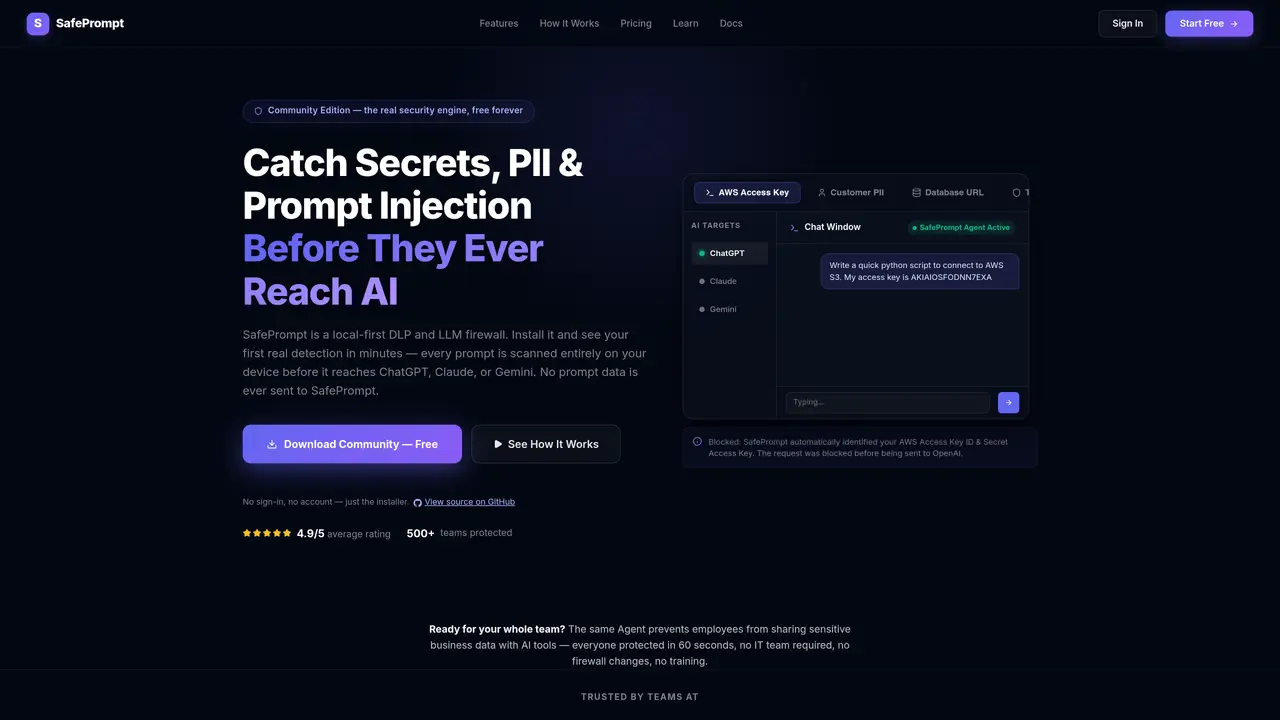
SafePrompt is a local-first data loss prevention (DLP) and LLM firewall designed to prevent accidental exposure of sensitive information to AI services. The tool operates as a local agent that intercepts and scans prompts entirely on the user’s device before they reach platforms like ChatGPT, Claude, or Gemini. It detects and redacts secrets, personally identifiable information (PII), prompt injections, and other sensitive data without sending any prompt content to SafePrompt’s servers. The system supports file and image scanning, including OCR for scanned documents, and maintains a local audit log of blocked or redacted incidents. SafePrompt is intended for enterprise teams and small businesses that need to balance AI productivity with security compliance, offering features like custom detection rules, fleet management, and policy synchronization across devices. It is particularly useful for organizations handling confidential business documents, customer data, financial information, or proprietary source code.
SafePrompt is a local-first data loss prevention (DLP) and LLM firewall that scans and redacts sensitive information from prompts before they reach AI services like ChatGPT, Claude, or Gemini. It operates entirely on the user's device, ensuring no prompt data is sent to SafePrompt's servers.
SafePrompt is designed for enterprise teams and small businesses that need to balance AI productivity with security compliance. It is particularly useful for organizations handling confidential business documents, customer data, financial information, or proprietary source code.
SafePrompt intercepts prompts locally on the user's device, detects and redacts sensitive data such as secrets, PII, and prompt injections, and maintains a local audit log of blocked or redacted incidents. It does not require cloud processing or complex proxy setups.
No, SafePrompt offers a Community Edition that does not require sign-in or an account. Users can simply download the installer and start using the tool immediately.
SafePrompt supports multiple AI platforms, including ChatGPT, Claude, Gemini, Copilot Enterprise, and internal AI applications. It is designed to provide unified protection across modern AI services.
To get started, download the SafePrompt agent from the website, install it on your device, and begin scanning prompts. No IT team, firewall changes, or training is required. The setup process takes approximately 60 seconds.
We use essential cookies to run aitoolnavio™, and optional cookies to analyze traffic and measure our marketing. You choose what we use — optional cookies stay off unless you turn them on. See our Privacy Policy.
One short email a week: fresh tools worth trying, honest takes and the updates that actually matter. No spam, unsubscribe any time.
Tesla’s AI stack powers Full Self-Driving, Optimus humanoid robots, and real-world autonomy with neural networks, custom hardware, and Dojo-scale training.
Customize, deploy, and control AI models securely.
Standardize application packaging and execution with portable containers for consistent local and cloud workflows.
AI-first electronic design automation for ICs, advanced packaging, and systems with hardware-assisted acceleration and elastic cloud delivery.
Unified AI-powered platform for real-time monitoring, analytics, and security across cloud infrastructure, applications, and services.
Prevention-first, AI-powered cybersecurity platform protecting networks, clouds, and endpoints with unified controls and autonomous response.
Automate tasks, analyze data, and ensure data security with advanced measures.
Cloud communications platform that lets developers embed SMS, voice, WhatsApp, email, video, verification, and conversational AI via APIs.
AI-powered endpoint security with XDR, cloud or on-prem control, and low system impact for ransomware, email threats, and account takeover prevention.
Automate error tracking, monitor application performance, and gain insights with advanced analytics.
Identify stolen identities, uncover copyright infringements, and find unauthorized use of images with precision.
Instant threat detection and response, AI-powered prevention, unified dashboard for full visibility and control.
Matched on what this tool does — grouped by the job you would be replacing.
matches Local prompt scanning and redaction · File and image scanning with OCR · Secret and PII detection
Browser extension that masks API keys and PII in AI chat prompts before they are sent
Local PII detection and masking gateway for AI prompts before they leave the device
Browser extension that redacts sensitive data from AI prompts before they leave the user's device
Browser extension that scans and blocks sensitive data before sending prompts to AI tools
matches Multi-provider AI gateway routing · Local audit logs with retention options
matches Prompt injection and jailbreak detection · Fleet management and policy synchronization
Enterprise-grade, OpenAI-compatible LLM API that bypasses standard content restrictions with policy-as-code governance and audit logging.
Unified OpenAI-compatible API to route, manage, and analyze LLM requests across 25+ providers for multi-model app development.
Enterprise AI governance platform intercepting LLM prompts and agent actions in real time
Centralized AI governance and runtime enforcement platform for mid-sized companies
Runtime security layer for n8n AI agent workflows that masks sensitive data before it reaches external models
Kernel-level enforcement and audit for AI agents on Linux
Local policy proxy that intercepts and validates AI coding agent tool calls before execution
Observability, monitoring and security platform for AI agents