Remove image backgrounds instantly, save time with advanced AI, and create stunning images effortlessly.
54M visits/mo-8.6%#2 Image & Design

Online AI image editor for background replacement, object removal and style blending
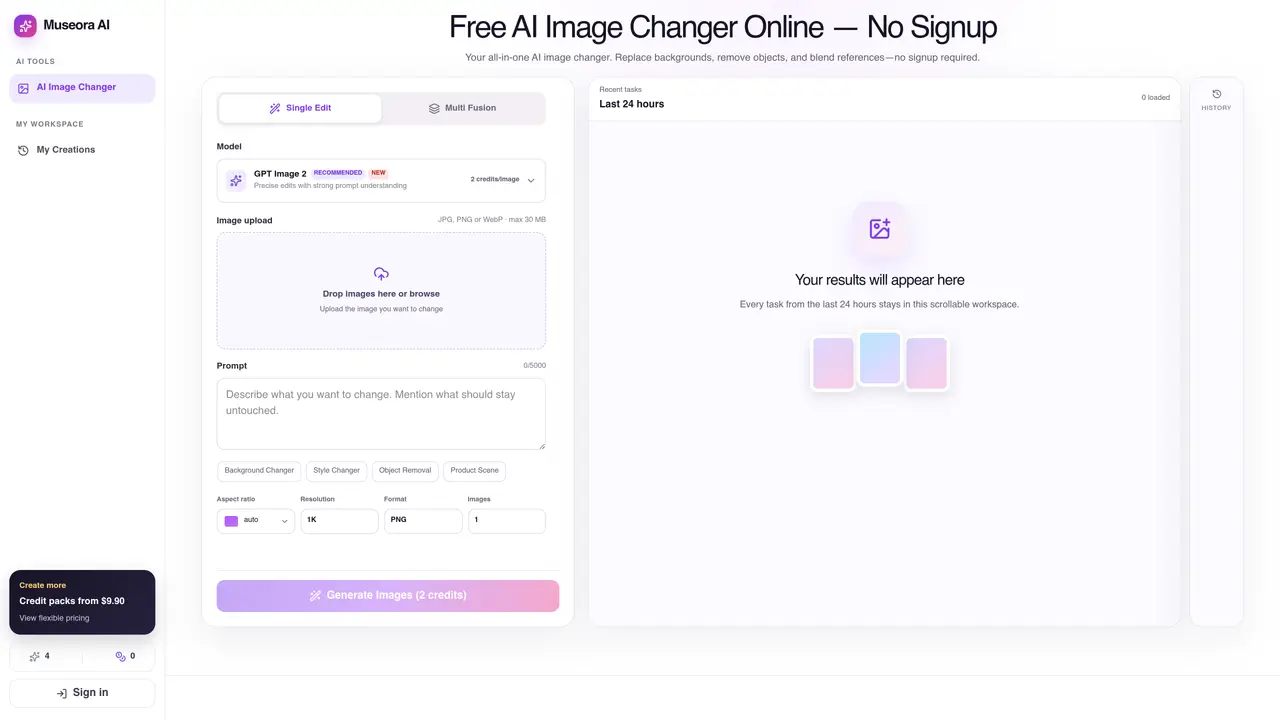
Museora AI Image Changer is a web-based tool that allows users to modify images through text prompts without requiring an account. The editor supports background changes, style transformations, object removal, and multi-image fusion. Users upload an image, select a model, and describe the desired change to generate a new version while preserving original composition where needed. The workspace retains recent tasks for 24 hours, enabling quick iterations without manual re-uploads. Outputs are stored privately and delivered via authorized links, with no public exposure of source files. The tool operates entirely in-browser and adapts to mobile devices, though larger screens may improve reference management and result comparison. Supported formats include JPG, PNG, and WebP up to 30 MB, with model-specific limits enforced during generation.
Yes. You can start without an account and receive four free credits in each 24-hour window. Signing in raises the free allowance to ten credits, enables My Creations, and lets you purchase additional credit packs. Free credits reset every 24 hours and do not roll over.
You can upload JPG, PNG, or WebP files up to 30 MB. The editor also checks each selected model's input limits before generation.
You can describe background changes, style changes, object removal, product scenes, and other prompt-based edits in the same AI Image Changer. Results depend on the source image, prompt, and selected model.
Yes. Multi Fusion combines several reference images in one generation. The exact minimum and maximum depend on the selected model, and the editor displays and validates that limit for you.
No. Inputs and results are kept in private object storage and are served through authorized access. Recent results stop appearing on the homepage after 24 hours, but the files are not automatically deleted.
Museora AI does not overlay its own branded watermark on generated downloads. Existing marks in a source image may remain unless you explicitly edit them, and output can still reflect the behavior of the selected model.
We use essential cookies to run aitoolnavio™, and optional cookies to analyze traffic and measure our marketing. You choose what we use — optional cookies stay off unless you turn them on. See our Privacy Policy.
One short email a week: fresh tools worth trying, honest takes and the updates that actually matter. No spam, unsubscribe any time.
Remove image backgrounds instantly, save time with advanced AI, and create stunning images effortlessly.
AI platform for upscaling images, enhancing photos, and generating high-quality creative assets with contextual detail.
Remove backgrounds, adjust colors, add text, filters, and shapes with ease.
Unleash creativity: edit photos, videos, and designs with AI-enhanced tools.
Transform photos effortlessly with AI: edit, enhance, and remove backgrounds.
Web and mobile AI platform for generating, editing, and training custom visuals from prompts with community models and face-swap tools.
Convert raster images into scalable vector graphics within seconds.
Create stunning designs, edit photos, remove objects, make collages, and transform images with powerful AI tools and effects.
Create stunning visuals, access image recognition and processing, and express creatively with natural language processing.
Cloudinary provides APIs and tools to integrate, manage, and optimize images and videos for AI-driven visual experiences.
All-in-one AI suite for creators to automate workflows, edit media, and generate content across video, design, and productivity tools.
Identify stolen identities, uncover copyright infringements, and find unauthorized use of images with precision.
Matched on what this tool does — grouped by the job you would be replacing.
matches Background replacement with automatic lighting adjustment · Object removal and scene rebuilding · Multi-image fusion for combining references
Edit or generate consistent 4K images from text.
AI image and video editing workspace with multiple AI tools in one workflow.
Free online AI photo editor with object removal, background replacement and enhancement
Online AI photo editor for background removal, upscaling and image generation
matches Background replacement with automatic lighting adjustment · Object removal and scene rebuilding
AI-enhanced photo editing with background removal and enhancements.
Web-based AI image generation, editing and enhancement tools
AI-powered tool for seamless photo editing and enhancement.
Browser-based AI photo editor for background removal, sharpening and retouching