Summarizes, extracts, and rewrites content from files.
89M visits/mo+8.7%#2 Productivity & Office

AI screen recorder that explains screen recordings as bug reports, guides or recaps
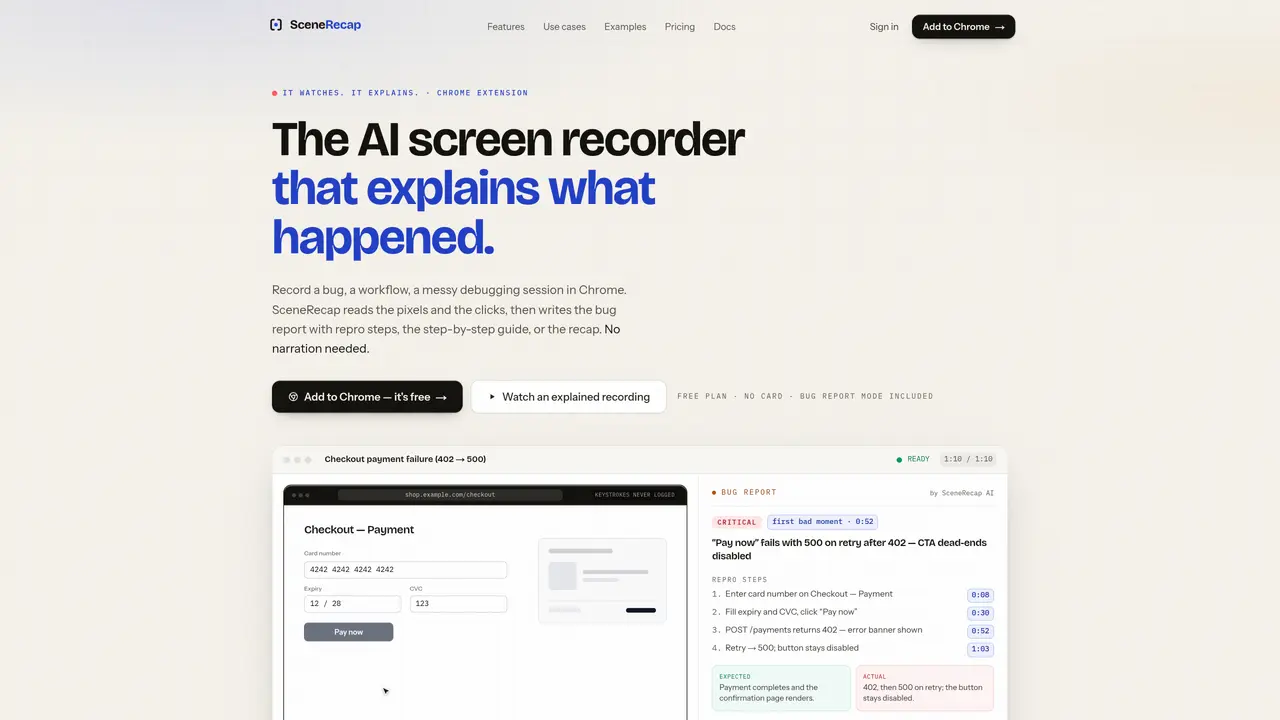
SceneRecap is an AI-powered screen recorder that captures and explains user interactions in web browsers or uploaded video files. It records pixel-level activity, clicks, navigation, console errors, and network responses without requiring voice narration. The tool automatically generates structured outputs such as bug reports with reproduction steps, step-by-step tutorials, narrative explanations of events, or meeting recaps with timestamped decisions and action items. SceneRecap operates as a Chrome extension for live recording or accepts uploaded screen recordings in formats like QuickTime, OBS, or Loom exports for offline analysis. The AI analyzes visual and interaction data to produce evidence-linked explanations with precise timestamps and seekable links to specific moments in the recording. Users can export results in multiple formats or integrate with project management tools like Jira, Linear, GitHub, or Notion.
SceneRecap is an AI-powered screen recorder that captures and explains user interactions in web browsers or uploaded video files without requiring voice narration. It records pixel-level activity, clicks, navigation, console errors, and network responses, then generates structured outputs such as bug reports, tutorials, explanations, or meeting recaps with precise timestamps and evidence links.
The tool is designed for developers, QA teams, support engineers, product managers, designers, and researchers who need to document, explain, or analyze user interactions, bugs, workflows, or meetings without manual narration or transcription.
SceneRecap primarily operates as a Chrome extension for live recording, but it also accepts uploaded screen recordings in formats like QuickTime, OBS, or Loom exports for offline analysis without requiring an extension.
Yes, SceneRecap allows users to export results in multiple formats and can integrate with project management tools like Jira, Linear, GitHub, or Notion for filing bug reports or sharing documentation directly.
SceneRecap does not log keystrokes as text, and fields like passwords or payment details are flagged only as being used without recording their contents. The tool reviews the video itself, ensuring sensitive data remains secure.
The Repro Agent is a feature available in higher-tier plans that re-runs recorded flows headlessly against a user-controlled environment to confirm whether a bug reproduces. It provides a verdict tied to observable signals and reports when reproduction fails, including reasons like state or environment differences.
We use essential cookies to run aitoolnavio™, and optional cookies to analyze traffic and measure our marketing. You choose what we use — optional cookies stay off unless you turn them on. See our Privacy Policy.
One short email a week: fresh tools worth trying, honest takes and the updates that actually matter. No spam, unsubscribe any time.
Summarizes, extracts, and rewrites content from files.
Automate citation and reference management, aid research with text and data mining, and securely store and share documents.
Capture, organize, and share ideas, notes, and documents effortlessly.
Headless CMS that lets developers manage structured content and deliver it anywhere via flexible APIs and real-time collaboration tools.
Efficiently create and manage cases, streamline workflows, securely store and share documents, and collaborate with colleagues.
Access files, collaborate, and secure your data with unbeatable customizable system.
An AI-powered PDF editor and converter for editing, OCR, signing, annotating, merging, and chatting with documents across devices.
Browser-based PDF editor that edits, signs, converts, merges, compresses, and shares files, with AI for form filling, document chat, and PDF creation.
Securely store, access, and search documents from any device with ease.
Create and customize legal documents, consult lawyers, and access legal guides all in one platform.
Centralize brand assets, automate approvals, and collaborate with external partners in a single digital asset management platform.
AI diagramming and documentation tool for engineering teams to create and update cloud architecture, ERDs, and flowcharts from prompts, code, and CI/CD workflows.
Matched on what this tool does — grouped by the job you would be replacing.
matches Bug report generation with repro steps and evidence · Repro Agent for automated bug reproduction testing
Adds a QA layer to AI coding workflows to catch bugs and usability issues before release
Autonomous AI QA platform that generates end-to-end tests from a web app URL
matches Step-by-step tutorial creation with screenshots · AI-powered tutorial generation from screen recordings
matches Timestamped meeting recaps with action items
Turn messy screen recordings into polished, personalized walkthroughs.
Turn a single screen recording into interactive demos, videos, and guides with AI, then brand and embed them anywhere to educate buyers, onboard users, and drive feature adoption.
Automate step-by-step tutorial creation by capturing on-screen actions with this AI-powered tool.
AI-powered Chrome extension that records browser workflows and turns them into editable step-by-step guides and SOPs.
Automate transcription, generate summaries, identify speakers, and timestamps for video-conferencing conversations.
Privacy-first AI that captures meetings, generates notes and action items, and makes everything searchable without giving up data ownership.
AI-powered meeting assistant with live transcription and delegate capabilities
Converts meeting audio into structured notes, decisions, and action items