Generate content, correct spelling, suggest synonyms to enhance writing.
173M visits/mo+0.1%#1 Productivity & Office

A private Mac app that continuously records, searches, and queries your screen history with optional on-device AI processing.
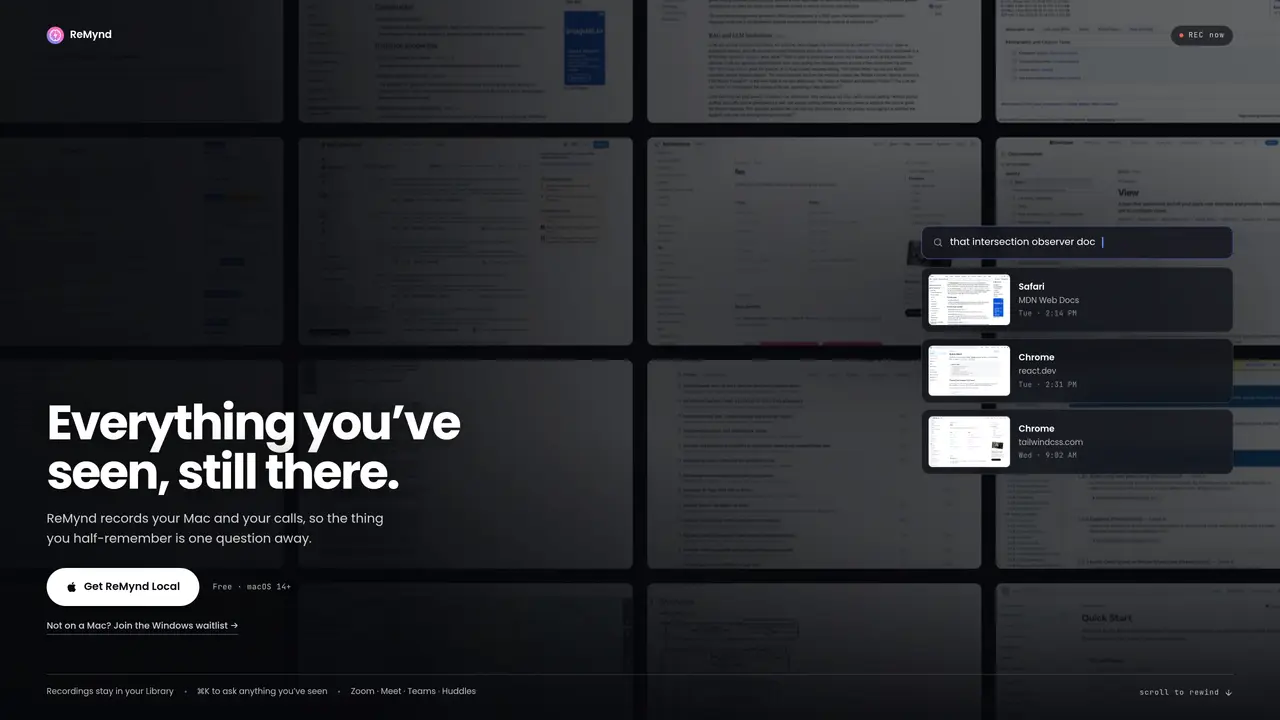
ReMynd is a Mac application that continuously and privately records everything displayed on your screen, creating a searchable history of your digital activity. The app captures not only on-screen content but also transcribes voice and video calls from platforms like Zoom, Slack Huddles, Google Meet, and Teams, integrating them into a unified timeline. Users can search this history using natural language queries or chat with it via AI, with all processing capable of running entirely on-device for maximum privacy. ReMynd supports bringing your own language model through LM Studio, ensuring no external data exposure. For those preferring cloud storage, encrypted backups can be stored in an S3-compatible bucket under user control, with no data ever used for model training or sold. The app emphasizes privacy by design, allowing users to maintain full ownership of their data without reliance on cloud services.
ReMynd continuously records everything displayed on a Mac screen and transcribes calls from platforms like Zoom, Google Meet, Microsoft Teams, and Slack Huddles. It creates a searchable timeline of digital activity that can be queried using natural language or AI chat.
ReMynd is designed for users who want to privately capture, search, and recall their digital activity, including professionals, researchers, or anyone who needs to reference past information quickly and securely.
All processing and storage occur on-device by default, with optional encrypted backups to a user-controlled S3-compatible bucket. No data is uploaded to external servers or used for model training.
Yes, ReMynd supports integrating local language models through LM Studio, ensuring no external data exposure during AI interactions.
ReMynd is currently available only for macOS 14+ and Apple silicon. A Windows version is in development, and users can join a waitlist for updates.
Download the app from the official website, install it on a compatible Mac, and follow the setup instructions. The app requires minimal configuration and begins recording immediately.
We use essential cookies to run aitoolnavio™, and optional cookies to analyze traffic and measure our marketing. You choose what we use — optional cookies stay off unless you turn them on. See our Privacy Policy.
One short email a week: fresh tools worth trying, honest takes and the updates that actually matter. No spam, unsubscribe any time.
Generate content, correct spelling, suggest synonyms to enhance writing.
Markdown-based note-taking and personal knowledge management app that turns notes into a connected system of ideas.
Capture, organize, and share ideas, notes, and documents effortlessly.
Easily create and track training courses, design learning environments, and access from any device with an intuitive interface.
An AI-powered note-taking app for students and professionals to write, sketch, annotate PDFs, record audio, and generate summaries, quizzes, and flashcards.
Handwritten note-taking app with searchable ink, PDF annotation, synced audio, and AI-powered study tools.
AI-powered process documentation tool that captures workflows into visual step-by-step guides with screenshots, editing, and exports.
AI web app that transcribes audio, video, and YouTube links into text in 98 languages with summaries, mind maps, and export formats for students and teams.
A note-taking and spaced-repetition flashcard app for students and learners, with PDF annotation plus AI tools for generating cards, quizzes, and study summaries.
AI-powered research assistant for organizing, analyzing, and synthesizing information from notes and documents.
Capture thoughts, create documents, and access on any device for convenient organization and productivity.
AI-powered PDF editor with built-in agents for summarization, translation, and document analysis.
Matched on what this tool does — grouped by the job you would be replacing.
matches Continuous screen recording with private, on-device processing · Searchable history of screen content and call transcripts · Natural language search and chat with screen history
Local-first AI assistant for Mac that captures notes, transcribes meetings, and provides context-aware chat
Open-source macOS app that quietly builds a private, searchable timeline of your Mac activity for on-device work tracking and AI agent queries.
matches Supports Zoom, Slack Huddles, Google Meet, and Teams call transcription · Searchable history of screen content and call transcripts
AI meeting assistant that captures real-time transcription, notes, and summaries in Zoom, Google Meet, and Microsoft Teams without adding a bot.
Automatic transcription and note-taking app for Mac meetings
Mac call assistant that transcribes calls privately and suggests replies
Instantly timestamp and summarize meeting highlights with AI-generated notes after your call.