Generate content, correct spelling, suggest synonyms to enhance writing.
173M visits/mo+0.1%#1 Productivity & Office

Blocks apps until real-world tasks are completed with AI-verified photo proof
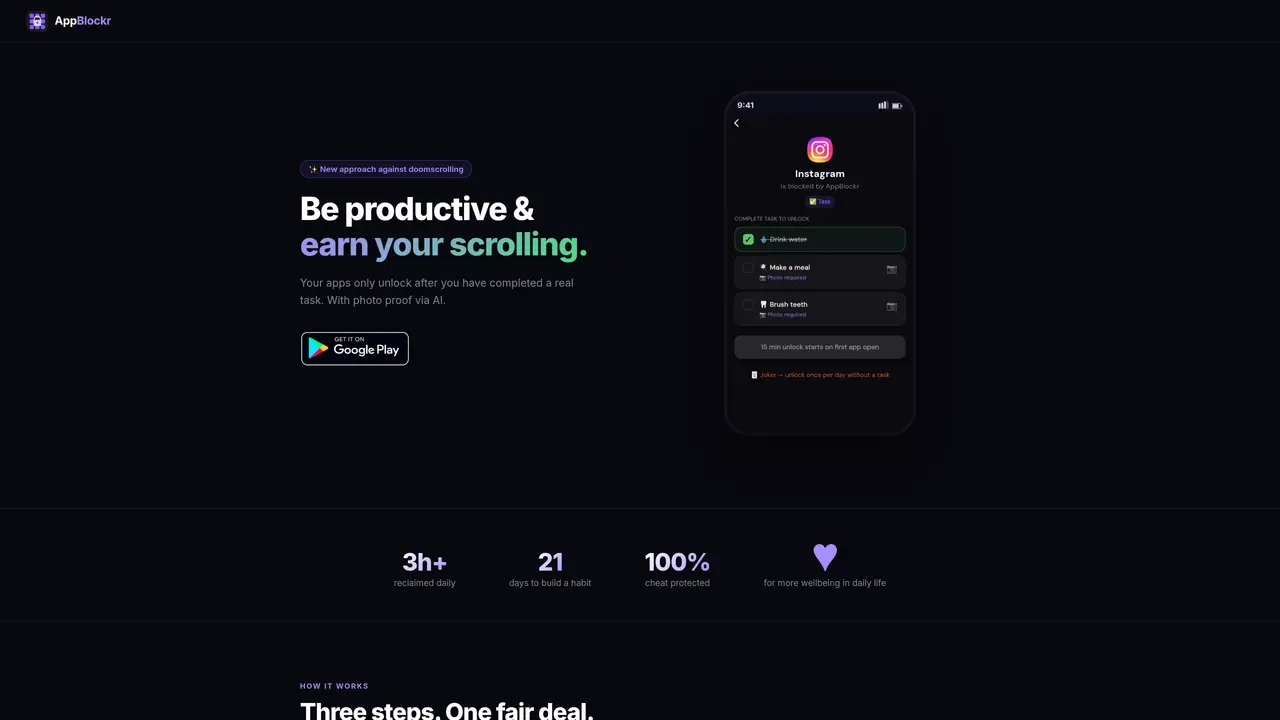
AppBlockr is a productivity tool that restricts access to mobile applications until users complete predefined real-world tasks. Users set daily tasks such as brushing teeth, making the bed, or drinking water, and must provide photo proof that the task is completed. An AI verifies the photo to prevent cheating, ensuring the task is genuinely done before unlocking the app. The tool offers three block modes: Task, which unlocks apps after task completion; Lock, a hard lockout without exceptions; and Breathe, which prompts a short breathing exercise before allowing app access. Time periods can be customized to apply different rules throughout the day, such as stricter rules in the morning and more relaxed ones in the evening. The app tracks screen time, ranks most-used apps, and shows weekly comparisons to help users monitor their progress. It aims to rewire habits by linking productivity with entertainment rather than enforcing strict bans.
AppBlockr is a productivity tool that restricts access to mobile apps until users complete predefined real-world tasks. Users set daily tasks, provide photo proof, and an AI verifies the completion before unlocking the app. The process involves three steps: completing a task, submitting photo proof, and unlocking the app.
AppBlockr is designed for individuals looking to reduce doomscrolling and improve productivity by linking entertainment with real-world tasks. It suits those who want a gradual approach to habit change rather than strict bans.
Yes, AppBlockr provides three block modes: Task, which unlocks apps after task completion; Lock, a hard lockout without exceptions; and Breathe, which prompts a short breathing exercise before allowing app access.
Yes, AppBlockr allows users to create unlimited time periods with individual rules. For example, stricter rules can be applied in the morning, more relaxed ones in the evening, and complete lockouts at night.
The AI automatically checks submitted photos to confirm task completion, such as detecting a toothbrush for brushing teeth or a water bottle for drinking water. Photos are not stored permanently, and the AI is context-sensitive to understand what belongs to the task.
AppBlockr tracks screen time, ranks most-used apps, and shows weekly comparisons to help users monitor their progress. It provides insights into app usage patterns and tracks completed tasks over time.
appblockr.com · third-party estimates from Similarweb
Last 2 months · grows by one month every month
Traffic figures are third-party estimates, good for scale and trends; they can differ from a company's own numbers. Updated monthly.
We use essential cookies to run aitoolnavio™, and optional cookies to analyze traffic and measure our marketing. You choose what we use — optional cookies stay off unless you turn them on. See our Privacy Policy.
One short email a week: fresh tools worth trying, honest takes and the updates that actually matter. No spam, unsubscribe any time.
Generate content, correct spelling, suggest synonyms to enhance writing.
Turn messy team ideas into actionable plans with Miro's visual workspace.
Leverage analytics, automate tasks, share documents, and coordinate projects.
Integrates AI into Airtable to analyze data, summarize insights, draft content, and automate workflows without prior AI experience.
Cloud accounting software that automates bookkeeping, invoicing, and financial reporting for small and growing businesses.
Streamline teamwork, manage projects, automate tasks efficiently.
Automate code, research, and documents using agents.
AI assistant for safe, reliable productivity with code, collaboration, and integrations.
Create customizable tables, databases, and spreadsheets, share data securely with team members.
Easy-to-use CRM platform that automates lead capturing, prioritizes tasks, and provides sales pipeline analytics for businesses of all sizes.
Transforms thoughts into actions, enhancing productivity and efficiency.
Write & run code in 50+ languages, auto-complete with AI, and code faster with an intuitive interface.
Matched on what this tool does — grouped by the job you would be replacing.
Paid placement · similar tools from listings that support aitoolnavio™
Instant lead response for home-service pros: your phone rings on every new lead, plus 14 days of follow-up
matches AI image verification for task completion · Customizable time periods with individual rules · Three block modes (Task, Lock, Breathe)
AI habit tracker and daily planner that builds focus and consistency through guided routines and small tasks.
A Gamified Task Management App that converts everyday tasks into a game.
Habit tracker with goals, OKRs, photo proof and AI coaching
Integrated workspace for planning, tracking habits, goals and finances