Generate content, correct spelling, suggest synonyms to enhance writing.
173M visits/mo+0.1%#1 Productivity & Office

Simple writing and safety tools for everyday business tasks without AI training
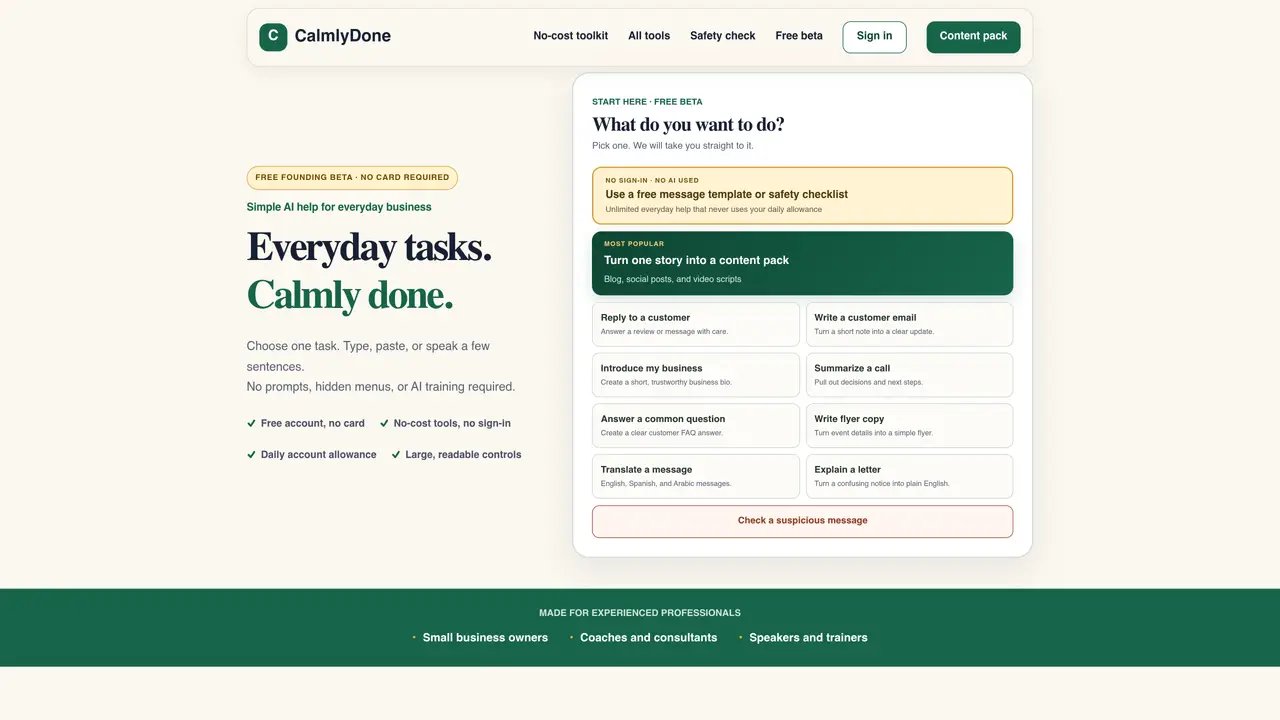
CalmlyDone provides a set of no-cost tools designed to assist with everyday business writing and safety checks. Users select a task such as replying to a customer, writing an email, summarizing a call, or translating a message. The process involves adding a few sentences or notes, choosing a tone from three options (Warm, Clear, or Professional), and generating a draft. The tool handles tasks like creating content packs, flyers, or FAQ answers, and includes a safety checker to identify potential scam warning signs in messages. It emphasizes simplicity with large controls, no hidden menus, and no sign-in requirements for basic tools. The platform also offers message templates, a private safety checklist, and guides for tasks like explaining confusing notices or translating messages between English, Spanish, and Arabic. A free account allows daily tasks and content packs, with no credit card required and no automatic posting.
CalmlyDone is a no-cost toolkit designed to assist with everyday business writing and safety checks. It allows users to perform tasks such as replying to customers, writing emails, summarizing calls, translating messages, and checking for potential scam warning signs in messages.
CalmlyDone is made for experienced professionals, including small business owners, coaches and consultants, and speakers and trainers who need straightforward tools for common business writing tasks.
No, CalmlyDone does not require sign-in for basic tools and does not ask for a credit card. A free account can be created without payment, and the daily allowance resets automatically.
The safety check tool identifies common warning signs of scams in messages but cannot prove a message is safe or catch every scam. Users are advised not to paste private information and to verify messages independently.
Users can complete tasks such as replying to customers, writing emails, summarizing calls, translating messages between English, Spanish, and Arabic, explaining confusing notices, creating flyers, and generating content packs.
Yes, many tools on CalmlyDone can be used without signing in, though creating a free account allows access to daily tasks and content packs.
We use essential cookies to run aitoolnavio™, and optional cookies to analyze traffic and measure our marketing. You choose what we use — optional cookies stay off unless you turn them on. See our Privacy Policy.
One short email a week: fresh tools worth trying, honest takes and the updates that actually matter. No spam, unsubscribe any time.
Generate content, correct spelling, suggest synonyms to enhance writing.
Turn messy team ideas into actionable plans with Miro's visual workspace.
Leverage analytics, automate tasks, share documents, and coordinate projects.
Integrates AI into Airtable to analyze data, summarize insights, draft content, and automate workflows without prior AI experience.
Cloud accounting software that automates bookkeeping, invoicing, and financial reporting for small and growing businesses.
Streamline teamwork, manage projects, automate tasks efficiently.
Automate code, research, and documents using agents.
AI assistant for safe, reliable productivity with code, collaboration, and integrations.
Create customizable tables, databases, and spreadsheets, share data securely with team members.
Easy-to-use CRM platform that automates lead capturing, prioritizes tasks, and provides sales pipeline analytics for businesses of all sizes.
Transforms thoughts into actions, enhancing productivity and efficiency.
Write & run code in 50+ languages, auto-complete with AI, and code faster with an intuitive interface.
Matched on what this tool does — grouped by the job you would be replacing.
Paid placement · similar tools from listings that support aitoolnavio™
Instant lead response for home-service pros: your phone rings on every new lead, plus 14 days of follow-up
matches Task selection for common business writing needs · Three tone options: Warm, Clear, or Professional · Content pack generation from a single story
matches Safety checker for suspicious messages · Message templates and private safety checklist
AI-powered writing tool for paraphrasing, summarizing, and enhancing writing effortlessly.
Write error-free academic papers, improve business communications with AI suggestions, and receive professional writing feedback.
Generates business emails, social captions and client proposals using AI
AI-powered writing studio for polishing drafts while preserving original voice
Transforms stiff, AI-generated text into natural and genuine writing.
Rewrites AI-generated text to sound natural and human while preserving facts