

Generate content, correct spelling, suggest synonyms to enhance writing.
173M visits/mo+0.1%#1 Productivity & Office
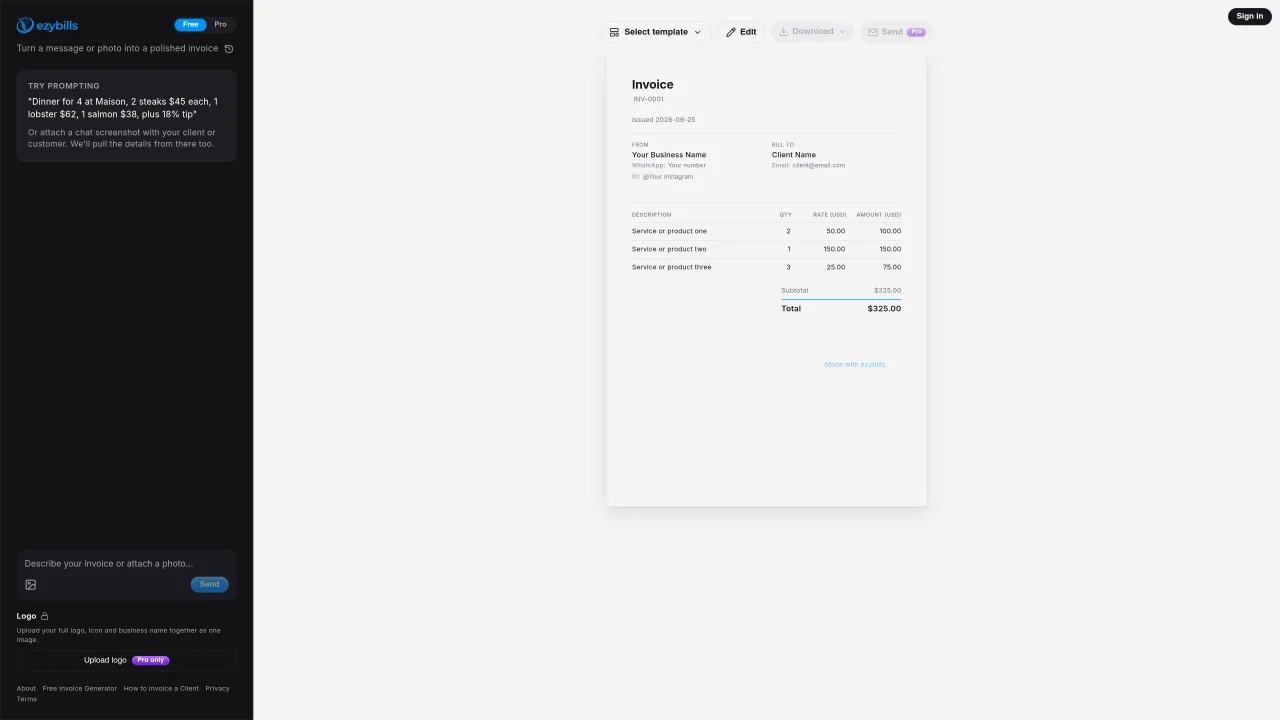
ezybills converts text or image inputs into formatted invoices. Users can input invoice details manually or upload a message or chat screenshot from which the service extracts key information such as services, quantities, rates, and totals. The tool supports logo uploads to brand invoices with a business’s visual identity. Templates are provided for consistent formatting, and invoices can be edited, downloaded, and sent directly to clients. The platform includes fields for business and client contact details, itemized descriptions, and automatic calculation of subtotals and totals. Invoices are issued with unique identifiers and timestamps for record-keeping.
ezybills converts text or image inputs into formatted invoices. It extracts key details such as services, quantities, rates, and totals from messages or chat screenshots, allowing users to generate professional invoices quickly.
ezybills is designed for freelancers and small businesses that need a fast, automated way to create and manage invoices while maintaining a professional appearance.
Users can start by uploading a message or chat screenshot containing invoice details, or entering information manually. The platform then formats the data into a professional invoice that can be edited, downloaded, or sent directly to clients.
The platform supports logo uploads for branding and provides templates for consistent formatting, but specific integration details should be checked on the ezybills website.
ezybills accepts text inputs or image files, such as screenshots of chat messages, from which it extracts invoice details like services, quantities, rates, and totals.
Yes, ezybills offers templates to ensure consistent formatting of invoices, which can be customized with business and client details.
We use essential cookies to run aitoolnavio™, and optional cookies to analyze traffic and measure our marketing. You choose what we use — optional cookies stay off unless you turn them on. See our Privacy Policy.
One short email a week: fresh tools worth trying, honest takes and the updates that actually matter. No spam, unsubscribe any time.
Generate content, correct spelling, suggest synonyms to enhance writing.
Turn messy team ideas into actionable plans with Miro's visual workspace.
Leverage analytics, automate tasks, share documents, and coordinate projects.
Integrates AI into Airtable to analyze data, summarize insights, draft content, and automate workflows without prior AI experience.
Cloud accounting software that automates bookkeeping, invoicing, and financial reporting for small and growing businesses.
Streamline teamwork, manage projects, automate tasks efficiently.
Automate code, research, and documents using agents.
AI assistant for safe, reliable productivity with code, collaboration, and integrations.
Create customizable tables, databases, and spreadsheets, share data securely with team members.
Easy-to-use CRM platform that automates lead capturing, prioritizes tasks, and provides sales pipeline analytics for businesses of all sizes.
Transforms thoughts into actions, enhancing productivity and efficiency.
Write & run code in 50+ languages, auto-complete with AI, and code faster with an intuitive interface.
Matched on what this tool does — grouped by the job you would be replacing.
Paid placement · similar tools from listings that support aitoolnavio™
Instant lead response for home-service pros: your phone rings on every new lead, plus 14 days of follow-up
matches AI invoice generation from text or screenshots · Logo upload and branding · Customizable invoice templates
matches OCR-based text extraction from scanned PDFs and images · Automatic field detection for invoice numbers, dates, vendors, totals, VAT, and line items · Structured output in Excel, JSON, or XML formats
Automates invoicing and follow-ups for small businesses with AI-powered assistance.
Automate invoice data entry, enhance accuracy, streamline workflow for small business owners and professionals.
AI-powered invoicing tool that generates and manages invoices via natural language
Automate data extraction from emails and documents with AI.
Extracts financial data from invoices, receipts and bank statements (including scanned PDFs) into Excel, JSON or XML without templates.