Generate content, correct spelling, suggest synonyms to enhance writing.
173M visits/mo+0.1%#1 Productivity & Office

Android keyboard app that learns your writing style to predict text, correct typos, and let you swipe to type.
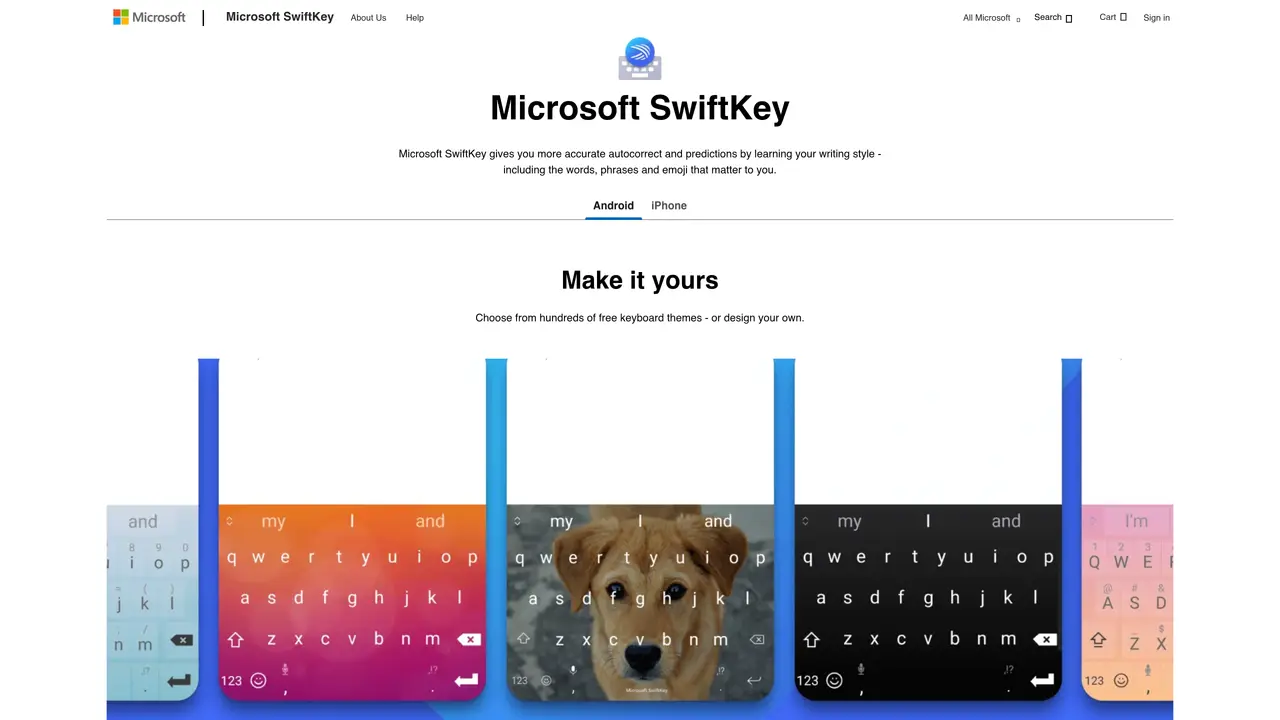
Microsoft SwiftKey is a smart keyboard application that improves typing on smartphones and tablets by adapting to the user’s writing habits. It provides real-time autocorrect that becomes more accurate over time by recognizing commonly used words, phrases, and even emoji. The app includes SwiftKey Flow, a swipe-to-type feature that allows users to glide their finger across the keyboard to form words quickly. Users can customize the keyboard with themes and toolbars, and it supports typing in up to five languages simultaneously without switching settings. The tool is designed for anyone looking to type faster, reduce errors, and personalize their mobile keyboard experience. It is particularly useful for frequent texters, multilingual users, and those who want a more efficient and tailored typing interface on their devices.
Microsoft
Redmond, United States · Founded 1975
Microsoft SwiftKey is a smart keyboard application that improves typing accuracy and speed on smartphones and tablets by learning the user's writing style, including words, phrases, and emoji.
SwiftKey is designed for anyone looking to type faster and with fewer errors, particularly frequent texters, multilingual users, and those who want a personalized typing experience.
Yes, SwiftKey supports typing in over 700 languages and allows users to type in up to five languages simultaneously without switching settings.
SwiftKey Flow is a swipe-to-type feature that allows users to glide their finger across the keyboard to form words quickly, reducing the need for individual key presses.
Yes, Microsoft SwiftKey is available as a free download with optional in-app features.
Yes, users can choose from hundreds of free keyboard themes or design their own, and customize the toolbar with tools like GIFs, Clipboard, Translator, and Stickers.
We use essential cookies to run aitoolnavio™, and optional cookies to analyze traffic and measure our marketing. You choose what we use — optional cookies stay off unless you turn them on. See our Privacy Policy.
One short email a week: fresh tools worth trying, honest takes and the updates that actually matter. No spam, unsubscribe any time.
Generate content, correct spelling, suggest synonyms to enhance writing.
Turn messy team ideas into actionable plans with Miro's visual workspace.
Leverage analytics, automate tasks, share documents, and coordinate projects.
Integrates AI into Airtable to analyze data, summarize insights, draft content, and automate workflows without prior AI experience.
Cloud accounting software that automates bookkeeping, invoicing, and financial reporting for small and growing businesses.
Streamline teamwork, manage projects, automate tasks efficiently.
Automate code, research, and documents using agents.
AI assistant for safe, reliable productivity with code, collaboration, and integrations.
Create customizable tables, databases, and spreadsheets, share data securely with team members.
Easy-to-use CRM platform that automates lead capturing, prioritizes tasks, and provides sales pipeline analytics for businesses of all sizes.
Transforms thoughts into actions, enhancing productivity and efficiency.
Write & run code in 50+ languages, auto-complete with AI, and code faster with an intuitive interface.
Matched on what this tool does — grouped by the job you would be replacing.
Paid placement · similar tools from listings that support aitoolnavio™
Instant lead response for home-service pros: your phone rings on every new lead, plus 14 days of follow-up
matches Predictive text that learns from your writing style · SwiftKey Flow swipe-to-type functionality · Real-time autocorrect with adaptive accuracy
matches Dictate and edit documents with AI · Convert spoken words into polished text instantly · Draft emails and notes by voice
Type faster with AI predictions, spell-check, multi-word suggestions, and support for 85+ languages in any app.
Create error-free messages, customize text with fonts/colors, and convert text to speech.
AI-powered text prediction and correction for faster, more accurate writing.
Dictate and edit documents three times faster with AI.
Convert spoken words into polished text instantly with AI, supporting 90 languages and 25 styles for emails, notes, and articles.
Draft emails and notes by voice, 10x faster.
Desktop dictation software that turns speech into polished text in any app with AI autocorrect and enterprise-grade privacy.