Generate content, correct spelling, suggest synonyms to enhance writing.
173M visits/mo+0.1%#1 Productivity & Office

A desktop app that automatically responds to permission prompts in Claude Code windows
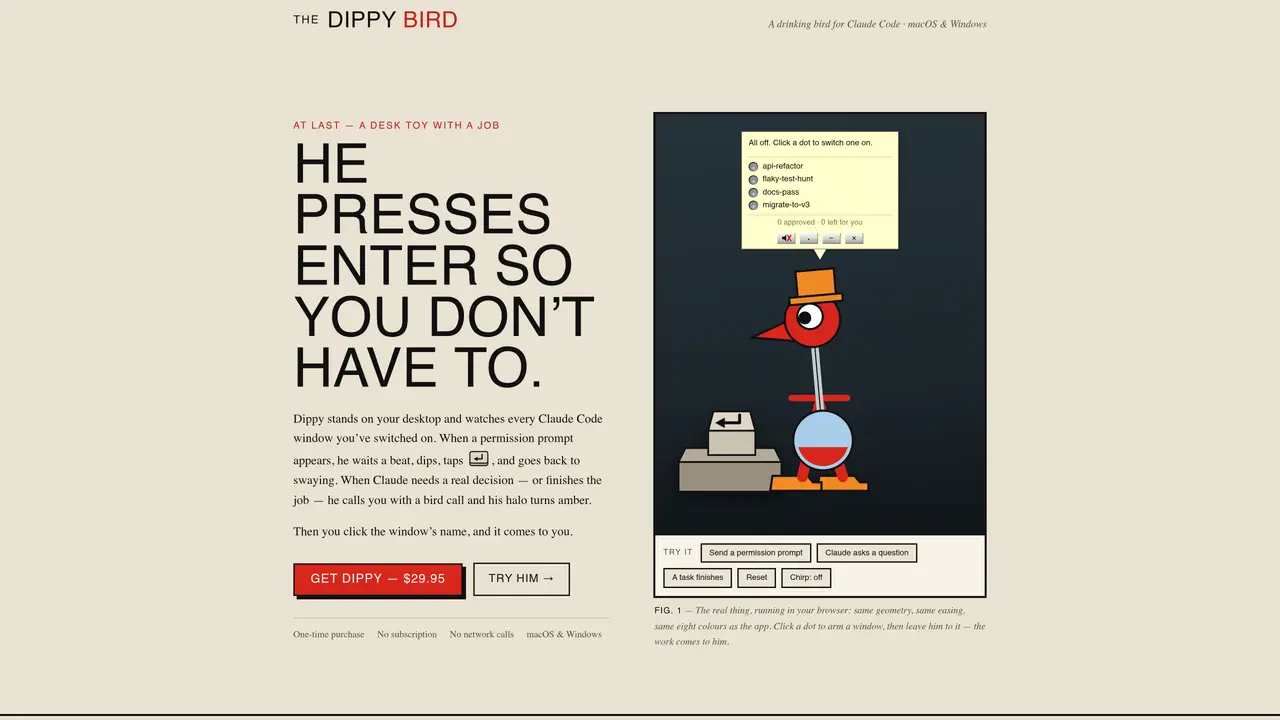
The Dippy Bird is a desktop utility designed to monitor and interact with Claude Code windows on macOS and Windows. It observes active windows and automatically presses Enter to respond to permission prompts, allowing users to avoid manual intervention. When a decision is required or a task completes, the app signals with a bird call and an amber halo, prompting the user to address the window. The bird can be minimized to a 56-pixel head that remains visible on the desktop, ensuring it is always accessible without obstructing workflow. It floats above all other windows, maintaining visibility regardless of application state. The tool requires no setup, as it automatically detects and tracks Claude Code sessions, displaying their names and statuses beneath the bird. Users can arm or disarm windows with a single click, and the bird’s behavior adjusts based on the selected mode, from fully automatic to selective responses.
The Dippy Bird is a desktop utility that monitors active Claude Code windows on macOS and Windows. It automatically presses Enter to respond to permission prompts, reducing the need for manual intervention while signaling when user input is required.
The tool is designed for developers and users who work with Claude Code and want to streamline repetitive permission prompts without constant manual oversight.
It detects and tracks Claude Code sessions automatically, displaying their names and statuses beneath the bird. Users can arm or disarm windows with a click, and the bird adjusts its behavior based on the selected mode.
Yes, The Dippy Bird can be minimized to a 56-pixel head that remains visible on the desktop, ensuring it stays accessible without obstructing workflow.
No setup is required. The tool automatically detects and tracks Claude Code sessions, displaying their names and statuses beneath the bird.
The bird operates in three modes: Red (fully automatic, taps all permission prompts), Blue (taps only reversible prompts), and Green (taps nothing, alerts user for all decisions).
We use essential cookies to run aitoolnavio™, and optional cookies to analyze traffic and measure our marketing. You choose what we use — optional cookies stay off unless you turn them on. See our Privacy Policy.
One short email a week: fresh tools worth trying, honest takes and the updates that actually matter. No spam, unsubscribe any time.
Generate content, correct spelling, suggest synonyms to enhance writing.
Turn messy team ideas into actionable plans with Miro's visual workspace.
Leverage analytics, automate tasks, share documents, and coordinate projects.
Integrates AI into Airtable to analyze data, summarize insights, draft content, and automate workflows without prior AI experience.
Cloud accounting software that automates bookkeeping, invoicing, and financial reporting for small and growing businesses.
Streamline teamwork, manage projects, automate tasks efficiently.
Automate code, research, and documents using agents.
AI assistant for safe, reliable productivity with code, collaboration, and integrations.
Create customizable tables, databases, and spreadsheets, share data securely with team members.
Easy-to-use CRM platform that automates lead capturing, prioritizes tasks, and provides sales pipeline analytics for businesses of all sizes.
Transforms thoughts into actions, enhancing productivity and efficiency.
Write & run code in 50+ languages, auto-complete with AI, and code faster with an intuitive interface.
Matched on what this tool does — grouped by the job you would be replacing.
Paid placement · similar tools from listings that support aitoolnavio™
Instant lead response for home-service pros: your phone rings on every new lead, plus 14 days of follow-up
matches Automatic permission prompt responses · Session detection and tracking · Color-coded status indicators (gray, red, green, blue)
Local tracking tool for Claude Code activity on macOS