Generate content, correct spelling, suggest synonyms to enhance writing.
173M visits/mo+0.1%#1 Productivity & Office

Multiplayer AI workspace for teams and agents to collaborate in a shared virtual office
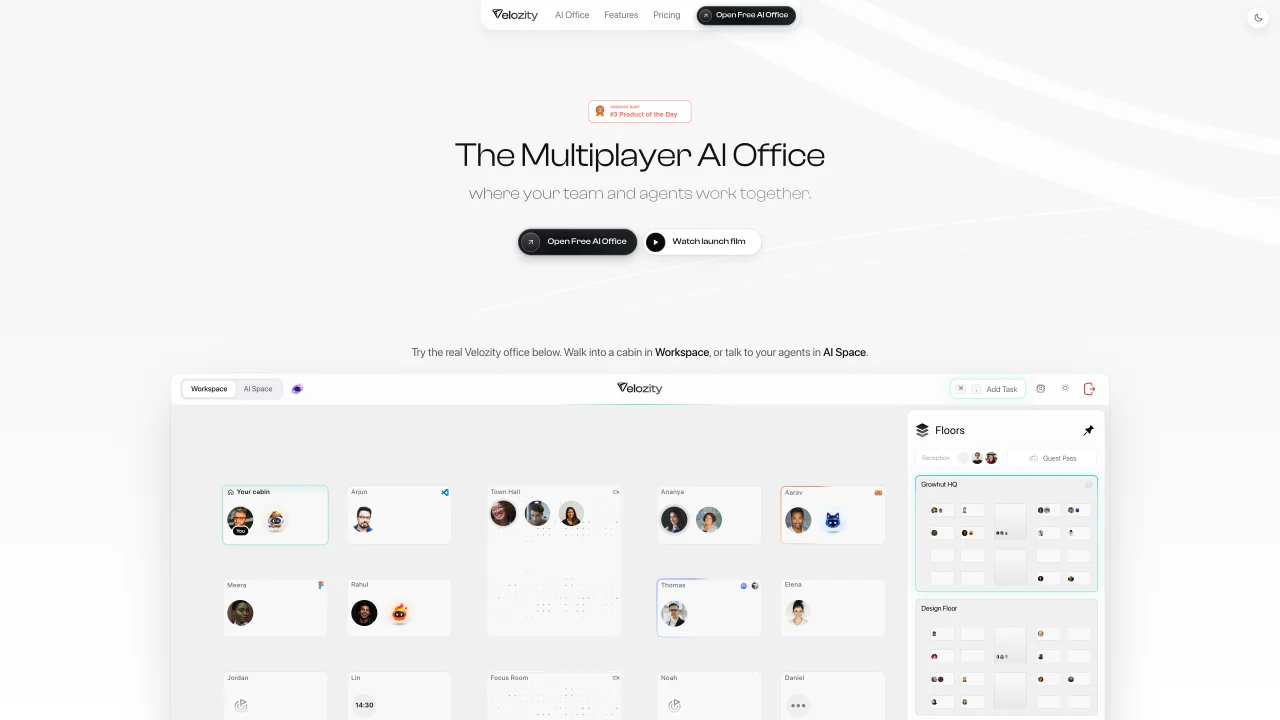
Velozity AI provides a shared virtual workspace called an AI Office where teams and AI agents work together in real time. The interface is divided into a Workspace for visual navigation and an AI Space for conversational interaction with agents. Users can invite teammates and external guests, manage access with guest passes, and control visibility settings for each space. The platform integrates with existing AI subscriptions to power custom agents and includes built-in features like Speed, an AI agent that handles tasks, captures information from emails and files, and generates summaries. Teams can coordinate through live presence indicators, video calls, transcriptions, and shared calendars without switching between multiple tools. The system supports task creation with priorities and due dates, deep research using internal data, and automated morning briefs summarizing daily priorities. Integrations span over 100 apps and include a cloud computer for running legacy applications.
Velozity AI is a shared virtual workspace called an AI Office where teams and AI agents collaborate in real time. It is designed for teams that want to centralize their workflows, integrate existing AI tools, and manage tasks, research, and communications without switching between multiple applications.
Velozity AI allows users to bring their own AI subscriptions to power custom agents within the platform. The system supports existing AI tools, enabling teams to tag and use their preferred agents alongside built-in features like Speed, Velozity's native agent.
Yes, Velozity AI includes guest pass management, allowing users to invite external guests to their workspace. Guests can access the workspace via a link, but entry is controlled by the host, who can admit or deny access as needed.
Velozity AI includes built-in features such as Speed, an AI agent that handles tasks, captures information from emails and files, and generates summaries. It also offers live presence indicators, video calls, transcriptions, shared calendars, task creation with priorities, deep research using internal data, and automated morning briefs.
Yes, Velozity AI supports task creation with priorities and due dates, automated task capture from emails and transcripts, and deep research using internal data. It also provides automated morning briefs that summarize daily priorities, helping teams stay organized.
Velozity AI integrates with over 100 apps and includes a cloud computer for running legacy applications. It supports synchronization with tools like Gmail for emails, transcripts, and files, as well as other third-party applications to streamline workflows.
We use essential cookies to run aitoolnavio™, and optional cookies to analyze traffic and measure our marketing. You choose what we use — optional cookies stay off unless you turn them on. See our Privacy Policy.
One short email a week: fresh tools worth trying, honest takes and the updates that actually matter. No spam, unsubscribe any time.
Generate content, correct spelling, suggest synonyms to enhance writing.
Turn messy team ideas into actionable plans with Miro's visual workspace.
Leverage analytics, automate tasks, share documents, and coordinate projects.
Integrates AI into Airtable to analyze data, summarize insights, draft content, and automate workflows without prior AI experience.
Cloud accounting software that automates bookkeeping, invoicing, and financial reporting for small and growing businesses.
Streamline teamwork, manage projects, automate tasks efficiently.
Automate code, research, and documents using agents.
AI assistant for safe, reliable productivity with code, collaboration, and integrations.
Create customizable tables, databases, and spreadsheets, share data securely with team members.
Easy-to-use CRM platform that automates lead capturing, prioritizes tasks, and provides sales pipeline analytics for businesses of all sizes.
Transforms thoughts into actions, enhancing productivity and efficiency.
Write & run code in 50+ languages, auto-complete with AI, and code faster with an intuitive interface.
Matched on what this tool does — grouped by the job you would be replacing.
Paid placement · similar tools from listings that support aitoolnavio™
Instant lead response for home-service pros: your phone rings on every new lead, plus 14 days of follow-up
matches Shared virtual office with Workspace and AI Space · Live presence indicators and video calling · Guest pass management for external access
matches Built-in AI agent (Speed) for task automation · Task creation with priorities and due dates · Email and file integration for task capture
matches Cloud computer for legacy applications
Collaborative workspace where teams and AI agents work together in shared rooms
Unified AI workspace that merges docs, tasks, chat, calls, and spreadsheets into one app with autonomous AI coworkers for seamless collaboration and automation.
AI workspace for client-service teams to centralize tasks, meetings, and client data
Centralize knowledge, collaborate in real time, and edit documents with AI-powered tools in one cloud workspace.
An AI-powered work management platform combining projects, tasks, docs, chat, agents, and 50+ integrations in one workspace.
Cloud-based development environment where agents run persistently on remote machines called orbs, enabling work from any device without local setup.
Private cloud computer for AI agents to collaborate on coding and research tasks
Cloud-hosted AI agents running on dedicated Linux machines for research, coding and automation tasks