Generate cinematic video clips from text or images and refine them with AI-powered editing tools for creators and visual professionals.
6.4M visits/mo+14.2%#8 Video & Animation

Converts still images into short AI-generated videos with adjustable motion and aspect ratio
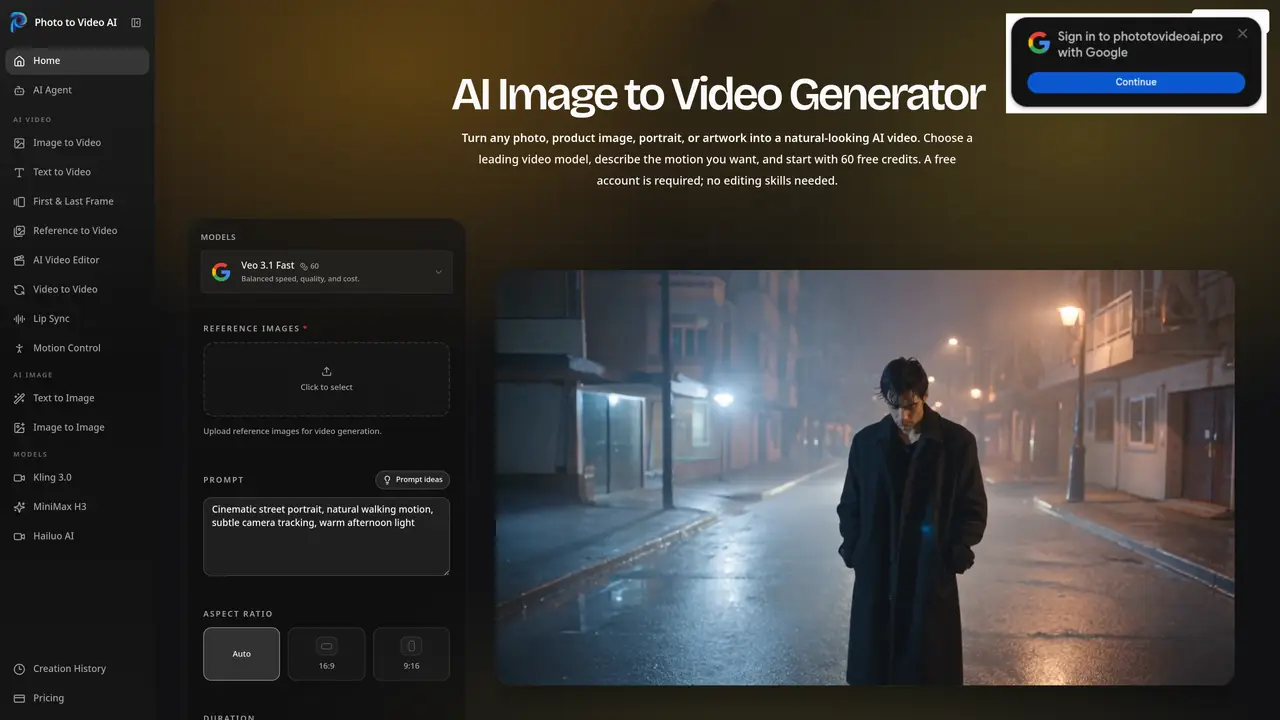
Photo to Video AI converts still images such as product shots, portraits, artwork, or landscapes into short AI-generated videos. Users upload an image and optionally provide a motion prompt describing subject movement, camera direction, or atmosphere. The tool supports multiple AI video models including Veo 3.1, Kling 2.6 and 3.0, MiniMax H3, Seedance, Hailuo, and Wan 2.6, each offering different balances of speed, quality, and cost. Generation settings include duration, resolution, aspect ratio, frames, and sound, with credit costs displayed before processing. Exported videos are delivered in MP4 format at 720p or 1080p and can be optimized for platforms like TikTok, YouTube, or product pages. The platform emphasizes predictable results by recommending clear, well-lit source images and focused motion prompts to reduce artifacts. Failed generations are refunded automatically, and users can review generation history and settings at any time.
Photo to Video AI is an online tool that converts still images into AI-generated videos. Users upload a photo and optionally provide a motion prompt to guide subject movement, camera direction, or atmosphere, then select a model and settings to generate a short video.
The tool suits marketers, content creators, e-commerce sellers, and individuals looking to transform static images into dynamic videos without requiring camera equipment or editing skills.
Supported models include Veo 3.1, Kling 2.6 and 3.0, MiniMax H3, Seedance, Hailuo, and Wan 2.6, each offering different balances of speed, quality, and cost for video generation.
Users receive free credits upon signing up, and credit costs are displayed before generating a video. Failed generations are automatically refunded, and users can review generation history and settings at any time.
The tool primarily operates as a standalone web application for generating videos from images. It does not list direct integrations with other platforms, but exported videos can be used on social media, websites, or marketing campaigns.
Use clear, well-lit images with the main subject in focus and prominent in the frame. Provide focused motion prompts to guide the AI, and avoid overly complex or crowded scenes to reduce artifacts in the output.
phototovideoai.pro · third-party estimates from Similarweb
Share of visits by channel
Video & Animation · Sep 2026
Traffic figures are third-party estimates, good for scale and trends; they can differ from a company's own numbers. Updated monthly.
We use essential cookies to run aitoolnavio™, and optional cookies to analyze traffic and measure our marketing. You choose what we use — optional cookies stay off unless you turn them on. See our Privacy Policy.
One short email a week: fresh tools worth trying, honest takes and the updates that actually matter. No spam, unsubscribe any time.
Generate cinematic video clips from text or images and refine them with AI-powered editing tools for creators and visual professionals.
Create custom titles, 3D objects, adjust color and contrast, add special effects, transitions, and animations.
Animate images effortlessly with text prompts and motion control.
Professional visual AI engine for node-based image, video, 3D, audio and generative workflows with full control over models and outputs.
AI video generation tool that creates videos from text prompts, images, or reference clips with strong character consistency.
AI-powered tool for creating, customizing, and animating lightweight Lottie graphics for websites and apps from text prompts.
Generates high-quality videos and images from text or images with cinematic controls and native 4K output.
An all-in-one creative suite specializing in Image-to-Video animation.
A web-based motion design tool for creating collaborative animations with Figma import and exports like 4K video, GIF, and Lottie.
AI-powered platform to create professional animated videos and presentations with voice-overs, text animation, and asset libraries.
Create animated presentations, design videos with voiceovers and music, and access tutorials and resources for easy use.
Create immersive experiences, personalize customer interactions, and provide dynamic conversations and advice to multiple players.
Matched on what this tool does — grouped by the job you would be replacing.
matches Upload JPG, PNG, or WEBP images · Optional motion prompts for subject and camera direction · Choice of multiple AI video models
Turns static photos into short MP4 videos with AI motion and prompt controls, designed for quick social-ready clips.
Converts still images into short AI-generated videos in-browser
Converts still images into short videos using AI motion prompts
Online AI tool that converts still images into short video clips with motion and audio
matches Text-to-video generation · Image-to-video generation · Multiple AI model options
Web-based AI video and image generator for creators and marketers with text-to-video, image-to-video, and synced audio features.
AI video generation platform that turns text or images into professional videos using multiple models with flexible policies and commercial use.
Converts text or still images into short cinematic videos using multiple AI models
Generates short AI videos from text prompts or images