Generate lifelike human videos with AI, making professional video creation fast and accessible for any user.
41M visits/mo+26.2%#1 Video & Animation

Converts still images into short AI-generated videos in-browser
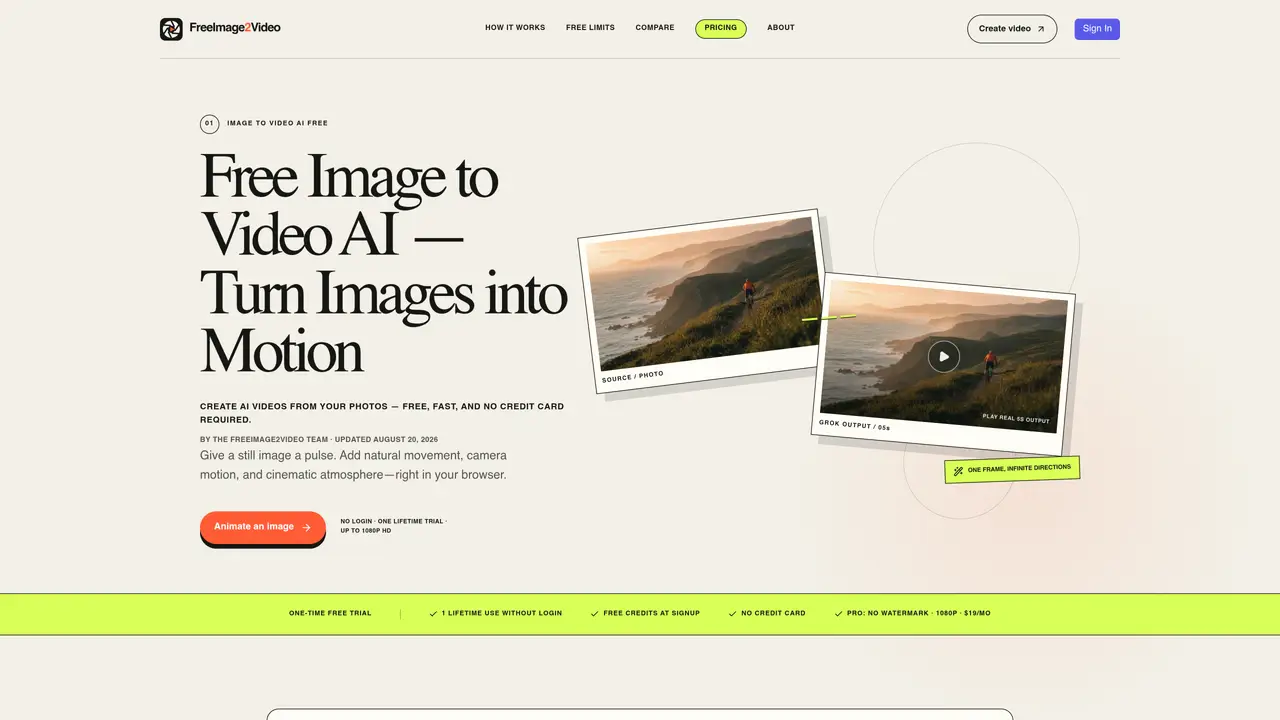
This tool transforms static images into short video clips using AI-driven motion and camera effects. Users can upload JPG, PNG, or WebP files up to 10MB and optionally describe desired movement such as camera motion or subject animation. The process occurs entirely in the browser with no account required for a single free trial generation. Outputs are previewed before download as MP4 files in resolutions up to 1080p. The service emphasizes simplicity with a one-screen workflow and optional prompts, while paid plans remove watermarks and provide recurring credits for multiple generations. Processing happens via Cloudflare R2 storage and a third-party video model, with anonymous generations handled through temporary visitor hashes rather than stored user data.
Users can create one lifetime video without an account. Creating a free account grants additional credits for multiple generations and unlocks higher resolutions and durations.
No account is required to generate a video. The tool allows immediate upload, motion description, and generation without login for a one-time free trial.
The tool supports JPG, PNG, and WebP files up to 10MB. Clear, well-lit images with a distinct subject typically produce the most stable motion results.
Most videos finish rendering in one to three minutes, though processing time may vary based on clip length and model queue availability.
Yes. Once rendering completes, users can preview the result in their browser and download the MP4 file for local use.
Anonymous generations are tracked using a one-way visitor hash, and images or prompts are not stored in an account history. Signed-in users have their generation history saved privately.
freeimage2video.com · third-party estimates from Similarweb
Last 2 months · grows by one month every month
Share of visits by channel
Video & Animation · Sep 2026
Traffic figures are third-party estimates, good for scale and trends; they can differ from a company's own numbers. Updated monthly.
We use essential cookies to run aitoolnavio™, and optional cookies to analyze traffic and measure our marketing. You choose what we use — optional cookies stay off unless you turn them on. See our Privacy Policy.
One short email a week: fresh tools worth trying, honest takes and the updates that actually matter. No spam, unsubscribe any time.
Generate lifelike human videos with AI, making professional video creation fast and accessible for any user.
xAI builds Grok frontier AI models for reasoning, coding, voice, images, video, enterprise workflows, and developer APIs.
AI-powered video messaging tool that records, shares, and manages video messages with AI-generated titles, summaries, and tasks.
Explore and test Google’s experimental AI tools and prototypes before they become products.
Creates licensed videos, images, music.
Web and mobile AI platform for generating, editing, and training custom visuals from prompts with community models and face-swap tools.
Create stunning videos in a few clicks, customize with powerful tools, and automate editing without experience.
Create, convert, and enhance videos effortlessly with professional effects and royalty-free music.
Create engaging videos with voiceovers, music, and customizations using a library of royalty-free assets.
Create auto-resized campaign images and videos with DaVinci AI's generative media suite.
Freemium, uncensored AI video and image creation for individual creators with text-to-video, image effects, and gem-based upgrades for HD and no watermarks.
Generate cinematic video clips from text or images and refine them with AI-powered editing tools for creators and visual professionals.
Matched on what this tool does — grouped by the job you would be replacing.
matches Browser-based image to video conversion · Optional motion description for AI enhancement · Resolution options up to 1080p HD
Turns static photos into short MP4 videos with AI motion and prompt controls, designed for quick social-ready clips.
Converts still images into short AI-generated videos with adjustable motion and aspect ratio
Converts still images into short videos using AI motion prompts
Online AI tool that turns still images into short HD video clips using plain-English motion prompts
matches Text-to-video generation · Image-to-video generation · Multiple AI model options
AI video generator that turns scripts or stories into long-form videos up to 50 minutes with consistent characters and 1080p export.
Converts text or still images into short cinematic videos using multiple AI models