Create marketing videos quickly, customize with templates, music, and photos, optimize for different platforms with AI.
4.4M visits/mo-5%#12 Video & Animation
AI tool that converts written scene descriptions into short video clips
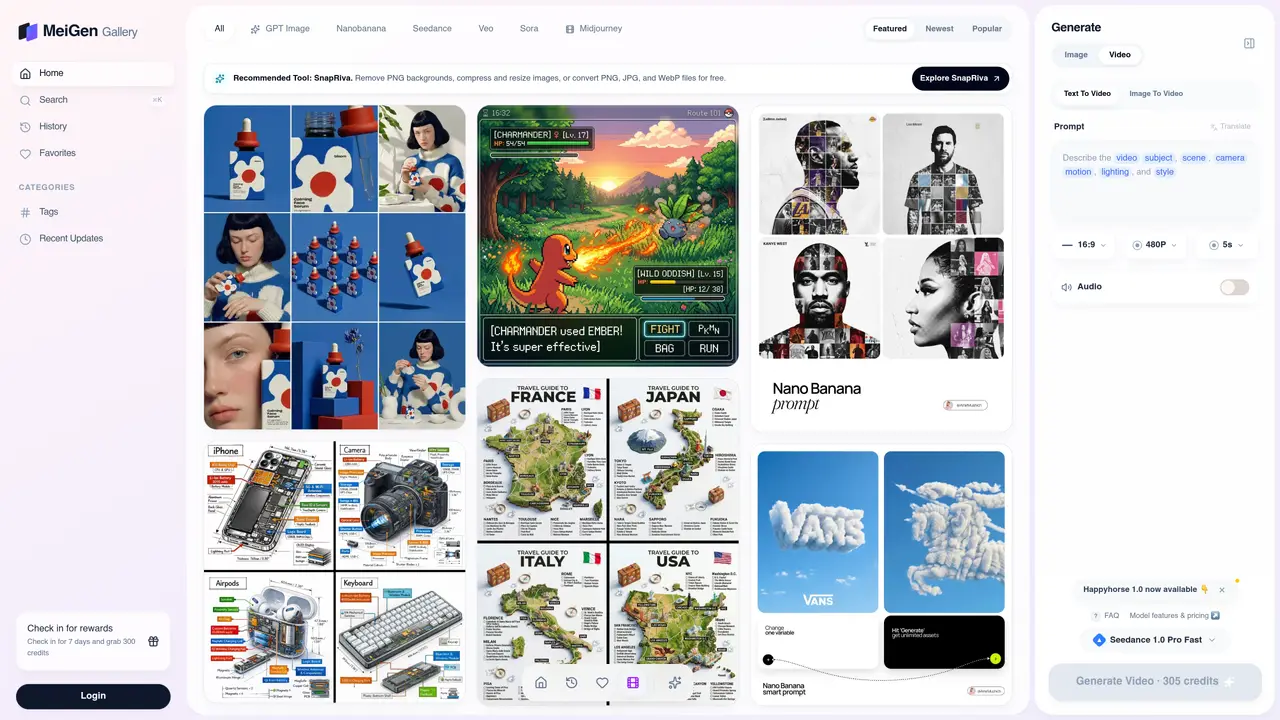
Text to Video AI Generator transforms written scene descriptions into short video clips without requiring an editing timeline. Users craft prompts by specifying subjects, desired motion, camera angles, lighting, and mood, then select a supported video model and output format. The platform integrates a prompt gallery, generation workspace, model controls, and history view, enabling creators to write, test, compare, and reuse prompts efficiently within a single interface. Supported outputs include cinematic scenes, product shots, explainer videos, and social media clips, with customizable options for duration, aspect ratio, resolution, and generated audio where available. The workflow prioritizes iterative refinement, allowing users to generate a clip, review the result, and adjust one variable at a time before saving effective prompts for future reuse. Designed for creators, marketers, educators, and storytellers, the tool streamlines the video production process by converting text-based ideas into visual content with minimal technical barriers. It caters to users seeking quick, high-quality video generation without the complexity of traditional editing software.
The Text to Video AI Generator converts written scene descriptions into short video clips without requiring an editing timeline. Users specify subjects, motion, camera angles, lighting, and mood in a text prompt, then select a supported video model and output format.
The tool is designed for creators, marketers, founders, and production teams who need quick visual drafts for marketing, social media, storyboards, or previsualization.
Start by writing a concrete scene description that includes the subject, action, setting, camera movement, lighting, and style. Then choose a video model, set production constraints like duration and aspect ratio, and generate the clip.
You can create cinematic scenes, product shots, explainers, social media clips, marketing visuals, B-roll, mood clips, transitions, and short visual loops for platforms like TikTok, YouTube, and Reels.
Yes, the tool offers options for generated audio where available, allowing users to include sound in their video clips.
Yes, the tool allows users to save effective prompts for future reuse, enabling iterative refinement and faster video creation in subsequent sessions.
We use essential cookies to run aitoolnavio™, and optional cookies to analyze traffic and measure our marketing. You choose what we use — optional cookies stay off unless you turn them on. See our Privacy Policy.
One short email a week: fresh tools worth trying, honest takes and the updates that actually matter. No spam, unsubscribe any time.
Create marketing videos quickly, customize with templates, music, and photos, optimize for different platforms with AI.
AI video clipping and editing tool that turns long videos into short clips with captions, reframing, and one-click social publishing.
Boost social media engagement, produce AI music videos, and remix videos with any style effortlessly.
Create promotional videos effortlessly with WeVideo's intuitive drag-and-drop interface.
An AI creation platform for turning images into videos, adding twist endings, and building interactive roleplay stories.
Drag-and-drop video maker for creating professional product demos, explainer videos, and ads without coding skills.
AI-powered video clipping and editing tool that extracts viral moments, adds captions, and schedules shorts for TikTok, YouTube, and Instagram.
Submagic is an AI tool that helps content creators create viral reels and shorts 10 times faster than any other video editing tool.
Turn text or links into short, viral-ready videos for TikTok, Instagram, and YouTube without editing skills.
Turns long videos into ready-to-post short clips for TikTok, Reels, and YouTube Shorts in minutes.
AIReel lets creators make AI-generated videos from text or image in minutes.
AI-powered tool for accurate captions, video clipping, and impactful face centering.
Matched on what this tool does — grouped by the job you would be replacing.
matches Prompt-based video generation from text descriptions · Model selection for different video styles and use cases · Duration, aspect ratio, resolution, and audio controls
Free AI video generator that turns text, images, audio, or video into cinematic clips with smooth camera motion and realistic character animation.
Converts still images into short AI-generated videos with adjustable motion and aspect ratio
AI video generator that creates short cinematic videos from text or still images
AI video generator that converts still images into short reels with configurable motion and camera paths
matches Image upload with JPG, PNG, or WebP support up to 10MB · Motion prompt control for camera and subject movement · Choice of aspect ratios (16:9, 9:16, 1:1)
Converts still images into short videos using AI motion prompts
AI studio converting text prompts or images into short videos with audio
Generates short AI videos from text prompts or images
Generates 4–30 second videos from text prompts, images, video clips, and audio direction