Automate video editing, add text-to-speech voice-overs, and optimize videos for impactful results.
4.4M visits/mo-5%#13 Video & Animation

Capture stunning visuals, blur backgrounds, and create professional live broadcasts with multi-camera support.
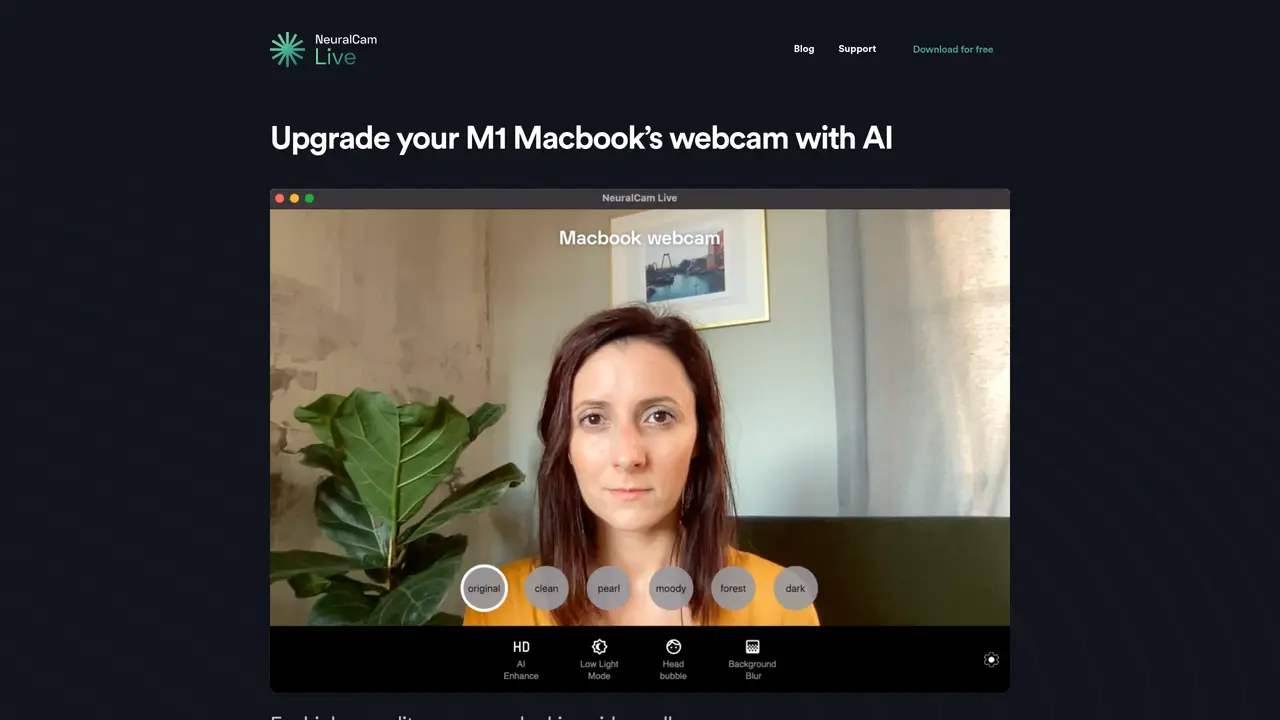
NeuralCam Live for Mac is the perfect solution for professional-looking live broadcasts. This app combines the power of AI and machine learning to give you the best possible streaming experience. With NeuralCam Live, you can capture stunning real-time visuals and create high-quality live broadcasts with an easy-to-use interface. The app also comes with a range of advanced features, such as built-in facial recognition, multi-camera support, and automatic background blur. Whether you’re streaming a business presentation or hosting a virtual event, NeuralCam Live for Mac will make sure you look your best. With its powerful AI capabilities, you can deliver a professional broadcast without the need for expensive equipment or technical expertise. NeuralCam Live for Mac is the perfect tool for creating compelling and captivating live broadcasts.
NeuralCam Live for Mac is an AI-powered virtual webcam app designed specifically for Macs with Apple Silicon. It enhances webcam video quality in real time for video calls and broadcasts.
It suits professionals, content creators, and anyone looking to improve the quality of their video calls or live broadcasts without expensive equipment or technical expertise.
After installation, users select NeuralCam Live as their camera in video conferencing apps. It automatically enhances the webcam feed using AI-driven features like sharpening, background blur, and style adjustments.
Yes, NeuralCam Live for Mac can be used for free, with additional advanced features available through a subscription.
It is compatible with most video calling apps, allowing users to apply a consistent high-quality look across all platforms.
Key AI features include AI Enhance for sharpening and contrast, Background Blur for a DSLR-like effect, AI Styles for professional color grading, and Low Light Mode for improved visibility in dim lighting.
We use essential cookies to run aitoolnavio™, and optional cookies to analyze traffic and measure our marketing. You choose what we use — optional cookies stay off unless you turn them on. See our Privacy Policy.
One short email a week: fresh tools worth trying, honest takes and the updates that actually matter. No spam, unsubscribe any time.
Automate video editing, add text-to-speech voice-overs, and optimize videos for impactful results.
Create custom titles, 3D objects, adjust color and contrast, add special effects, transitions, and animations.
Vmake is an all-in-one AI-powered video creation and enhancement platform designed to help creators, marketers, and businesses produce high-quality video content quickly and effortlessly.
AI-enhanced photo and video editing software with local, secure processing.
Efficiently convert, burn, and customize videos for optimal results.
Create lifelike videos from text and images.
Create stunning videos effortlessly with HitPaw's intuitive interface and advanced editing features.
Web-based AI video editor that repurposes YouTube or TikTok clips into scroll-stopping short-form videos with AI voiceovers and viral subtitles.
AI-powered aim trainer that analyzes performance and delivers personalized exercises for FPS gamers to improve accuracy and track progress.
Web-based AI editor that upscales videos to 4K, removes backgrounds and watermarks, generates subtitles, makes clips, and translates videos.
Automatically enhance videos, create stunning results, and supports multiple file formats, with an intuitive chat-based interface.
AI plugin for Adobe Premiere Pro that automates repetitive video editing tasks like silence removal, captioning, and chapter detection.
Matched on what this tool does — grouped by the job you would be replacing.
matches AI-powered camera · Automatic background blur · Multi-camera support
A teleprompter for creating videos.
A Chrome extension that enhances webcam video with AI backgrounds, beauty filters, and recording for remote workers and creators.
matches AI-powered camera · Automatic background blur · Built-in facial recognition
Capture, edit, and share stunning photos effortlessly with powerful editing tools, artistic filters, and easy sharing options.
DSLR AI photobooth software for events with instant face swaps and style effects