Generate lifelike human videos with AI, making professional video creation fast and accessible for any user.
41M visits/mo+26.2%#1 Video & Animation

Turns text, images, audio, or Figma designs into broadcast-ready animated videos instantly with AI-generated layouts and motion graphics.
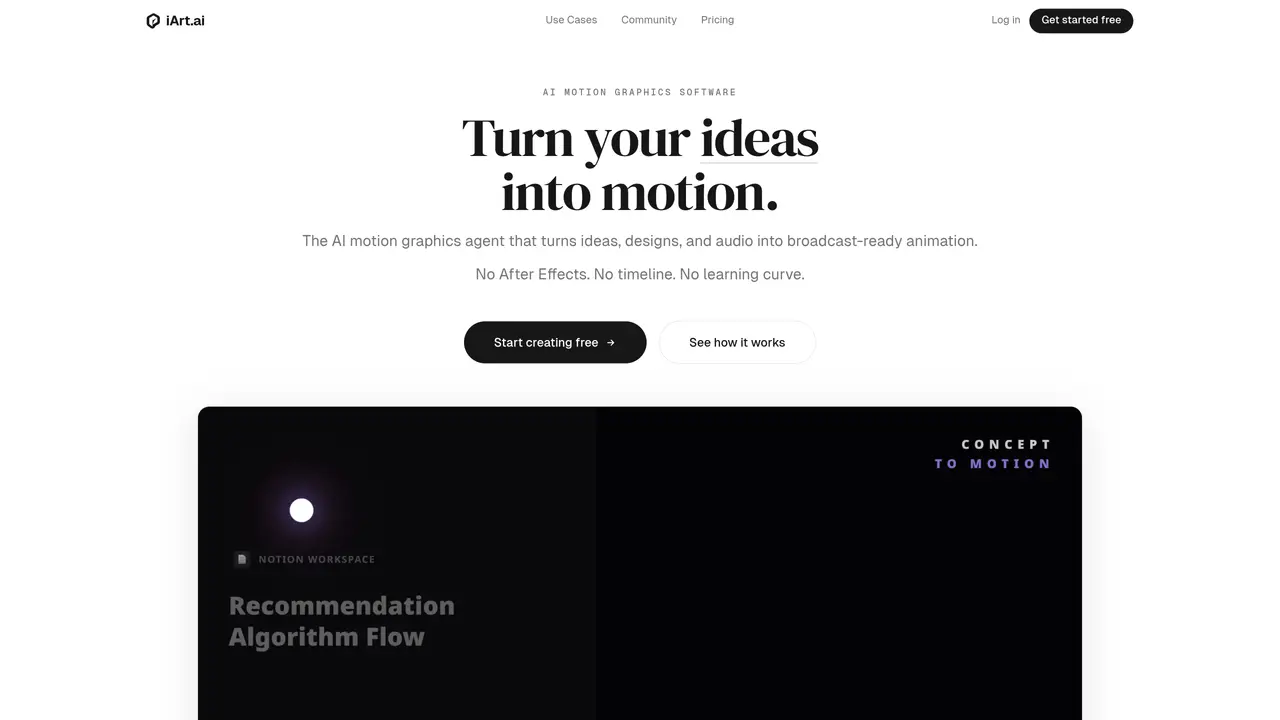
iArt.ai is an AI-powered motion graphics engine that transforms ideas, designs, and audio into broadcast-ready animated videos without requiring After Effects or manual timeline editing. The tool automates layout design, typography, timing, and transitions, enabling users to create polished motion graphics from text descriptions, Figma files, images, or audio inputs in seconds. It enforces brand fonts and colors, syncs animations to voiceovers—including cloned or text-to-speech voices—and supports rapid iteration with cloud-based rendering up to 4K resolution. Non-animators can achieve Apple Keynote-style motion graphics with minimal effort, while experienced users benefit from accelerated workflows and consistent branding across projects. The platform accepts a wide range of inputs, including Notion documents, YouTube links, and existing designs, and provides editable outputs for further customization. iArt.ai positions itself as an AI-powered alternative to After Effects, prioritizing speed and accessibility over complex manual animation techniques. It is designed for creators, marketers, and teams who need to quickly produce explainers, social media clips, product demos, and branded intros without steep learning curves or costly software dependencies.
After Effects requires manual keyframing and months of learning, while iArt.ai generates professional motion graphics from text descriptions in seconds without a timeline, plugins, or a learning curve. It is designed as an AI-powered alternative for non-animators.
Tools like Sora or Runway generate cinematic footage, whereas iArt.ai creates vector-precise motion graphics with intentional typography, layout, and timing—similar to Apple Keynote visuals rather than stock video.
No. You can describe what you want in plain language or drop in an existing file, and iArt.ai handles the design, animation, and timing. Basic writing skills are sufficient to create motion graphics.
iArt.ai accepts text descriptions, Figma designs, Notion documents, images, audio files, YouTube links, and other inputs. It connects to existing tools via MCP integrations with minimal friction.
Yes. Every output is editable, allowing adjustments to timing, colors, text, and easing curves. Unlike many AI tools, iArt.ai provides real control over the final result rather than forcing regeneration.
iArt.ai exports animations as MP4 files (H.264) with support for up to 4K resolution at 60fps. All exports are production-ready and can be shared directly without manual rendering.
iart.ai · third-party estimates from Similarweb
Last 4 months · grows by one month every month
Share of visits by channel
Share of visits · estimated visits
Other countries: 38.3%
How people reach this site from other AI tools
128 a month · 0.4% of all visits
Video & Animation · Sep 2026
Traffic figures are third-party estimates, good for scale and trends; they can differ from a company's own numbers. Updated monthly.
We use essential cookies to run aitoolnavio™, and optional cookies to analyze traffic and measure our marketing. You choose what we use — optional cookies stay off unless you turn them on. See our Privacy Policy.
One short email a week: fresh tools worth trying, honest takes and the updates that actually matter. No spam, unsubscribe any time.
Generate lifelike human videos with AI, making professional video creation fast and accessible for any user.
xAI builds Grok frontier AI models for reasoning, coding, voice, images, video, enterprise workflows, and developer APIs.
AI-powered video messaging tool that records, shares, and manages video messages with AI-generated titles, summaries, and tasks.
Explore and test Google’s experimental AI tools and prototypes before they become products.
Creates licensed videos, images, music.
Web and mobile AI platform for generating, editing, and training custom visuals from prompts with community models and face-swap tools.
Create stunning videos in a few clicks, customize with powerful tools, and automate editing without experience.
Create, convert, and enhance videos effortlessly with professional effects and royalty-free music.
Create engaging videos with voiceovers, music, and customizations using a library of royalty-free assets.
Create auto-resized campaign images and videos with DaVinci AI's generative media suite.
Freemium, uncensored AI video and image creation for individual creators with text-to-video, image effects, and gem-based upgrades for HD and no watermarks.
Generate cinematic video clips from text or images and refine them with AI-powered editing tools for creators and visual professionals.
Matched on what this tool does — grouped by the job you would be replacing.
matches Turns text, images, audio, or Figma designs into broadcast-ready animated videos instantly with AI-generated layouts and motion graphics. · AI-generated layouts and animations · Cloud rendering with 4K export
Free AI tool by Tencent that converts text or images into high-quality videos with realistic motion and cinematic camera work up to 4K resolution.
Instantly generate AI videos, UGC ads, animations, and social media clips from text prompts or images with automated editing workflows.
Convert documents, presentations, and PDFs into professional narrated explainer videos instantly using AI.
A native multimodal AI video generator that turns text, images, and audio into cinematic, physics-aware videos with perfectly synced sound and conversational editing capabilities in a single pass.
matches Kinetic typography synced to voiceovers · AI-generated layouts and animations
matches Brand font and color enforcement · AI-generated layouts and animations
Generate motion graphics, kinetic typography, animated text and social-ready animations from prompts and templates without manual scene building.
Web-based drag-and-drop video editor for adding animated text, templates, and AI captions to social and marketing videos.
Turns text prompts into polished kinetic-typography videos for social media and ads in minutes without design skills or editing.
Turns long-form audio into kinetic typography videos by transcribing and syncing text with visual templates automatically.
Turns documents, URLs, PDFs, images and screen recordings into polished, on-brand videos with AI-driven research, scripting, voiceovers and editing.
AI animated video generator that turns text or pasted content into editable MP4/MOV animations with brand styling for marketers, founders, and creators.
AI video generator that turns text prompts or recordings into polished reels
Transform raw footage into polished videos with Levio's AI-powered video editing agent.