The Best AI Coding Assistants in 2026, Ranked for Real Projects
Most rankings score these tools on how fast they build a to-do app. Almost nobody builds to-do apps for a living. Here's the same field ranked on the thing that actually decides it: how each one behaves in a codebase that already exists, has history, and has to keep running.
Almost every ranking of AI coding tools is a greenfield test. Someone builds a to-do app, or a landing page, or a Pomodoro timer from an empty folder, and the tool that produces the prettiest result in the fewest prompts wins.
Nobody’s job looks like that. Real work is a codebase somebody else started, with four years of history, a test suite that half-passes, a deploy script nobody understands, and a bug that only shows up on Tuesdays. The question isn’t which tool builds fastest from nothing. It’s which one you’d trust inside something that’s already running.
So this ranking uses a different scorecard. Here it is, with the weights, before the list — because a ranking that hides its criteria is just an opinion with a number on it.
The rubric
| Criterion | Weight | The actual question |
|---|---|---|
| Legacy fit | 30% | Can it work inside conventions it didn’t invent, in code it didn’t write? |
| Blast radius control | 25% | When it’s wrong, how much is wrong — and how fast do you get back? |
| Escape hatch | 20% | What survives if the vendor changes the terms, the price, or its mind? |
| Review cost | 15% | How much of your day does reading its output consume? |
| Cost predictability | 10% | Can you forecast next month’s bill within 30%? |
Two things are deliberately not in there. Benchmark scores, because they’re stale before the post is indexed and they measure puzzle-solving, not maintenance. And greenfield speed, because it’s the thing every other ranking already over-weights.
One criterion deserves defending, because it’s unusual: escape hatch, at 20%. On 18 June 2026, Google stopped serving Gemini CLI requests for free users and Google AI Pro and Ultra subscribers, pushing everyone to the closed-source Antigravity CLI. That tool had over 100,000 GitHub stars. Anyone who had wired it into a CI pipeline or a team workflow had a migration, not a choice. For side projects that’s an annoyance. For a real project it’s an outage. If your tooling can be switched off by someone else’s roadmap, that’s a risk, and risks belong in the score.
The ranking
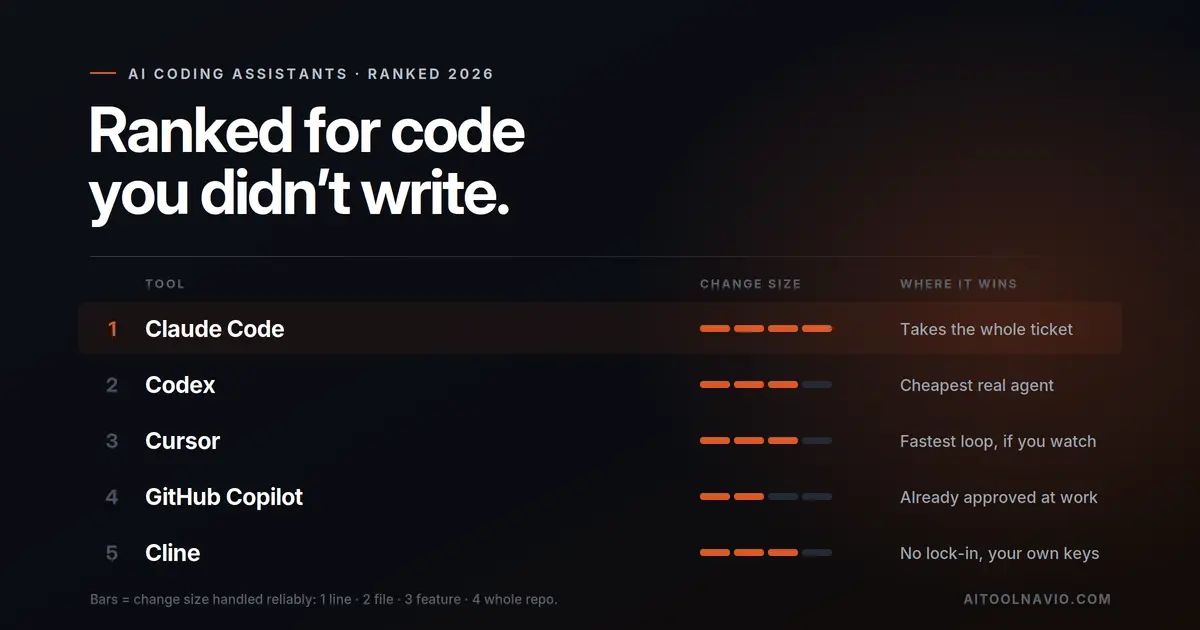
1. Claude Code — the one that finishes the ticket
Claude Code ranks first because it’s built around the assumption that you weren’t watching, and that assumption produces the right features. Checkpoints let you rewind the codebase with /rewind or a double-tap of Esc. Hooks fire your test suite automatically after a change, so a bad edit gets caught by your rules rather than your eyes. Subagents split a large job into parallel tracks. It runs in a terminal, which means it also runs over SSH, in CI, and inside a container — wherever the real code actually lives.
Legacy fit is its strongest column: give it a repo and a clear instruction and it reads before it writes. Blast radius is its weakest — it changes more per run than anything else here, and a vague prompt buys you a confident mistake spread across nine files. Checkpoints are the mitigation, and they’re why it still wins the criterion.
Where it loses points: escape hatch. It’s a closed harness locked to one model family, and it shares a usage pool with your regular Claude chat, so a heavy afternoon of coding eats the same budget as everything else. Cost predictability is the worst of the top five.
2. Codex — the cheapest way into a real agent
OpenAI’s Codex is close enough to first place that the gap is mostly taste. It’s open source, OS-sandboxed, and it rides a ChatGPT subscription you may already be paying for — which is the single biggest reason it outranks tools with more polish. If you have ChatGPT Plus, you have an agent today at no extra cost.
It scores well on escape hatch for the harness (open source, sandboxed) and well on blast radius thanks to sandboxing and budgets. It gives up ground on legacy fit — it needs more operational supervision than Claude Code, and more of the guardrails are yours to build.
Watch the billing shape. Codex usage runs on rolling five-hour windows rather than a monthly pool, which is a genuinely different rhythm to plan around. A heavy morning can leave you throttled at 2pm.
3. Cursor — the best experience, if you’re watching
Cursor is the most coherent product in this list and the most pleasant to use. Cursor 2.0 brought a multi-agent interface, parallel agents running on git worktrees or remote machines, a built-in browser for testing what the agent just changed, and Composer — an in-house model that Cursor says finishes most turns in under 30 seconds.
That speed earns real points on review cost, because a fast loop means you catch a wrong turn in ten seconds rather than ten minutes. And blast radius is well handled: you see every diff before it lands.
Why it’s third and not first: it’s an entire IDE. Adopting Cursor on a real project means moving your editor, your extensions, and your team’s setup. That’s a genuine cost, and it’s a cost you pay again if you ever leave. Its escape hatch score suffers for the same reason — your workflow lives inside one vendor’s fork of VS Code.
4. GitHub Copilot — the one that’s already approved
GitHub Copilot wins a criterion none of the others can touch: it’s already in your editor, already through procurement, and already on the security team’s approved list. On a real project inside a real company, that’s not a footnote. It’s often the whole decision.
It has the best blast radius score by a distance — most of what it does is a line at a time, and rejecting a suggestion costs one keystroke. It has the best cost predictability too, with the only serious free tier in the category and the cheapest paid entry point.
Why it’s fourth: legacy fit at the scale that matters. It has an agent mode, a CLI, and a coding agent that works on GitHub issues, and they’re all fine. But its center of gravity is still the inline suggestion, and a refactor spanning forty files is not what it’s shaped for. It also had the messiest pricing year of the group, moving to usage-based billing mid-stream.
5. Cline — the hedge
Cline is here for one reason: it’s the highest-scoring tool on escape hatch, and after the Gemini CLI shutdown that’s worth more than it was in January. It’s open source, it extracted an Apache-licensed SDK in May 2026, and it’s bring-your-own-key — so it runs on whichever model you point it at. It supports parallel agents and headless CI runs.
The trade is real: you assemble more, you configure more, and nobody’s tuning the harness-and-model pairing for you. If you’re the person on your team who’d rather own the stack than rent it, this is the pick. If you want it to work on Tuesday afternoon without reading docs, it isn’t.
6. Windsurf — good tool, awkward position
Windsurf does several things well — its Cascade agent and persistent Memories are genuinely useful on long-running work, and at $15/month Pro it’s the cheapest full IDE here. It also has the most generous free tier of any editor in this list.
It ranks sixth because it’s competing directly with Cursor on Cursor’s own ground, and on a real project the tiebreaker is momentum: ecosystem, extensions, community answers to your specific problem at 11pm. Worth trialling if the price gap matters to you; hard to argue as a default.
7. Google Antigravity — rank with an asterisk
Antigravity is a strong product. It’s an agent-first fork of VS Code with an IDE, a CLI and an SDK, a manager view for orchestrating several agents at once, and access to Gemini 3.1 Pro — plus Claude and open-model options. During preview it’s free with generous limits, which makes it the best value in the category on paper.
The asterisk is the reason it’s seventh. Antigravity is the tool that Gemini CLI users were migrated into, on a deadline, after the thing they’d built on was switched off. Free preview pricing is not a plan you can budget against, and “generous limits” is a sentence that gets edited. Excellent for evaluation and side work. I’d want to see it out of preview before putting a team’s real project on it.
8. OpenCode and Aider — the honorable mentions
OpenCode is the largest open-source harness in the category, MIT-licensed, supporting 75+ model providers. If maximum portability is your top criterion, it beats Cline on breadth — it’s ranked lower only because it asks more of you before it’s useful.
Aider deserves mention for inventing the shape most of these tools now use: git-native pair programming with atomic commits, so every AI change is a reviewable, revertable commit. It’s still excellent at exactly that. But its release pace has slowed while the field went agentic, and on a real project you’re now choosing it for a philosophy rather than a capability.
The tier that shouldn’t be in this ranking at all
Lovable, Bolt.new, Vercel v0 and Replit show up in almost every “best AI coding tool” list, and including them is a category error that costs people real money.
These are app builders. They’re outstanding at going from nothing to a working, deployed prototype in an afternoon — genuinely the fastest path from idea to URL that has ever existed. That is a real and valuable job.
It is not this job. They’re built to generate a codebase, not to live inside one that already exists with conventions, history and a team. Point them at a mature repo and you get confident output that ignores everything that makes it yours. Use them to find out whether the thing is worth building. Use the tools above to build the thing you’re going to maintain.
What you’ll pay
| Tool | Free tier | Entry | Heavy use |
|---|---|---|---|
| Claude Code | No | Claude Pro $20/mo | Max from $100/mo |
| Codex | Limited | ChatGPT Plus $20/mo | Pro $200/mo · Business ~$25–30/user |
| Cursor | Hobby | Pro $20/mo | Pro+ $60 (~3×) · Ultra $200 (~20×) |
| GitHub Copilot | 2,000 completions/mo | Pro $10/mo ($15 credits) | Pro+ $39 ($70) · Max $100 ($200) |
| Cline | Free tool | Your model bill only | Whatever you spend on tokens |
| Windsurf | Yes | Pro $15/mo (500 credits) | Teams $30/user/mo |
| Antigravity | Free in preview | — | — |
Every paid tool here bills for usage above what’s included, so treat the sticker price as a floor. Copilot is cheapest to start, Cline is cheapest to run if you already buy API credits, and Claude Code is the easiest to accidentally overspend on because its budget is shared with your chat usage.
The ranking flips if…
- …you work somewhere with procurement. Copilot moves to first. The best tool you can’t install ranks below the adequate tool you can.
- …you already pay for ChatGPT. Codex moves to first on value alone. Try it before adding a second subscription.
- …your code can’t leave your network. Cline or OpenCode move to the top, because they’re the ones you can point at a self-hosted model.
- …you’re maintaining one big legacy monolith. Claude Code extends its lead. Whole-repo context is exactly the problem it’s shaped for.
- …you’re prototyping, not maintaining. Throw this ranking out and use an app builder. Different job, different list.
What to actually do this week
Don’t trial five tools. Do this instead: take one real ticket from your backlog — not a toy, something with an awkward dependency and a test you’re afraid of — and run it through two tools. One from the top of this list, one you can get for free.
Then measure the only thing that matters: how long did review take, and did you understand the result? A tool that writes a correct patch you can’t follow has not helped you. It’s moved the work to next quarter and added interest.
That’s the whole test. Everything above is just a shortcut to picking which two.
Go deeper
- Head-to-head on the top three: Cursor vs GitHub Copilot vs Claude Code
- Full listings: Claude Code, Cursor, GitHub Copilot, Windsurf
- Browse every AI coding assistant or put two side by side
- On a budget? Free AI tools
FAQ
What is the best AI coding assistant in 2026?
For working inside an existing codebase, Claude Code — it handles the largest unit of work and gives you checkpoints to undo it. For value, Codex, because it’s included with a ChatGPT subscription. For teams inside a company, GitHub Copilot, because it’s already approved.
Which AI coding assistant is best for legacy code?
Claude Code, with Codex close behind. Both read a repository before editing and can hold a whole-project change in one task. Inline-completion tools help you type inside legacy code but won’t carry a cross-cutting refactor.
Is there a good free AI coding assistant?
Yes — three. GitHub Copilot’s free tier gives 2,000 completions a month, Windsurf has a free plan, and Google Antigravity is free during its preview. Cline is free software; you pay only for model usage.
Should I use an app builder like Lovable or Bolt for a real project?
Use them to validate an idea fast, not to maintain one. They’re built to generate a codebase rather than work inside an existing one, so they tend to ignore the conventions and history that a maintained project depends on.
What happened to Gemini CLI?
Google stopped serving Gemini CLI requests for free users and Google AI Pro and Ultra subscribers on 18 June 2026, directing them to Antigravity CLI. Gemini Code Assist Standard and Enterprise customers kept access. It’s the clearest recent argument for weighting vendor risk when you choose tooling.
Do I need more than one?
Most people settle on two — an inline assistant for typing and an agent for tasks. Copilot plus Claude Code or Codex is the common pairing, and they don’t conflict because one lives in your editor and the other in your terminal.
Primary sources:
- Gemini CLI retirement, 18 June 2026, and the Antigravity CLI migration — the official
google-gemini/gemini-cliGitHub discussion. Enterprise carve-out (Gemini Code Assist Standard/Enterprise, Google Cloud) confirmed there. - Copilot tiers, credits and free-tier completion count — github.com/features/copilot/plans
- Cursor plans and on-demand billing — cursor.com/pricing; Composer, multi-agent, worktrees, browser tool and the “under 30 seconds” claim — cursor.com/blog/2-0, attributed to Cursor in-text
- Claude plan pricing and Claude Code inclusion — claude.com/pricing; checkpoints, hooks, subagents, background tasks — Anthropic’s announcement
- Windsurf plans and credits — windsurf.com/pricing
- Antigravity — launch date, VS Code fork, agent-first design, manager view, free preview, Gemini 3.1 Pro plus Claude and open-model support
Liked this? We do one every Friday.
The week's new AI tools, what each one actually does, and the ones worth your time — written the same way as this post.
One email a week · unsubscribe in one click