
Automate job postings, track applicants, and streamline hiring with an intuitive HCM platform for talent acquisition.
32M visits/mo+3.9%#5 Business & Marketing

AI-powered bulk file renamer for macOS that suggests descriptive filenames from document content with user approval.
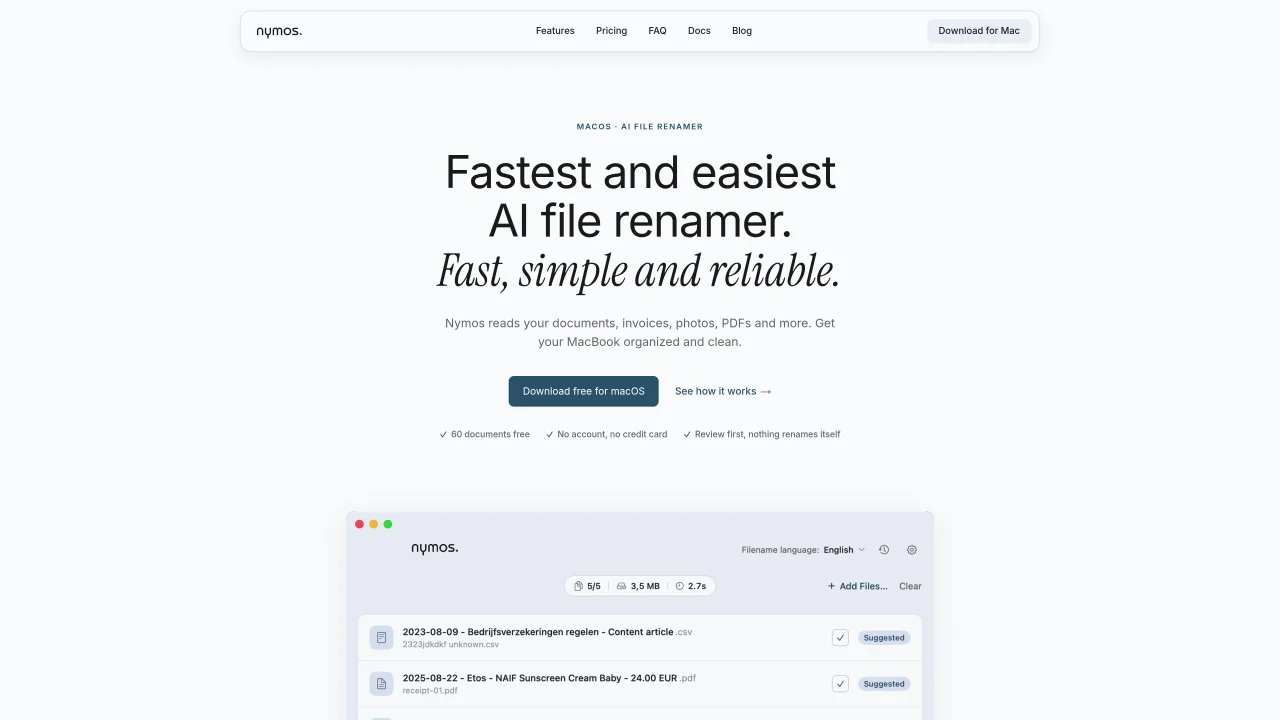
Nymos is a macOS application that uses AI to rename files in bulk based on their content. It reads 57 file types including PDFs, Office documents, Pages files, photos, and text files, using built-in OCR for scanned documents. The tool suggests descriptive filenames that follow patterns you can define with templates, such as date, type, vendor, and amount fields. The workflow is designed around user control: Nymos analyzes files and suggests new names, but nothing is renamed without your approval. You can review suggestions, undo changes with Command-Z, and track the full history of every rename operation. A watch folder mode can monitor directories like Downloads and automatically suggest names for new arrivals. Nymos offers two pricing models. The managed plan runs AI processing on EU-based servers for $9 per month with 400 documents included, while the self-managed option is a $79 one-time purchase where you connect your own AI provider key from Anthropic, OpenAI, Gemini, or other OpenAI-compatible endpoints. The free trial includes 60 documents with no account or credit card required. Content is processed and then discarded, with no permanent storage or model training.
Nymos reads the content of files such as PDFs, Office documents, photos, and text files, then suggests clear, descriptive filenames based on the extracted information. Users review each suggestion before applying it, ensuring no automatic renaming occurs.
Nymos supports 57 file types, including PDFs (with built-in OCR for scans), Word, Excel, PowerPoint, Pages, Numbers, Keynote, OpenDocument, HEIC photos, plain text, Markdown, CSV, and video or audio files named from metadata.
No. Nymos never renames files automatically. Even in watch folder mode, it only prepares suggestions that require user review before any changes are made.
No. Nymos only renames files in place, leaving folder structures and file locations unchanged.
By default, Nymos names files in the language detected in the content, such as Dutch for 'factuur' or German for 'Rechnung.' Users can also standardize filenames to English, Dutch, or Spanish.
The watch folder mode monitors directories like Downloads and automatically analyzes new files, suggesting names that users can review and approve before applying.
We use essential cookies to run aitoolnavio™, and optional cookies to analyze traffic and measure our marketing. You choose what we use — optional cookies stay off unless you turn them on. See our Privacy Policy.
One short email a week: fresh tools worth trying, honest takes and the updates that actually matter. No spam, unsubscribe any time.
Automate job postings, track applicants, and streamline hiring with an intuitive HCM platform for talent acquisition.
Automate workflow, optimize operations, and detect potential issues with this efficient AI-driven solution.
AI automation and agent-building platform with 3,000+ app integrations
Automate email sending, save leads to CRMs, and create complex workflows for customer support tickets.
Open-source workflow automation platform to build, run, and monitor agentic and traditional workflows with 500+ integrations and AI governance.
AI-powered platform streamlining workflows with no-code automation.
With Accio, manufactures/ products/ suppliers/ inspirations will come to you, any time, any where.
Create & deploy AI apps, access real-time insights, and easily build models with an intuitive user interface.
Automate outreach campaigns, create personalized emails with AI, and monitor results with detailed analytics.
AI-powered fleet management platform for trucking, delivery, and field service teams, combining GPS tracking, ELD compliance, dash cams, maintenance, and spend management.
Automate tasks, streamline workflows, and create powerful automation flows effortlessly.
Control your computer and apps from any chat.
Matched on what this tool does — grouped by the job you would be replacing.
Paid placement · similar tools from listings that support aitoolnavio™
Instant lead response for home-service pros: your phone rings on every new lead, plus 14 days of follow-up
matches AI-powered filename suggestions from file content · Supports 57 file types including PDFs, Office docs, and scanned images · Built-in OCR for scanned documents
Auto-renames messy files using content into clear labels.
macOS app that renames screenshots and files by content and provides private, offline search for Mac users.
Desktop AI file renamer for Mac and Windows that analyzes images and documents to generate meaningful filenames with local or private cloud processing options.
AI-powered file renamer for PDFs, scans and documents