
Design, distribute, and analyze surveys online or via email with real-time insights using Survey Monkey.
38M visits/mo-3.9%#2 Business & Marketing

AI tool that converts research PDFs into verifiable literature review matrices
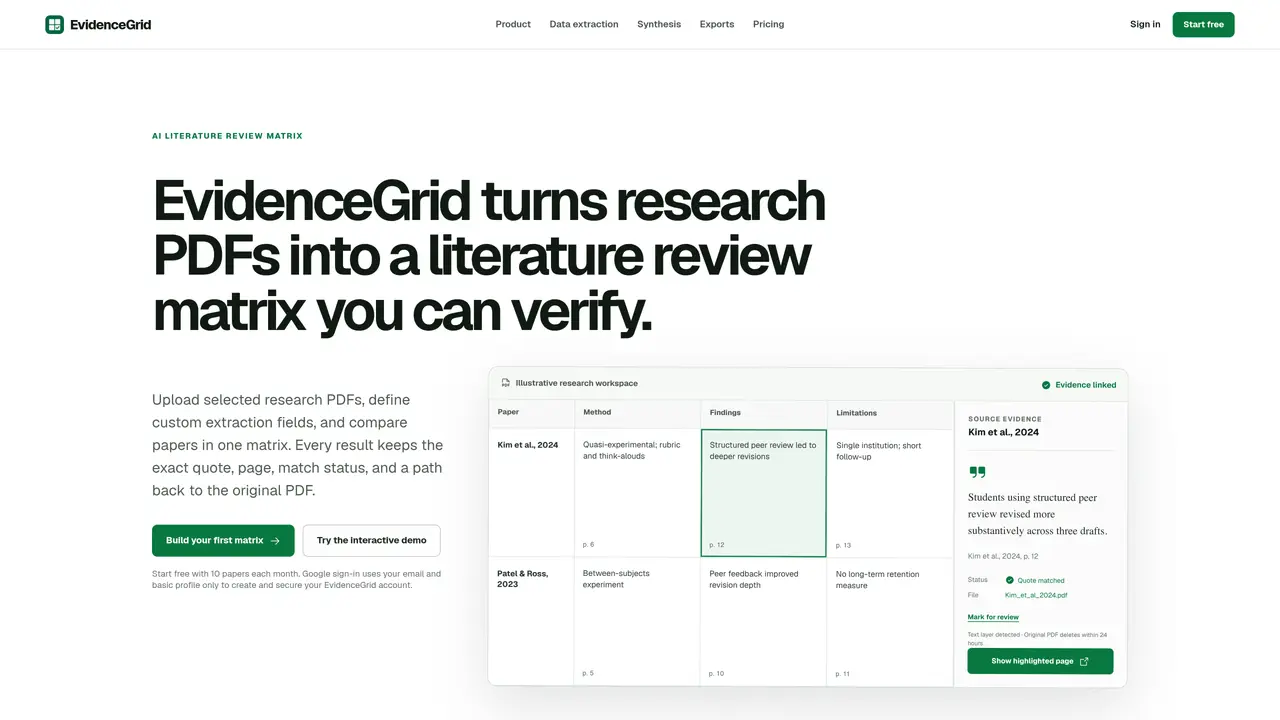
EvidenceGrid is a research workflow tool that converts PDF-based academic literature into structured literature review matrices. It extracts exact quotes, page numbers, source links, and metadata while preserving the original context of each citation. Researchers upload PDFs or reference files, then define custom extraction fields tailored to their specific research questions, such as study design, sample size, or key findings. The platform supports batch processing for large literature reviews, evidence verification with repair options to correct extraction errors, and cross-paper synthesis to identify themes, agreements, disagreements, limitations, and research gaps. Users can export matrices in multiple formats, including PDF, Word, Excel, or Obsidian, and optionally deliver results directly to reference managers like Zotero or note-taking tools such as Notion. Workspaces can be saved as reusable templates, enabling researchers to replicate extraction schemas across projects without rebuilding structures or re-uploading papers. The tool emphasizes reproducibility by maintaining traceable links between extracted evidence and original sources, facilitating transparent and verifiable literature reviews.
An AI literature review matrix organizes comparable evidence from multiple research papers into structured fields. EvidenceGrid keeps each extracted answer linked to its exact quote, page number, match status, and source PDF, allowing researchers to verify the matrix before synthesis or export.
EvidenceGrid is designed for researchers, academics, and students who need to systematically extract, verify, and synthesize evidence from research PDFs. It supports structured literature reviews, systematic reviews, and evidence-based workflows.
EvidenceGrid offers a Free plan that includes custom fields, reusable templates, evidence review, synthesis, file downloads, and Obsidian export. Paid plans provide additional features and higher usage limits; details are available on the pricing page.
EvidenceGrid supports direct delivery of verified evidence to Zotero and Notion. It also allows importing references in RIS, BibTeX, and CSV formats, and exporting results in PDF, Word, Excel, or Obsidian formats.
EvidenceGrid requires supported PDFs for extraction, and its accuracy depends on the quality of the source material. Repair options are available for uncertain fields, but results may still require manual verification for complex claims.
To get started, create a workspace, define your research question, and choose a template or custom extraction fields. Upload research PDFs or import references, then extract and verify the evidence before exporting or synthesizing the results.
We use essential cookies to run aitoolnavio™, and optional cookies to analyze traffic and measure our marketing. You choose what we use — optional cookies stay off unless you turn them on. See our Privacy Policy.
One short email a week: fresh tools worth trying, honest takes and the updates that actually matter. No spam, unsubscribe any time.
Design, distribute, and analyze surveys online or via email with real-time insights using Survey Monkey.
Create targeted campaigns, automate email campaigns, and analyze performance for maximum ROI.
Discover keywords, analyze competitors' SEO strategies, and make data-driven decisions for website performance.
Analyze website performance, track competitors' tactics, and access comprehensive analytics and optimization features.
YouTube and Instagram growth toolkit with AI-powered optimization and analytics
Develop, run data jobs, transform datasets, leverage ML algorithms for actionable insights.
Streamline hiring, monitor job performance, and choose flexible pricing plans.
Unified AI-powered platform for real-time monitoring, analytics, and security across cloud infrastructure, applications, and services.
Securely store, analyze, and scale data while enhancing security and performance with encryption and automated backups.
AI-powered customer feedback platform for mid-market businesses to run conversational surveys and extract insights.
Automate review requests, analyze sentiment, and monitor ratings with a streamlined dashboard for improved customer feedback.
Monitor brand performance, create content for social media, and gain insights with deep analytics.
Matched on what this tool does — grouped by the job you would be replacing.
matches PDF and reference file uploads (RIS, BibTeX, CSV) · Custom extraction fields with evidence requirements · Background extraction jobs for matrix population
AI-assisted qualitative coding and evidence synthesis for researchers
AI-powered research workspace for literature reviews and evidence synthesis
AI-powered research workspace for literature review, PDF analysis and academic writing
matches PDF and reference file uploads (RIS, BibTeX, CSV) · Custom extraction fields with evidence requirements · Background extraction jobs for matrix population
matches Natural language Q&A with answers citing exact page and passage · Multi-document chat sessions for cross-referencing and synthesis · AI writing with citations for academic and marketing content
AI document automation tool that extracts fields from PDFs, images, and files to autofill PDF templates or Google Sheets for teams and individuals.
Converts PDFs, images and Office files into structured JSON, CSV or Excel with AI-powered OCR and field extraction.
A web-based generative AI workspace for writing with citations, file-based chat, and media generation.
Turns PDFs and documents into searchable Q&A with page-level citations