AI chatbot for conversation, work, research, coding, and content creation.
5.9B visits/mo+5%#1 Chatbots & Assistants
AI chatbot for websites that can be trained on business data and embedded without code
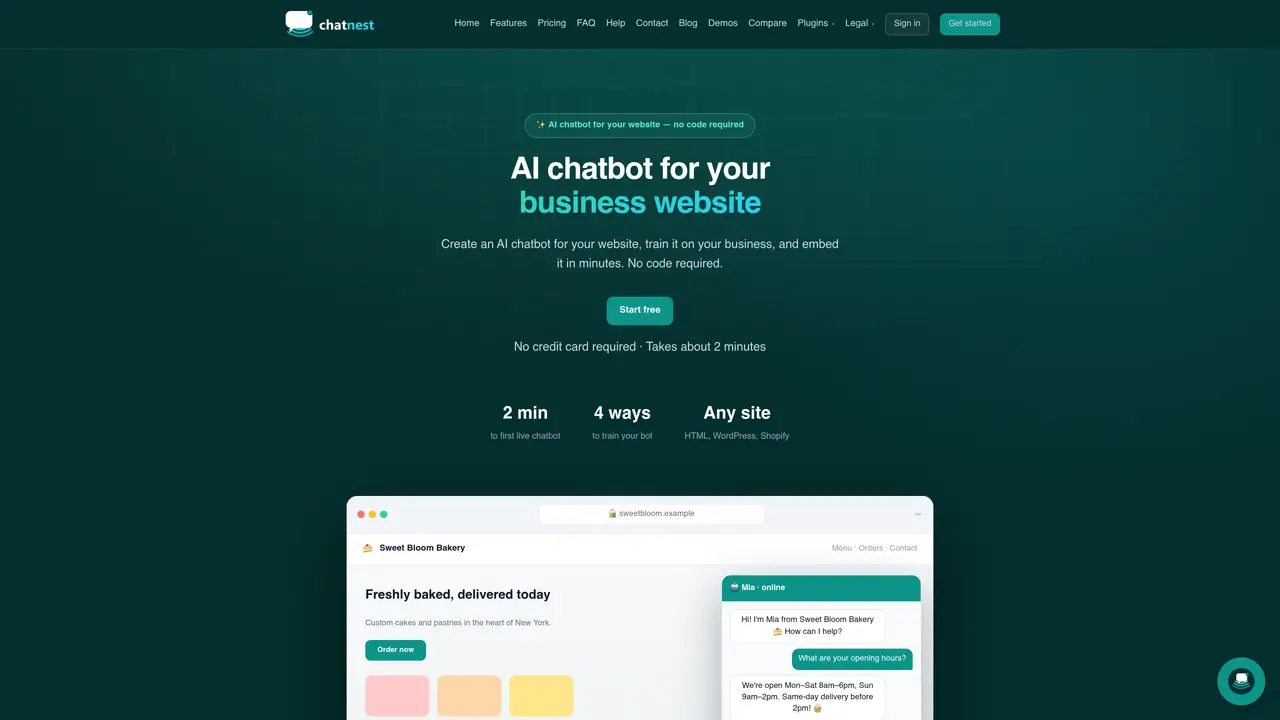
ChatNest is an AI-powered chatbot service designed to be deployed on websites with minimal setup. Users create a chatbot, train it using business information such as FAQs, website content, or custom rules, and then embed it on their site using a single script tag. The platform supports integration with HTML, WordPress, Shopify, React, and Webflow sites. Once live, the chatbot handles customer inquiries by answering questions sourced from the provided knowledge base, with attribution to specific pages or FAQs. It includes features like lead capture, multilingual support, voice chat, and a live inbox for human takeover when needed. The service provides weekly insights on missed questions and new leads, helping businesses refine the bot’s responses over time.
No code is required. The chatbot is configured entirely through the dashboard, and embedding it on a website involves copying a single script tag into the site’s HTML.
The chatbot can be trained using four methods: pasting business information, adding FAQ pairs, setting behavior rules, or entering a website URL for automatic crawling of up to 25 pages on the free plan.
The platform uses a fast, frontier-class language model selected by ChatNest. No API keys or technical setup are required on the user’s side; training and embedding are handled through the dashboard.
Yes. The live inbox allows users to manually take over conversations, responding as a human while the visitor continues in the same thread.
The widget can be installed on any website that supports a script tag, including plain HTML, WordPress, Shopify, React, and Webflow.
Visitors will see a friendly notice, and the conversation will pause until the next day or until the user upgrades their plan.
We use essential cookies to run aitoolnavio™, and optional cookies to analyze traffic and measure our marketing. You choose what we use — optional cookies stay off unless you turn them on. See our Privacy Policy.
One short email a week: fresh tools worth trying, honest takes and the updates that actually matter. No spam, unsubscribe any time.
AI chatbot for conversation, work, research, coding, and content creation.
Create and interact with AI companions and virtual characters using GPT-4o on Chub AI's platform.
Open-source Chinese AI chatbot for conversational AI, coding, and agentic workflows, built on the GLM-5 architecture.
Automate customer responses, personalize messages, and create an AI-powered chatbot for 24/7 customer service.
Chat with many top models for everyday tasks.
Overchat AI is an all-in-one platform that brings together the world’s leading AI models in a single application.
AI-powered platform for targeted online ad management, performance analysis, and strategy optimization with human oversight.
AI-powered tarot readings and personalized interpretations for self-reflection and guidance.
Turn hand-drawn sketches into editable 3D models and photorealistic images with AI.
Empower teams with AI-driven chat, data analysis, and workflow automation.
Get answers, writing help, and plans across devices with Nova AI App.
AI-powered app builder that turns data into functional web apps without coding.
Matched on what this tool does — grouped by the job you would be replacing.
Paid placement · similar tools from listings that support aitoolnavio™
Anonymous AI chat for 200+ models. No email or phone: a random account number, or chat as a guest.
matches Answers with sources from business content · Instant FAQ answers · Knowledge base training from multiple sources
matches Lead capture with email alerts · Weekly insights digest
matches Multilingual support (7 languages) · Voice chat functionality
A platform to create custom chatbots trained on your website and knowledge base content.
Build multilingual website chatbots from documents in minutes with no-code AI.
Build GPT-based support agents trained on internal data for 24/7 customer service, HR assistance, and lead capture with seamless human handoff.
Web-based AI customer service chatbot for businesses that answers questions in 95 languages and trains on URLs or files.
Revolutionize customer support with AI, no-code customization, and omnichannel integration.
AI-powered chatbot platform for automating website support and lead capture
AI chat assistant for businesses that answers questions, books appointments and escalates to humans
AI assistant that reads a website and answers visitor questions automatically
Transform your website with AI-driven, multilingual, 24/7 chatbot support.
Build GPT-4 support and sales bots trained on your content and deploy them on websites or messengers without coding.
AI customer-support agents trained on a business’s own content across multiple channels
AI support agent handling website chat, voice and messaging channels