
AI-powered video messaging tool that records, shares, and manages video messages with AI-generated titles, summaries, and tasks.
16M visits/mo-3.4%#5 Chatbots & Assistants
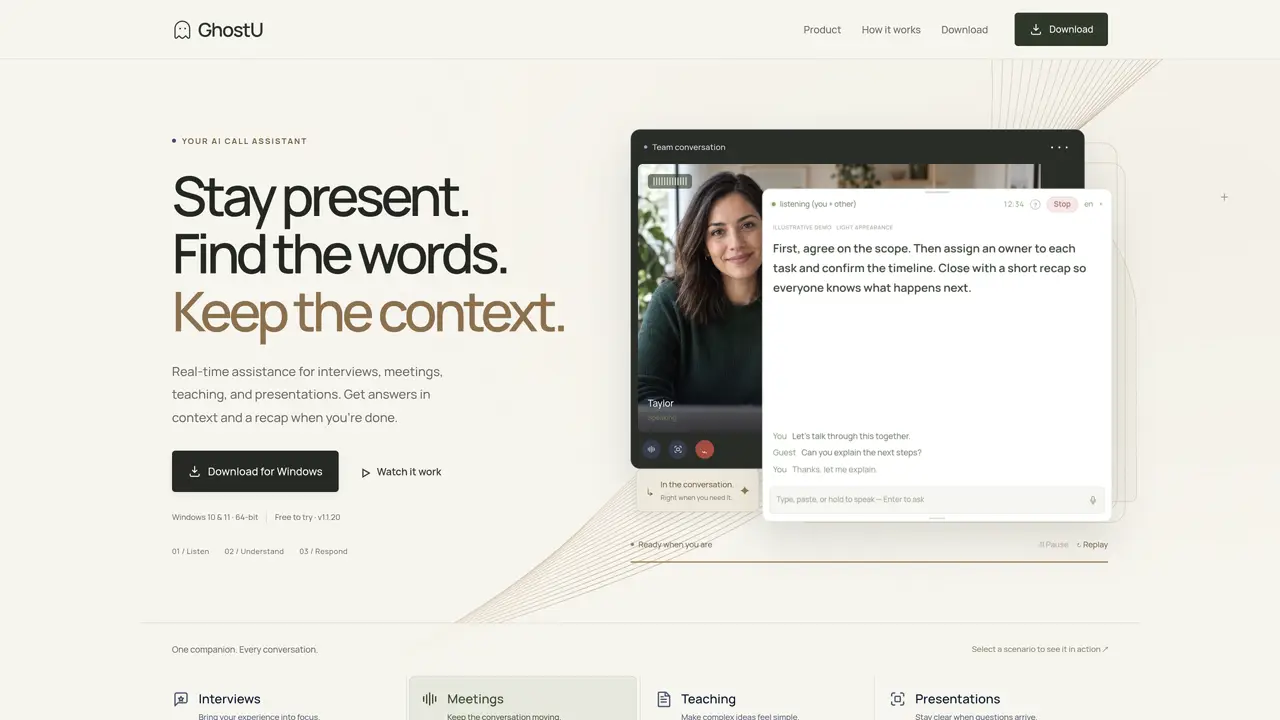
Ghost U is a desktop application that provides real-time assistance during interviews, meetings, teaching sessions, and presentations. It listens to both the user’s microphone and call audio, generating a live, color-coded transcript to maintain conversation context. Users can press Ctrl+Enter to receive context-aware answers or Ctrl+9 to capture and query on-screen content. The tool supports multi-snip functionality for stacking screenshots and includes click-through capability to interact with underlying applications. After a session ends, Ghost U automatically generates a categorized recap with questions, answers, and screenshots for later review. The application operates as a private panel that remains hidden from shared screens, ensuring only the host sees the notes and suggestions. It requires no additional setup beyond installation and login, and allows users to select different AI models for different tasks.
Ghost U is a desktop application that provides real-time assistance during interviews, meetings, teaching sessions, and presentations. It is designed for professionals, educators, and presenters who need contextual support while engaging with others.
Ghost U listens to both the user’s microphone and call audio, generating a live, color-coded transcript to maintain conversation context. Users can press Ctrl+Enter for context-aware answers or Ctrl+9 to capture and query on-screen content.
No, Ghost U operates as a private panel that remains hidden from shared screens, ensuring only the host sees the notes and suggestions.
After a session ends, Ghost U automatically generates a categorized recap with questions, answers, and screenshots for later review.
Yes, Ghost U allows users to select different AI models for different tasks.
Ghost U is available for Windows 10 and 11 (64-bit). macOS and Linux builds are in development.
We use essential cookies to run aitoolnavio™, and optional cookies to analyze traffic and measure our marketing. You choose what we use — optional cookies stay off unless you turn them on. See our Privacy Policy.
One short email a week: fresh tools worth trying, honest takes and the updates that actually matter. No spam, unsubscribe any time.
AI-powered video messaging tool that records, shares, and manages video messages with AI-generated titles, summaries, and tasks.
Hardware device that records conversations and converts them into searchable transcripts, summaries, and notes.
Automate transcription, generate summaries, identify speakers, and timestamps for video-conferencing conversations.
AI-powered meeting recorder and summarizer that captures, transcribes, and generates actionable insights from conversations.
Automatically record, transcribe, take notes, and create summaries with key insights during meetings.
Transforms audio/video to summarized text, instantly, across platforms.
Automatically transcribe meetings, create summaries, and securely store audio files in a searchable format.
Automatically turn meetings into searchable notes and tasks.
Wearable AI device that captures conversations and meetings, then auto-generates transcripts, summaries, action items, mind maps, and searchable notes.
Record, transcribe, and share key insights from virtual trainings, online meetings, and content creation.
Record, transcribe, and summarize online meetings from Google Meet and Zoom with AI, then share insights across collaboration tools.
Transform audio/video to text with precision, supporting 1500+ platforms, enriched by AI features.
Matched on what this tool does — grouped by the job you would be replacing.
matches Live color-coded transcription · Context-aware answer suggestions · Click-through interaction
Real-time AI interview assistant that transcribes interviewer audio and provides hidden answer suggestions during live interviews on Zoom, Google Meet, Teams, and coding sessions.
Real-time AI assistant that provides live, private answers during calls using on-device processing
Real-time AI overlay for live calls that provides live guidance and automatic recaps
matches Screen capture with Ctrl+9 · Multi-snip screenshot stacking · Panel opacity adjustment
matches Real-time transcription with local model · Floating panel for streaming AI answers · Session capture and searchable transcripts
Real-time AI interview assistant that transcribes questions and surfaces suggested answers during live interviews on Zoom, Meet, Teams, and coding platforms.
AI interview assistant that provides real-time answers during live video calls without being detected
Real-time AI assistant for interviews that provides structured answers without detection
AI meeting copilot that transcribes calls locally and streams answers in a floating panel
Local interview assistant that drafts answers during calls on macOS
Local-first AI assistant that listens to interviews and streams answers to a paired device