AI-powered video messaging tool that records, shares, and manages video messages with AI-generated titles, summaries, and tasks.
16M visits/mo-3.4%#5 Chatbots & Assistants

A desktop AI assistant that captures meeting notes, summarizes context across apps, supports AI writing with memory, and tracks tasks.
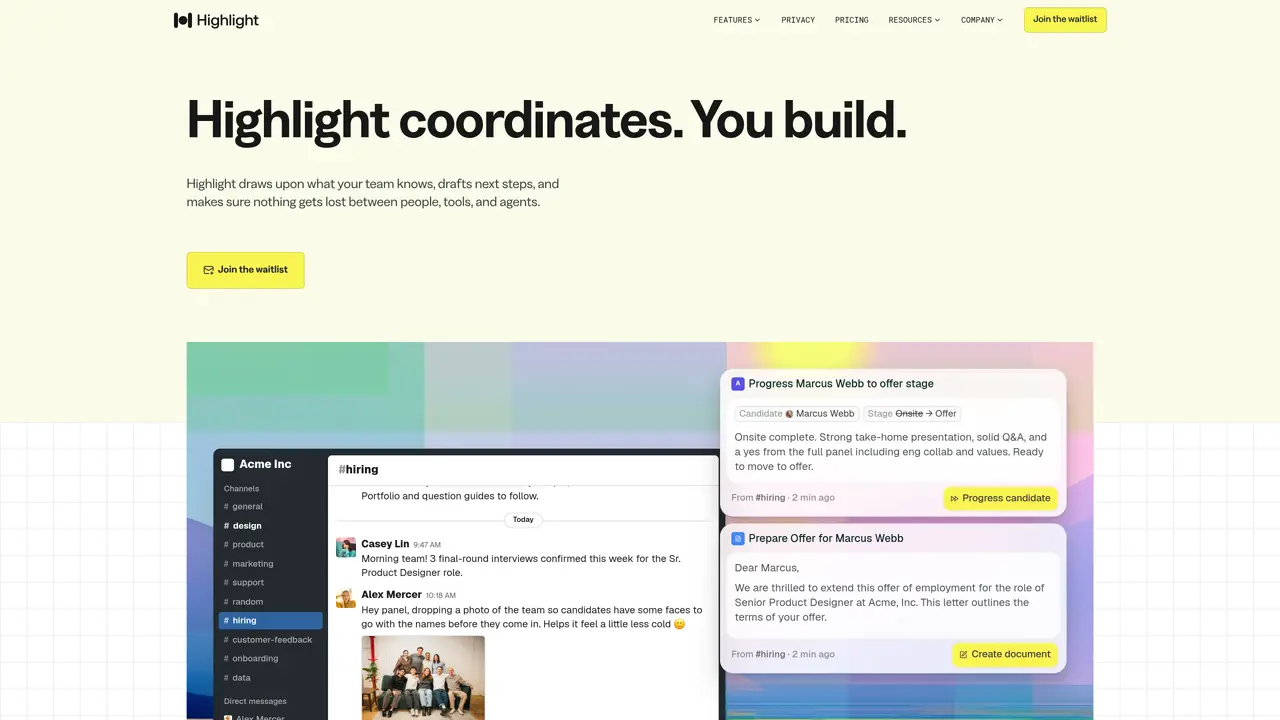
Highlight AI is a desktop personal AI assistant designed for professionals, students, and teams. It captures context across desktop applications to transform everyday work into searchable notes, writing support, and action items. The tool provides chat intelligence that leverages on-screen context, allowing users to ask questions and receive assistance based on real-time desktop activity. It generates magic meeting notes, including transcription, summaries, and instant action items, without requiring meeting bots. Highlight AI supports memory-backed AI writing for drafting and rewriting with continuity across documents and sessions. It also offers hands-free voice interaction and automated task tracking to capture and follow up on work as it happens. The assistant is built to work across multiple platforms and integrates with tools like Notion and Google Docs, emphasizing privacy-forward design with local processing for audio transcription and screen context. It is used by over 500,000 users and teams worldwide and maintains SOC 2 Type II compliance in its trust center.
Highlight AI is a desktop personal AI assistant that captures context across desktop applications to transform everyday work into searchable notes, writing support, and action items. It leverages on-screen context to provide chat intelligence, generate meeting notes, and automate task tracking without requiring meeting bots.
Highlight AI is designed for professionals, students, teams, and organizations of all sizes. It supports roles such as product managers, engineers, designers, and recruiters by automating coordination tasks and preserving institutional knowledge.
Highlight AI captures commitments, decisions, and context from meetings, messages, and documents in real time. It then connects this information into a shared memory that the entire team can access, ensuring nothing gets lost between people and tools.
Key features include automated meeting notes with transcription and summaries, hands-free voice interaction, memory-backed AI writing, automated task tracking, and integrations with tools like Notion, Google Docs, Slack, and Linear. It also offers local processing for privacy and SOC 2 Type II compliance.
Yes, Highlight AI integrates with a wide range of tools your team already uses, including Notion, Google Docs, Slack, Linear, and email platforms. It connects to these tools to capture context and automate workflows seamlessly.
To get started with Highlight AI, visit the official website and join the waitlist. Once available, you can download and install the desktop application to begin capturing context and automating your workflows.
highlightai.com · third-party estimates from Similarweb
Last 4 months · grows by one month every month
Share of visits · estimated visits
Other countries: 28%
Chatbots & Assistants · Sep 2026
Traffic figures are third-party estimates, good for scale and trends; they can differ from a company's own numbers. Updated monthly.
We use essential cookies to run aitoolnavio™, and optional cookies to analyze traffic and measure our marketing. You choose what we use — optional cookies stay off unless you turn them on. See our Privacy Policy.
One short email a week: fresh tools worth trying, honest takes and the updates that actually matter. No spam, unsubscribe any time.
AI-powered video messaging tool that records, shares, and manages video messages with AI-generated titles, summaries, and tasks.
Hardware device that records conversations and converts them into searchable transcripts, summaries, and notes.
Automate transcription, generate summaries, identify speakers, and timestamps for video-conferencing conversations.
AI-powered meeting recorder and summarizer that captures, transcribes, and generates actionable insights from conversations.
Automatically record, transcribe, take notes, and create summaries with key insights during meetings.
Transforms audio/video to summarized text, instantly, across platforms.
Automatically transcribe meetings, create summaries, and securely store audio files in a searchable format.
Automatically turn meetings into searchable notes and tasks.
Wearable AI device that captures conversations and meetings, then auto-generates transcripts, summaries, action items, mind maps, and searchable notes.
Record, transcribe, and share key insights from virtual trainings, online meetings, and content creation.
Record, transcribe, and summarize online meetings from Google Meet and Zoom with AI, then share insights across collaboration tools.
Transform audio/video to text with precision, supporting 1500+ platforms, enriched by AI features.
Matched on what this tool does — grouped by the job you would be replacing.
matches Captures meeting notes and summaries automatically · Provides chat intelligence with on-screen context · Tracks tasks and follow-ups hands-free
Streamline meeting notes and action items with AI, ensuring efficiency and data security.
AI-powered meeting assistant that records, summarizes, and organizes notes from Zoom, Google Meet, and Teams with seamless workflow integration.
Automatically record Mac meetings, generate notes and follow-ups.
MacOS app that automatically captures, summarizes conversations, and generates follow-up tasks with AI.
matches Supports memory-backed AI writing with continuity · Offers local processing for privacy-focused transcription · Integrates with tools like Notion and Google Docs
Mac-based AI assistant that watches your screen to provide context-aware help without manual copy-pasting.
AI executive assistant that organizes Gmail and Outlook inboxes, drafts replies in your voice, schedules meetings, and tracks follow-ups for busy professionals.
Local AI assistant that captures work context on a Mac and automates routine tasks across integrated tools
AI assistant that tracks and surfaces unresolved commitments across email, Slack, voice and calendar