Cloud platform for web scraping, browser automation, and AI data extraction with 20,000+ pre-built tools and scalable cloud runs.
4M visits/mo-5%#13 Automation & Agents

Local research synthesis layer that captures and structures data for AI prompts
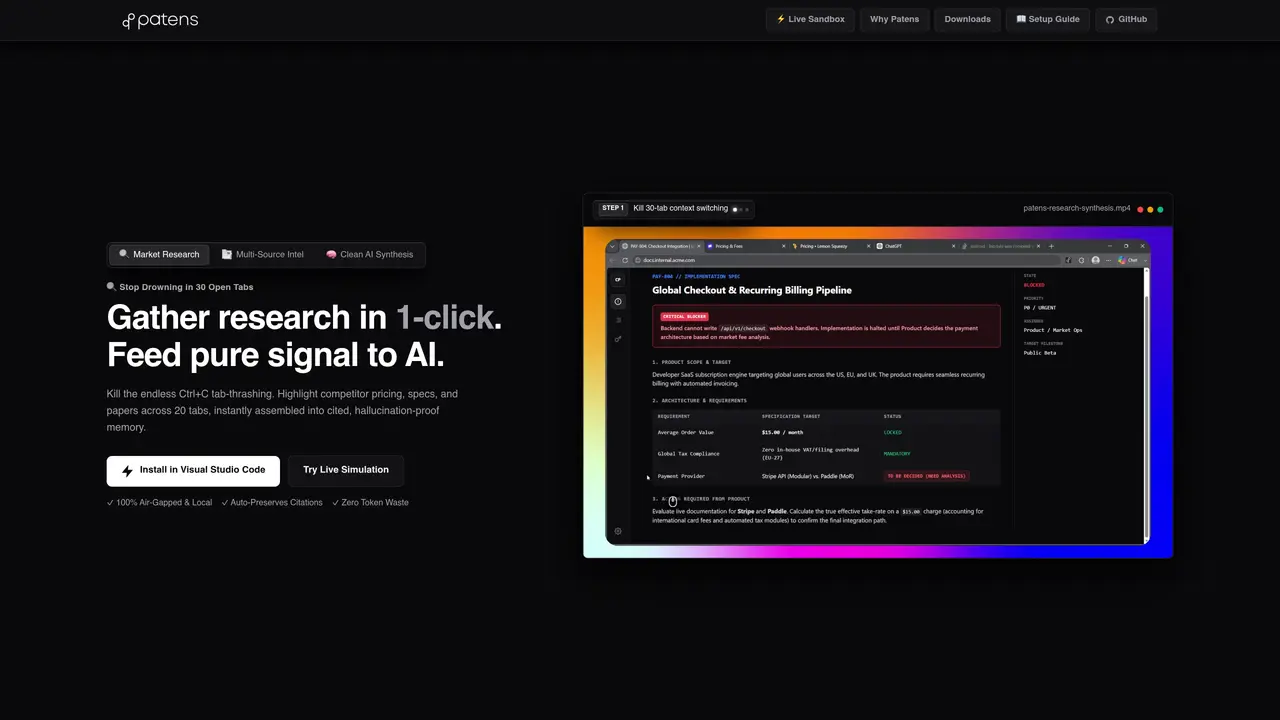
patens is a local-first research and synthesis tool designed to eliminate context switching and clipboard management when gathering information for AI prompts. It operates as a background vector memory engine that captures snippets, tables, and quotes from web pages or PDFs with one click, preserving origin URLs and timestamps. The tool integrates with browsers and IDEs via extensions or standalone applications, allowing users to stream structured, cited Markdown directly into AI chat interfaces or code editors. Research is automatically clustered into a hierarchical document tree, enabling precise navigation and selective injection into prompts without re-explaining context. A 40-second undo window and persistent local storage prevent accidental data loss while maintaining 100% source provenance. The system supports zero-hallucination synthesis by retaining metadata and formatting citations automatically, making it suitable for tasks like market research, competitive analysis, and technical documentation.
patens is a local-first research and synthesis tool that captures snippets, tables, and quotes from web pages or PDFs with one click, preserving origin URLs and timestamps. It operates as a background vector memory engine that clusters research into a hierarchical document tree and allows structured, cited Markdown to be streamed directly into AI chat interfaces or code editors.
patens is designed for researchers, analysts, developers, and anyone who needs to gather and synthesize information from multiple sources without context switching or clipboard management. It is particularly useful for tasks like market research, competitive analysis, and technical documentation.
patens integrates with browsers and IDEs via extensions or standalone applications, including Visual Studio Code, Cursor, Windsurf, JetBrains, and standalone AI tools like Claude or ChatGPT. It also supports FastMCP for querying local memory and auto-syncs physical _context/ files for reference in supported editors.
Yes, patens is designed to be 100% air-gapped and local, meaning all research and memory are stored on the user's local hardware. It does not require an internet connection to function once installed.
Users can get started by installing the browser extension, desktop app, or standalone binary from the Microsoft Store or direct download. The tool offers a live sandbox simulation for testing the workflow without installation, and setup guides are available for specific AI or workspace integrations.
Yes, patens supports layout-safe PDF extraction, allowing users to open any PDF in their browser and harvest clean structured text, tables, and figures in seconds without broken formatting.
We use essential cookies to run aitoolnavio™, and optional cookies to analyze traffic and measure our marketing. You choose what we use — optional cookies stay off unless you turn them on. See our Privacy Policy.
One short email a week: fresh tools worth trying, honest takes and the updates that actually matter. No spam, unsubscribe any time.
Cloud platform for web scraping, browser automation, and AI data extraction with 20,000+ pre-built tools and scalable cloud runs.
AI web crawler that extracts clean web data into JSON or markdown for developers and marketers.
Labelbox is an enterprise-grade data labeling platform designed to help organizations create, manage, and deploy AI applications.
Real-time AI search and crawling API for developers and AI teams to extract and summarize web data for agents and research workflows.
Enterprise-grade proxy networks, web scrapers, and ready-to-use datasets for reliable web data collection.
Map, analyze, and visualize geospatial data effortlessly while securely tracking real-time locations.
Open-source analytics platform to build interactive dashboards, automate data prep, and enforce enterprise-grade security.
Converts scanned documents and images into editable, searchable formats with AI-powered OCR and data extraction.
Open-source AI document parser that converts PDFs, images, and documents into structured Markdown or JSON for AI workflows.
Streamlines AI data retrieval for efficient processing.
Automate data extraction, capture data from images and text, streamline data entry processes with easy-to-use tools and APIs.
Web scraping and data extraction API that simplifies gathering data from websites with features like JavaScript rendering and geotargeting.
Matched on what this tool does — grouped by the job you would be replacing.
matches 1-click snippet capture with Ctrl+Shift+Click · 40-second undo window for clip management · Hierarchical document tree for navigation
Pieces auto-captures your workflow context across tools and surfaces it via a privacy-first AI assistant for faster recall and reuse.
Chrome extension that extends Google NotebookLM with capture, organization, and export features
Universal AI memory platform that captures and reuses project context across AI tools
Local memory manager for AI agents that retains context across tools
matches PDF extraction with layout-safe tables · FastMCP integration for local memory queries
matches IDE extensions for Cursor, VS Code, JetBrains · FastMCP integration for local memory queries
Open-source AI document parser that converts PDFs, images, and documents into structured Markdown or JSON for AI workflows.
AI-powered PDF parsing API that extracts tables, paragraphs, images, and TOC from complex PDFs into RAG-ready JSON or Markdown for developers and businesses.
Unified local PDF parser for macOS with multiple OCR and extraction tools
AI-powered IDE for autonomous coding tasks and agentic development workflows
AI coding assistant with a routing engine that selects the cheapest capable model for each task
Persistent codebase memory and exact navigation for AI coding agents
Persistent memory layer for coding agents that preserves project evidence and context across sessions